40
Program Mode - Starting
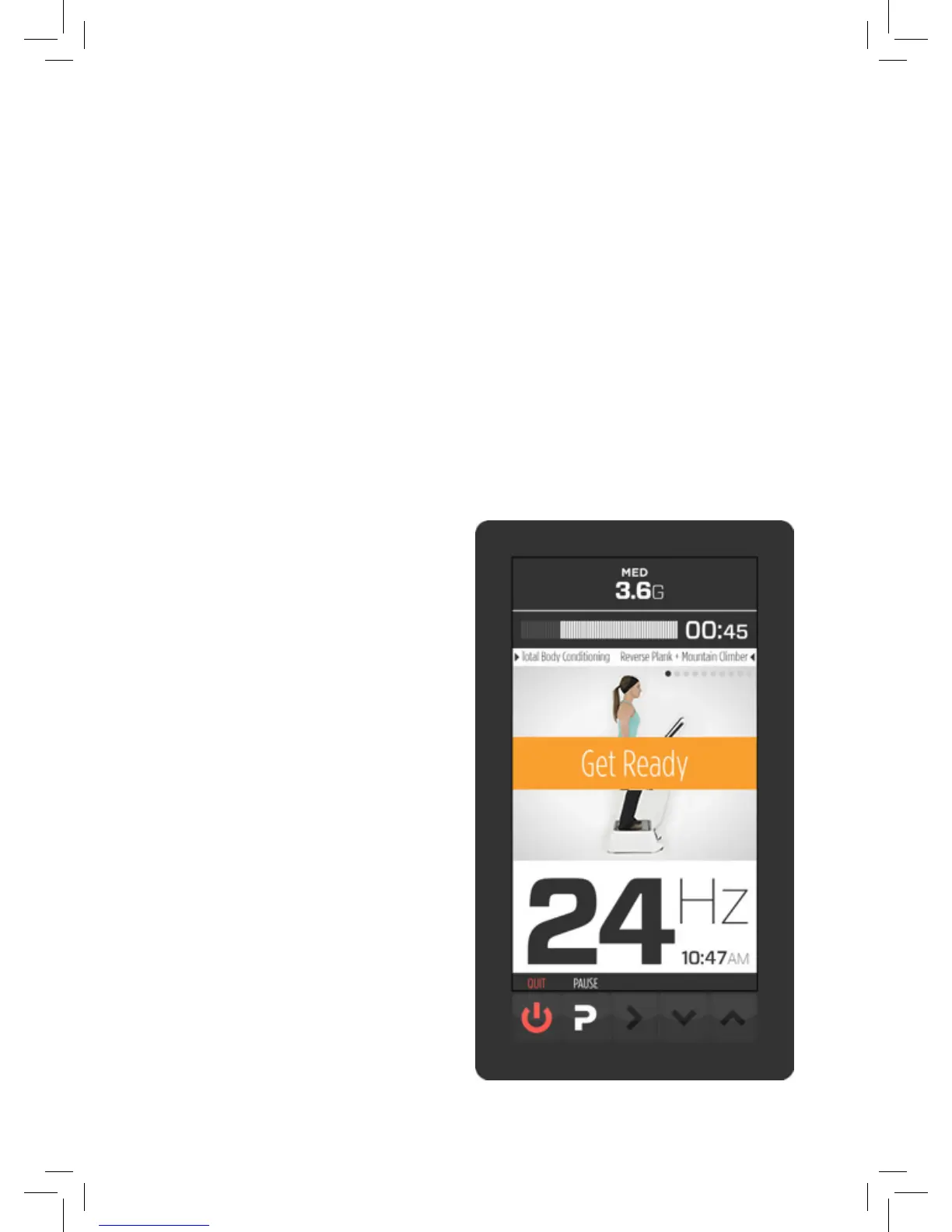
After highlighting a program and pressing the START button the
screen changes.
In this example, only the centre “MED” G-FORCE indicator has a
value. This tells you which amplitude contact position to use. The
machine has not started vibrating yet so the G-FORCE indicator
is grey but still tells you how much G-FORCE you will be using
when it does start.
The timer indicates how long that exercise will last. Beneath the
timer the mode indicator tells you which program you are using
on the left, and on the right it tells you the name of the exercise
about to begin.
The notication area displays
a video of the exercise and
the “get ready” notice ashes
on and o for 5 seconds be-
fore that exercise starts. On
the top right of the video area
there are a line of dots indi-
cating the number of exercis-
es in this program. The rst
dot is dark indicating they are
about to start the rst exer-
cise in the program.


 To Next Page