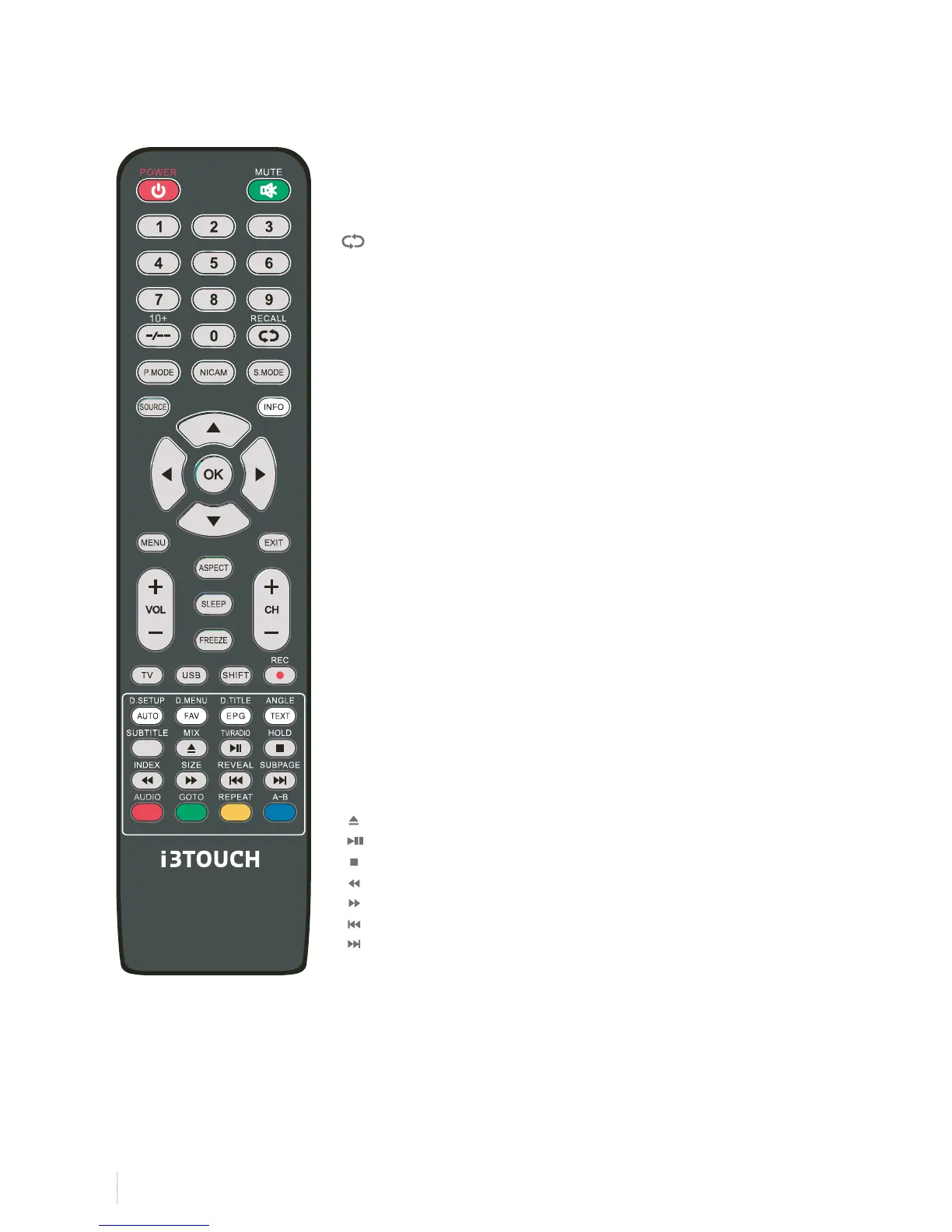
POWER : Turn the MONITOR on/standby.
MUTE : Press to mute the sound, press again or press VOL+ to unmute.
NUMBER BUTTONS : Choose channel directely. Press number
buttons and press OK button to play the channel.
: Return to the previous channel viewed.
P.MODE : Select the picture mode.
S.MODE : Select the sound mode.
NICAM : Press this key to select simple tone, stereo or bilingual mode/
only when it`s supported by broadcasting system.
SOURCE : Press to display the input source menu.
MENU : System setup menu.
INFO : Display current mode information.
OK : Confirm button for menu.
EXIT : Exit the OSD menu.
Cursor left/right /up/down : Cursor buttons used in menus.
VOL+/- : Press ”VOL+/-”, you can adjust the volume.
ASPECT : Press to see top half of page double size,
Press again to see the bottom half of page double size.
Press again for normal size.
SLEEP : Standby timer.
FREEZE : Holds the current picture.
USB : Multimedia source signal fast switching.
AUTO : Press to change the auto reduction mode.
FAV : Display the favorite program list.
EPG : Press to display EPG information (Electronic Program Guide).
TEXT : Turn off/on the Teletext display.
MIX : Press to display the picture and the teletext at the same time.
HOLD : Hold on or off the current page display.
INDEX : Press to return to the index/initial page.
SIZE : Change the size of display in Teletext mode.
REVEAL : Reveal or Hide the hidden words.
SUBPAGE : Display a sub-page of upper options.
: Open/Close program
: Play/Pause program
: Stop program
: Fast reverse
: Fast forward
: Previous chapter
: Next chapter
AUDIO : In DVD source voice switching.
GOTO : In DVD source press to cycle to a desired position.
REPEAT : Press to change the playing mode.
A-B : Repeat the segment between A and B.
Colour buttons : Short cuts-follow the coloured links.
Handle the remote control with care. Avoid falling off or being trampled or splashed with liquids.
Remote Control


 To Next Page