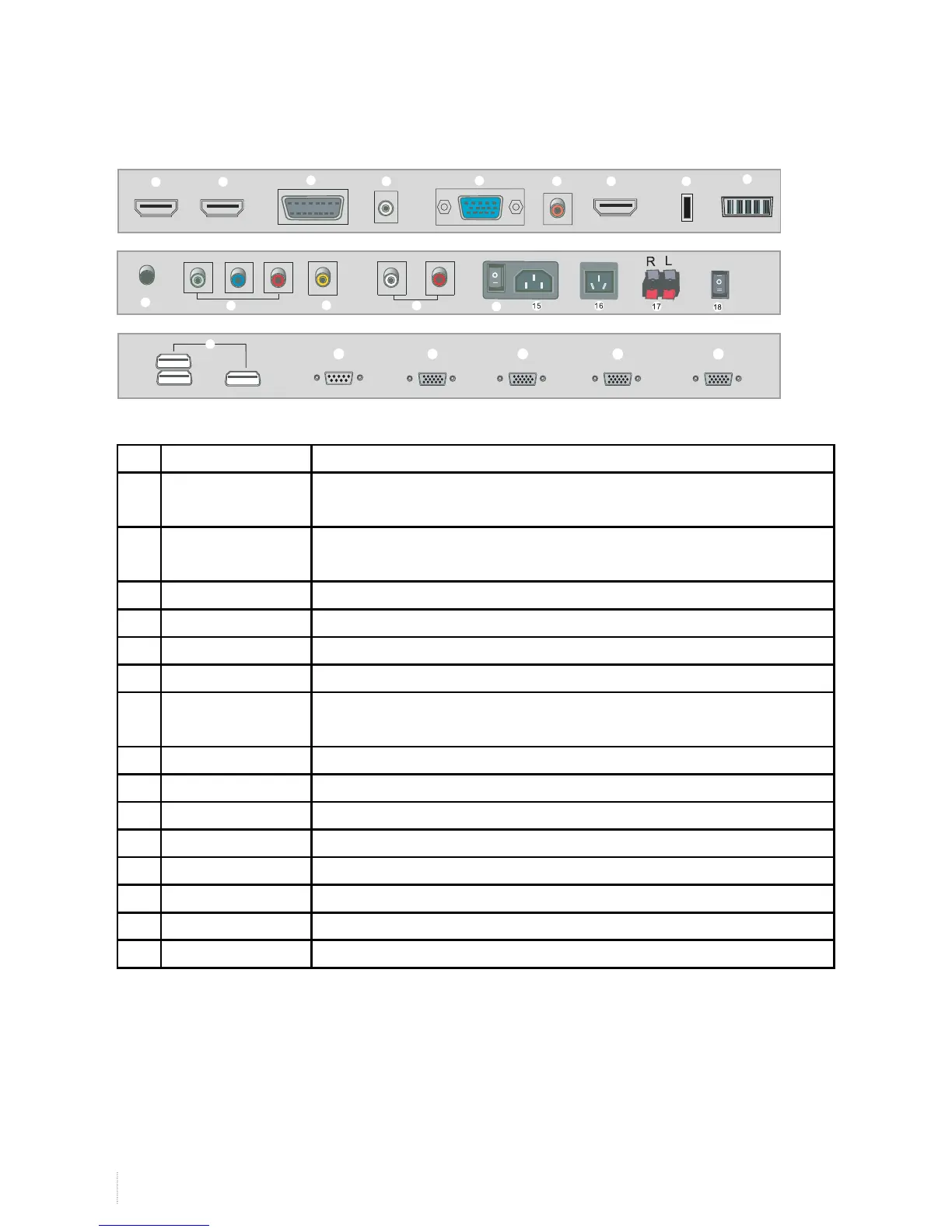
No. Name Description
1 HDMI1 Connect to the digital audio/video output terminal of the digital signal source
equipment.
2 HDMI2 Connect to the digital audio/video output terminal of the digital signal source
equipment.
3 SCART Connect them to the Scart video output terminal.
4 PC Audio PC Audio input
5 VGA IN Input terminal for pc
6 SPDIF Digital audio coaxial output
7 HDMI3 Connect to the digital audio/video output terminal of the digital signal source
equipment.
8 USB Multimedia USB, music, pictures and video support.
9 CI CARD CI Signal input
10 EARPHONE Earphone signal output
11 YPBPR Connect every terminal to the component video.
12 AV IN AUDIO L R Video and Audio signal input.
13 AV AUDIO L R Video and Audio signal input (L R).
14 ON/OFF Power on/off
15 POWER SWITCH power
Rear panel interface
1
7
8
9
10
11
12
13
14
2
3
4
5
6
19
20
21 22
23
24


 To Next Page