DX8
Dual Balance Charger/Discharger/DC Power
Extra Function
Log Files Manage
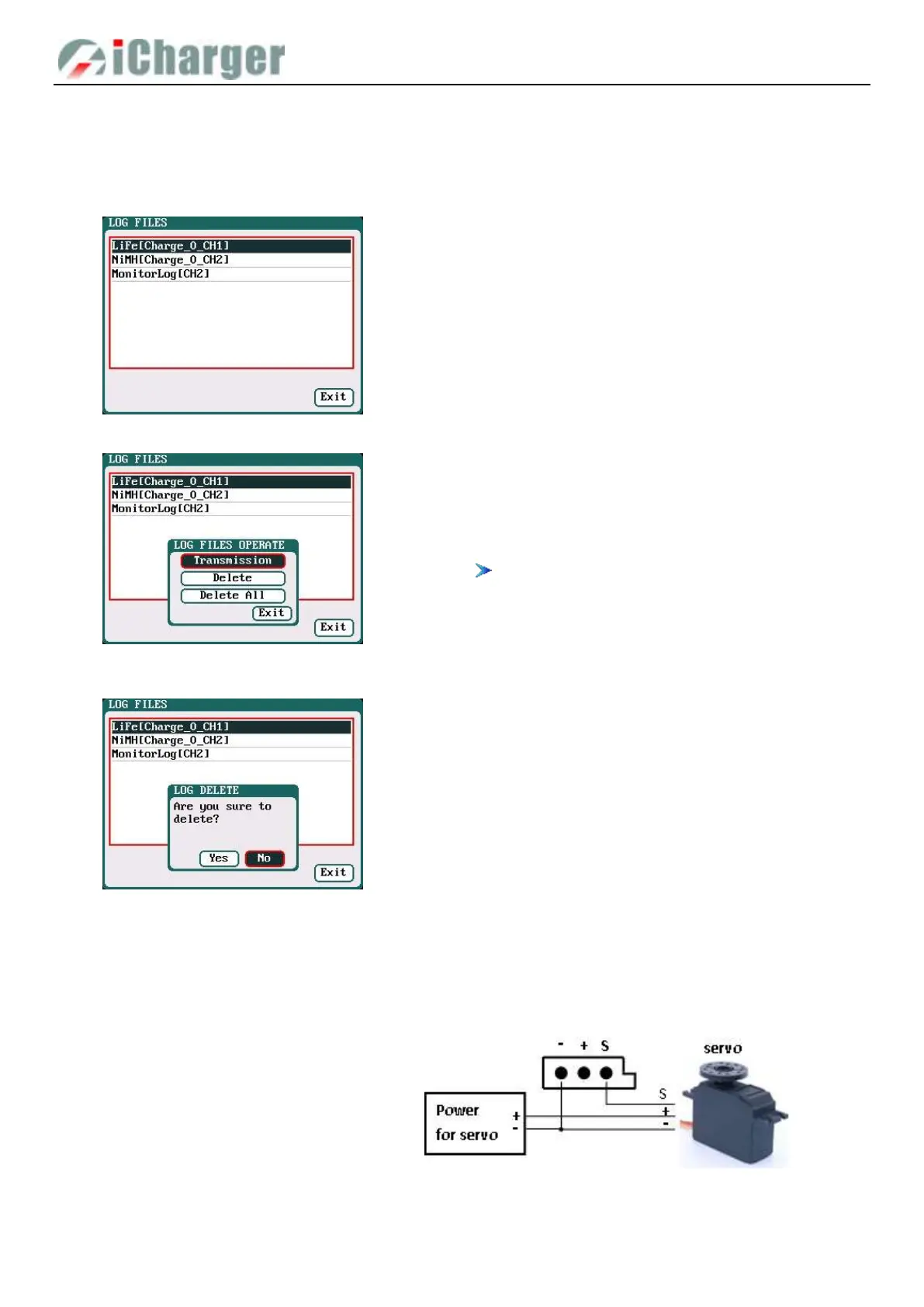
Select SYSTEM MENU→LOG FILES to enter the manage interface.
First select and click the .TXT files when managing log files and the system will pop up the LOG FILES OP dialog box.
Select Delete to pop up the LOG FILE DELETE dialog box, Select Yes to delete this file, select No to cancel. And select
Delete All to delete all.
Servo Test
Connect the servo with the multifunctional port like below, but pay attention that the port can’t provide voltage for the servo,
and it needs connect external power supply.
Select SYSTEM MEN→SERVO TEST to enter servo test interface; insert Servo into multi-function port to test.
Log Files Manage Dialog
Transmission: transmission to PC
Delete: delete files
Delete All: delete all files
The charger must be connected with computer via
USB when select Transmission and the client
software must have identified to the charger.



 To Next Page