EasyManua.ls Logo

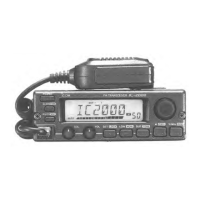
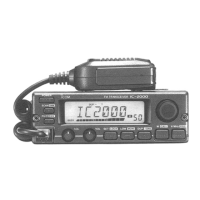
Icom IC-208H - Service Manual

Icom IC-208H
52 pages
Print Icon
To Next Page IconTo Next Page
Loading...
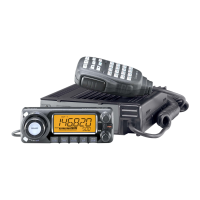
VHF/UHF FM TRANSCEIVER
i208H
SERVICE
MANUAL

Other manuals for Icom IC-208H

Questions and Answers

  • J
    Joshua AndersonAug 17, 2025
    What to do if the Icom IC-208H Transceiver frequency cannot be set?
    • H
      Holly MorrisAug 18, 2025
      If you cannot set the frequency on your Icom Transceiver, it might be because the frequency lock function is activated (turn the function OFF), or priority watch is paused on the watching frequency (push [M/CALL•PRIO] for 1 second to cancel the watch).
  • H
    Holly MccarthyAug 20, 2025
    How to fix Icom IC-208H Transceiver if frequency cannot be set via the microphone?
    • J
      justinjarvisAug 20, 2025
      If you cannot set the frequency via the microphone on your Icom Transceiver, the frequency lock function may be activated (turn the function OFF), the microphone keypad lock function may be activated (push [FUNC] then [SQLZ #(16KEY-L)] to deactivate the microphone keypad lock function), or priority watch is paused on the watching frequency (push [M/CALL•PRIO] for 1 second to cancel the watch).
  • D
    David CummingsAug 22, 2025
    Why my Icom IC-208H Transceiver does not turn on?
    • Y
      Yolanda PriceAug 22, 2025
      Your Icom Transceiver might not be turning on due to several reasons: the power connector may have a poor contact (check the connector pins), the polarity of the power connection might be reversed (re-connect the power cable observing the proper polarity), or the fuse might be blown (replace the fuse if damaged; check the cause first).
  • A
    Anthony JohnsonAug 26, 2025
    What to do if no sound comes from the Icom Transceiver speaker?
    • T
      Timothy HolmesAug 26, 2025
      If no sound is coming from the speaker of your Icom Transceiver, check these possible causes: the volume may be too low (rotate [VOL] clockwise), the audio mute function may be activated (push any switch or key to deactivate it), the squelch may be set too high (set the squelch level to the threshold), or a selective call or squelch function like pocket beep or tone squelch may be active (turn the appropriate function OFF).
  • E
    Elizabeth MoraAug 28, 2025
    How to fix low sensitivity on Icom IC-208H Transceiver?
    • J
      Jennifer DixonAug 28, 2025
      If the sensitivity is low and only strong signals are audible on your Icom Transceiver, it could be due to a poor contact or short circuit in the antenna feedline or connector (check and replace the feedline or resolder the antenna connector if needed), or the squelch attenuator function might be activated (set [SQL] between 10–12 o’clock position).
  • A
    amanda10Aug 30, 2025
    Why Icom IC-208H repeater cannot be accessed?
    • C
      Charles RobertsAug 30, 2025
      If you cannot access a repeater with your Icom Transceiver, it could be due to a wrong offset frequency being programmed (correct the offset frequency), or a wrong subaudible tone frequency being programmed (correct the subaudible tone frequency).
  • C
    chloealvarezSep 1, 2025
    What to do if Icom Transceiver scan does not operate?
    • K
      Karen BergerSep 2, 2025
      If the scan function does not operate on your Icom Transceiver, it could be because the squelch is open (set the squelch to the threshold point), only 1 memory channel is programmed or other channels are set as skip channels (program other memory channels or cancel the memory skip function in the desired channels), or priority watch is activated (cancel the watch).
  • S
    Stacy FosterSep 4, 2025
    Why no contact possible with another station on Icom IC-208H Transceiver?
    • H
      Hunter MillerSep 4, 2025
      If you cannot contact another station with your Icom Transceiver, it may be because the other station is using tone squelch (turn the tone squelch function ON), or the transceiver is set to duplex (set to simplex).
  • R
    Ryan RobinsonSep 6, 2025
    Why does my Icom IC-208H Transceiver transmission is automatically cut off?
    • A
      amandasmithSep 6, 2025
      If the transmission on your Icom Transceiver is automatically cut off, the time-out timer may be activated (set the timer to OFF).
  • R
    Rhonda SmithSep 9, 2025
    What causes erroneous information on the function display of Icom Transceiver?
    • C
      Christian EvansSep 9, 2025
      If the function display on your Icom Transceiver shows erroneous information, the CPU may be malfunctioning, and you may need to reset the CPU.

Summary

SECTION 1 SPECIFICATIONS

SECTION 2 INSIDE VIEWS

CONTROL UNIT TOP VIEW

Top view of the control unit's printed circuit board.

MAIN UNIT TOP VIEW

Top view of the main unit's printed circuit board.

CONTROL UNIT BOTTOM VIEW

Bottom view of the control unit's printed circuit board.

MAIN UNIT BOTTOM VIEW

Bottom view of the main unit's printed circuit board.

SECTION 3 DISASSEMBLY INSTRUCTIONS

Removing the MAIN unit

Step-by-step guide for disassembling the main unit.

Removing the CONTROL unit

Step-by-step guide for disassembling the control unit.

SECTION 4 CIRCUIT DESCRIPTION

4-1 RECEIVER CIRCUITS

Detailed description of the transceiver's receiver circuitry.

4-2 TRANSMITTER CIRCUITS

Detailed description of the transceiver's transmitter circuitry.

4-3 PLL CIRCUITS

Description of the Phase-Locked Loop (PLL) circuits.

4-4 OTHER CIRCUITS

Description of miscellaneous circuits within the transceiver.

4-5 POWER SUPPLY CIRCUITS

Description of the transceiver's power supply circuits.

4-6 PORT ALLOCATIONS

Details on the function of each port on the main CPU.

SECTION 5 ADJUSTMENT PROCEDURES

5-1 PREPARATION FOR ADJUSTMENTS

Required test equipment and mode entry for adjustments.

ADJUSTMENT ITEM EXPLANATION

Explanation of display items and adjustment sequences.

SOFTWARE ADJUSTMENTS (TRANSMITTING)

Software adjustment procedures for transmitting parameters.

SOFTWARE ADJUSTMENTS (TRANSMITTING AND RECEIVING)

Software adjustments for both transmitting and receiving.

SOFTWARE ADJUSTMENT (RECEIVING)

Software adjustment procedures for receiving parameters.

SECTION 6 PARTS LIST

[CONTROL UNIT] PARTS LIST

List of parts for the control unit.

[VCO UNIT] PARTS LIST

List of parts for the VCO unit.

[MAIN UNIT] PARTS LIST

List of parts for the main unit.

SECTION 7 MECHANICAL PARTS AND DISASSEMBLY

[CHASSIS PART] MECHANICAL DETAILS

Mechanical components of the chassis part.

[MAIN UNIT] MECHANICAL DETAILS

Mechanical components of the main unit.

[VCO BOARD] MECHANICAL DETAILS

Mechanical components of the VCO board.

[ACCESSORIES] MECHANICAL DETAILS

Mechanical details of included accessories.

SECTION 8 SEMI-CONDUCTOR INFORMATION

TRANSISTORS AND FETS

Diagrams and symbols for transistors and FETs used.

DIODES

Diagrams and symbols for diodes used.

SECTION 9 BOARD LAYOUTS

9-1 CONTROL UNIT BOARD LAYOUT

Top view layout of the control unit's PCB.

CONTROL UNIT BOTTOM VIEW BOARD LAYOUT

Bottom view layout of the control unit's PCB.

9-2 MAIN UNIT BOARD LAYOUT

Top view layout of the main unit's PCB.

MAIN UNIT BOTTOM VIEW BOARD LAYOUT

Bottom view layout of the main unit's PCB.

9-3 VCO BOARD LAYOUT

Top view layout of the VCO board's PCB.

VCO BOARD BOTTOM VIEW LAYOUT

Bottom view layout of the VCO board's PCB.

SECTION 10 BLOCK DIAGRAM

SECTION 11 VOLTAGE DIAGRAMS

11-1 CONTROL UNIT VOLTAGE DIAGRAM

Voltage distribution diagram for the control unit.

MAIN UNIT VOLTAGE DIAGRAMS

Voltage distribution diagrams for the main unit.

Icom IC-208H Specifications

General IconGeneral
ModeFM
Voltage13.8V DC
Channels200
DisplayLCD
TypeMobile
Frequency Range144-148 MHz
Tone SquelchCTCSS
ModulationFM

Related product manuals