20
7
DSC OPERATION
■ DSC address ID (Continued)
Entering a D Group ID
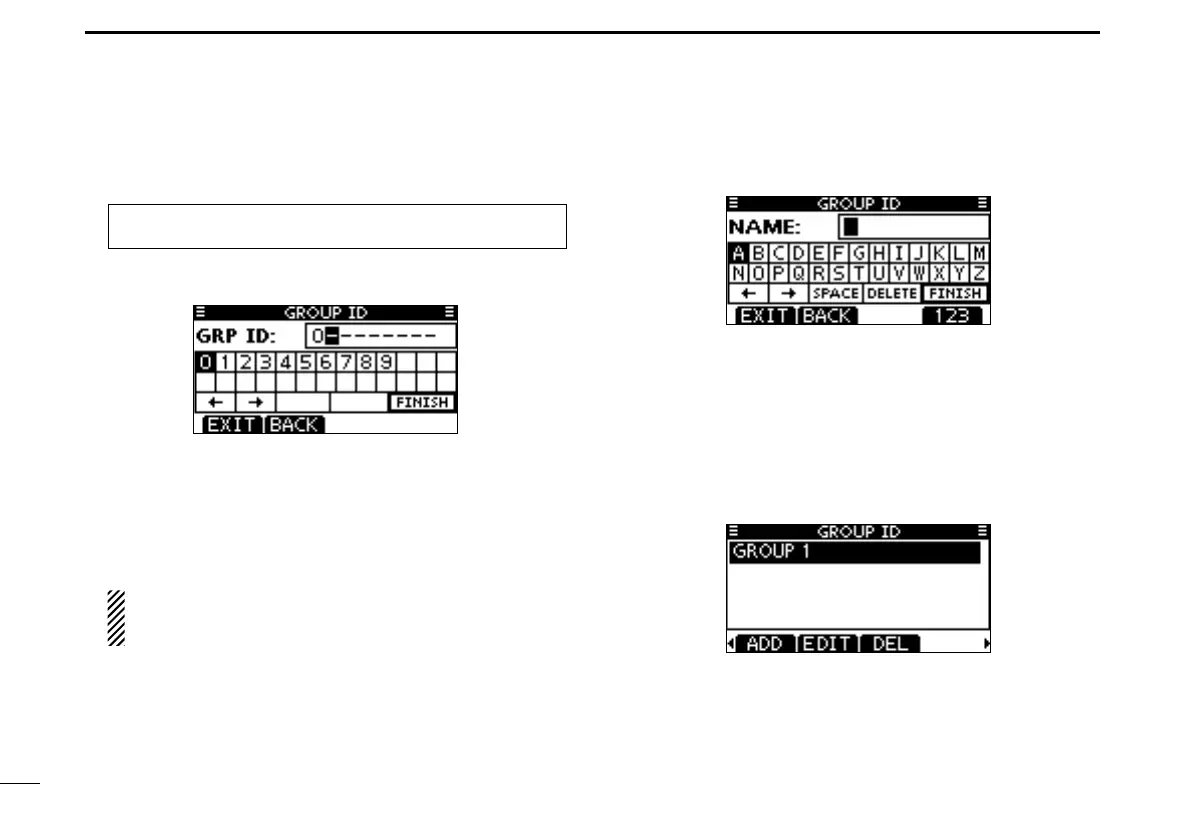
Enter “GROUP ID” in the DSC SETTINGS menu. q
Push [ADD]. w
•The“GROUPID”entryscreenisdisplayed.
Enter a desired group ID in the following way: e
•SelectadesirednumberusingDial,or[Y]/[Z]/[Ω]/[≈].
•Push[ENT]orDialtosetit.
•Tomovethecursor,selecteitherarrow,“←” or “→,” then push
[ENT] or Dial.
•Push[EXIT]toreturntothenormaloperatingmode.
•Push[BACK]toreturntothepreviousscreen.
The first digit is specified as ‘0,’ and the second digit is
other than ‘0’ for a Group ID.
The first two digits are ‘0’ for any Coast station ID.
Repeat step r e to enter the specific 9 digits group code.
After entering the 9 digit code, push [ENT] or Dial to set it. t
•GroupIDnameentryscreenisdisplayed.
Enter a desired 10 digit ID name in the following way: y
•SelectadesiredcharacterusingDial,or[Y]/[Z]/[Ω]/[≈].
•Push[ENT]orDialtosetit.
•Tomovethecursor,selecteitherarrow,“←” or “→,” then push
[ENT] or Dial.
•Push[123],[!$?],or[ABC]toselectacharactergroup.
After entering the ID name, select “FINISH” using Dial, or u
[Y]/[Z]/[Ω]/[≈], then push [ENT] or Dial to save it.
•The“GROUPID”listscreenisdisplayed.
Push [MENU] to exit the MENU screen. i
MENU ➪ DSC Settings ➪
Group ID
(Push [MENU].)
(Rotate Dial, then push [ENT].)



 To Next Page