28
7
DSC OPERATION
■ Making DSC calls
Making an Individual call (continued) D
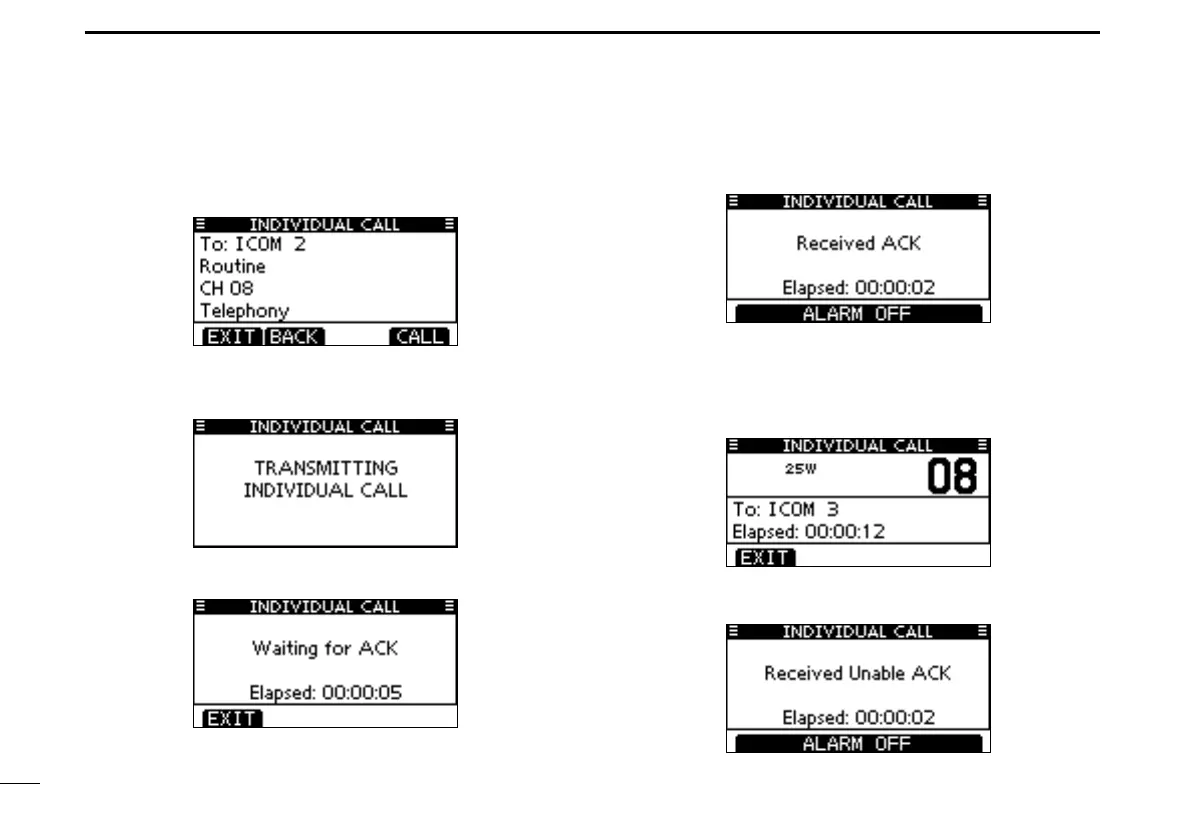
A confirmation screen is displayed. r
•Conrmthecallcontents.
Push [CALL] to transmit the Individual call. t
•IfChannel70isbusy,thetransceiverstandsbyuntilthechannel
becomes clear.
Standby on Channel 70 until an acknowledgement is re- y
ceived.
When the acknowledgement ‘Able to comply’ is received, u
alarm sounds and the screen below is displayed.
Push [ALARM OFF] to stop the alarm and then select the
intership channel specified in step e.
•Adifferent intershipchannel willbeselected ifthe stationyou
called cannot use the channel.
•Replyusingthemicrophone.Andgotostepi.
Or, when the acknowledgement ‘Unable to comply’ is re-
ceived, alarm sounds and the screen below is displayed.



 To Next Page