30
7
DSC OPERATION
■ Making DSC calls (Continued)
Making an D Individual Acknowledgement
When you receive an Individual call, you can make an ac-
knowledgement (‘Able to Comply,’ ‘Propose New Channel,’ or
‘Unable to Comply’) by using the on-screen prompts (Quick
ACK). Also, you can send an acknowledgement through the
MENU system (Man ual ACK).
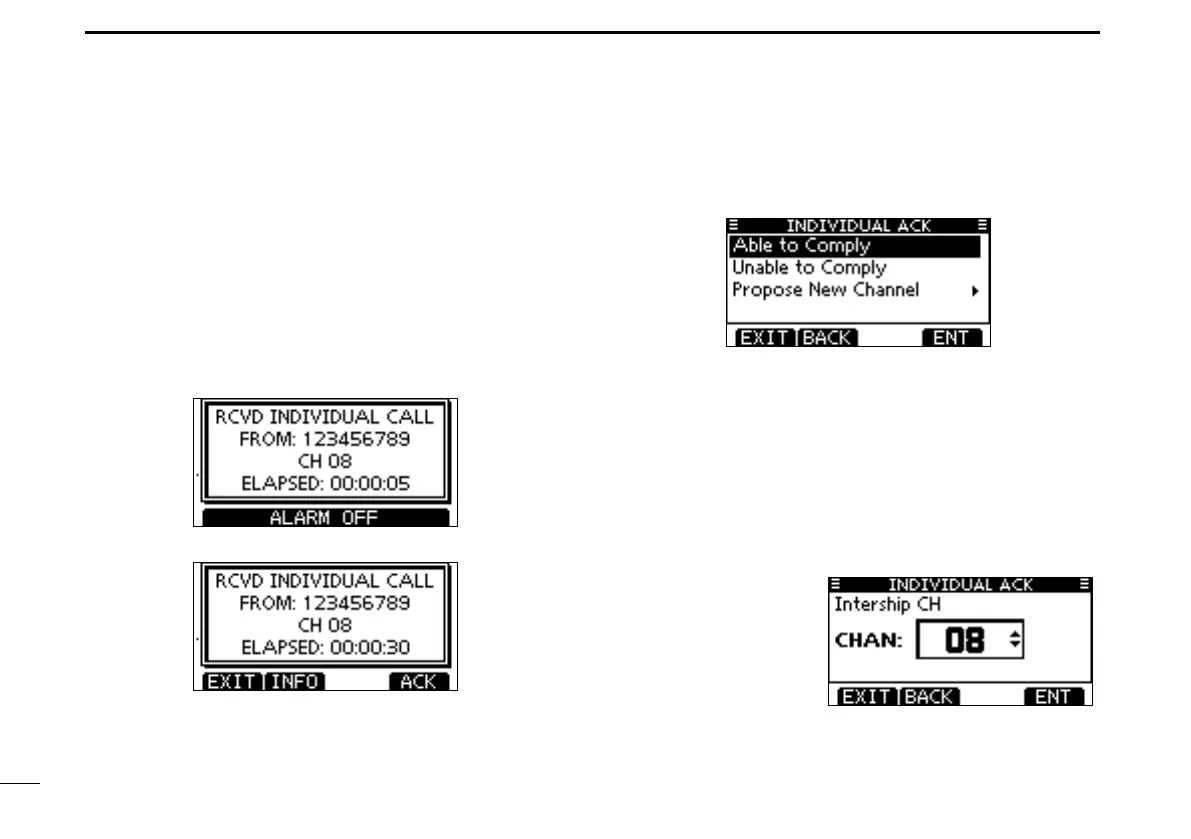
Quick ACK:
When an Individual call is received, alarm sounds and the q
screen below is displayed.
Push [ALARM OFF] to stop the alarm.
Push [ACK]. w
Select one of three options, then push [ENT]. e
•Push[EXIT]toreturntothenormaloperatingmode.
•Push[BACK]toreturntothepreviousscreen.
•AbletoComply: Makeanacknowledgmentcallwithout
any changes.
•UnabletoComply: Youcannotmakeacommunication.
The Acknowledgement call (‘Unable to
Comply’) can be automatically trans-
mitted, if set. See page 62 for details.
•ProposeNewChannel: You can make an acknowledgement
call, but you specify the intership chan-
nel. Select a desired intership chan-
nel, using Dial, or [Y]/[Z], then push
[ENT].



 To Next Page