17
7
SET MODE
6
7
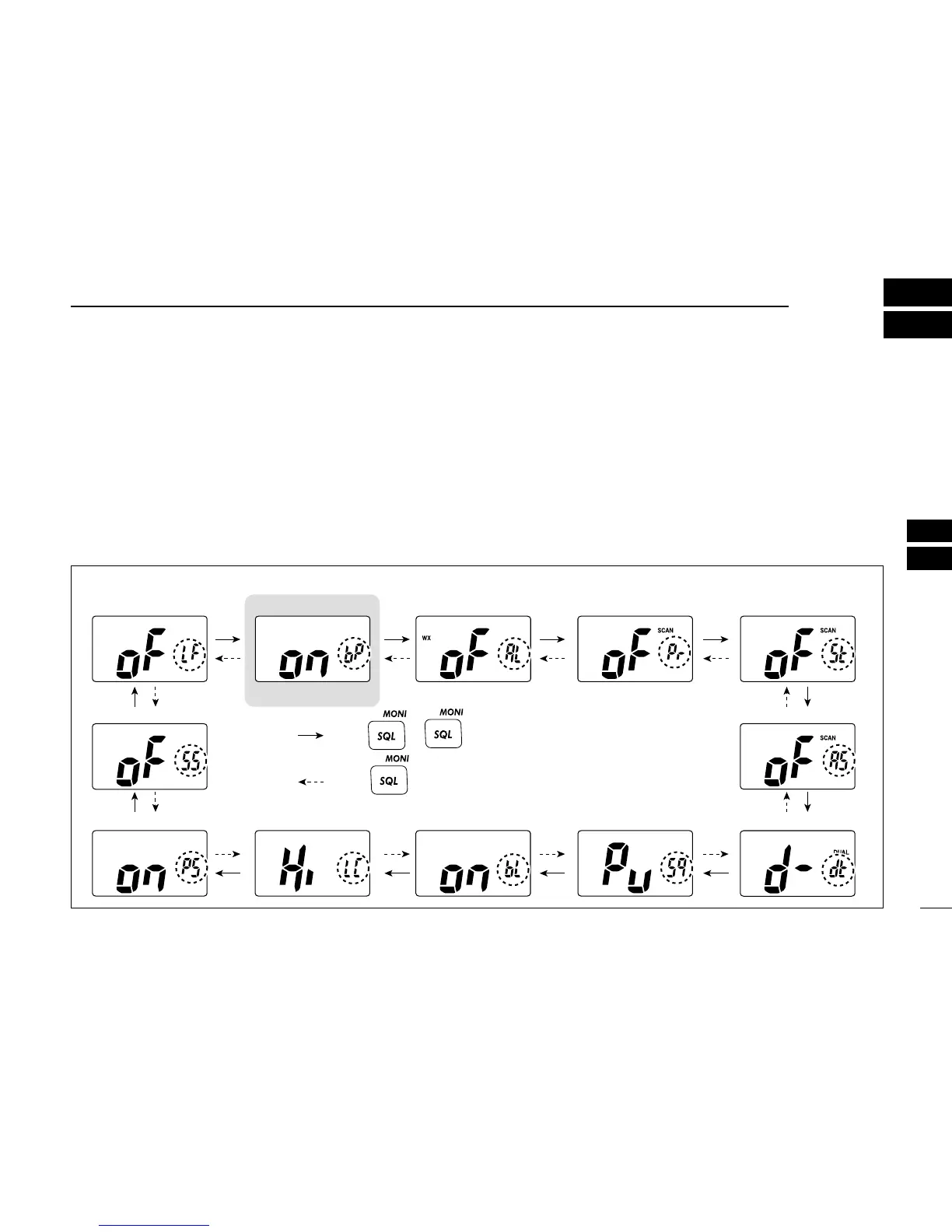
■ Set mode programming
Set mode is used to change the settings for 12 transceiver
functions: beep tone function, weather alert function, priority
scan function, scan resume timer, auto scan function, dual/tri-
watch function, monitor key action, automatic backlighting,
LCD contrast setting, power save function, squelch sensitivity
and low fix function*.
*Appears only when the optional battery case is attached.
D Set mode operation
q Turn power OFF.
w While pushing [SQL], turn power ON to enter set mode.
• “bP” appears.
e Push [SQL] or [
YY
]/[
ZZ
] while pushing and holding [SQL]
to select the desired item, if necessary.
r Push [
YY
]/[
ZZ
] to select the desired setting of the item.
t To exit set mode, push [16].
D SET MODE ITEMS (The display shows the current settings, and the selected function is displayed in the dotted circle.)
• Auto scan
Starting item
• Beep tone• Low fix* • Scan resume timer
• Dual/Tri-watch
• Automatic
backlighting
• Power save • LCD contrast • Monitor key action
• Squelch sensitivity
• Priority scan• Weather alert
: Push
+ [Z]
: Push or
+ [Y]
*Appears only when the optional
battery case is attached.



 To Next Page