17
7
8
10
15
18
13
11
16
9
14
12
17
1
4
2
5
3
6
8
SET MODE
■ Using the Set mode
You can set seldom changed settings in the Set mode.
You can customize the transceiver settings to suit your preference and operating style.
1. While holding down [VOL/SQL], push [
] to enter the Set mode.
• The “Beep” item is displayed.
L When the transceiver is turned OFF:
Hold down [VOL/SQL], and within 1 second, push [
]. This will turn ON the transceiver
and enter the Set mode.
2. Push [VOL/SQL], or push [▲] or [▼] while holding down [VOL/SQL] to select an item.
3. Push [▲] or [▼] to select an option.
4. Push [16/C] to exit the Set mode.
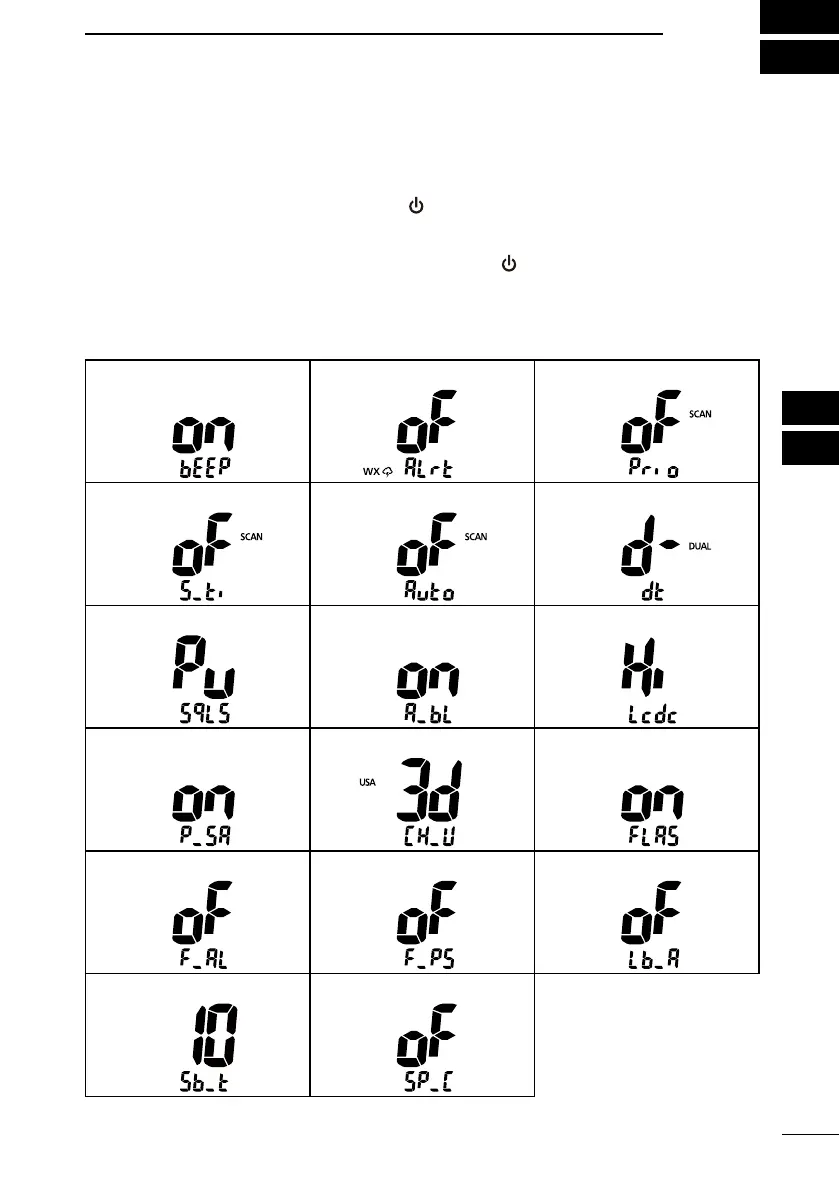
• Beep • WX Alert*
1
• Scan Type*
2
• Scan Timer*
2
• Auto Scan*
2
• Dual/Tri-watch*
2
• SQL Key Action • Backlight • Contrast
• Power Save • CH Display*
3
• Float’n Flash
• Float’n Flash Alarm • Float’n Flash Power Save • Low Battery Alarm
• Sub-function Delay Timer • Auto SP Line Convert
*
1
For the USA, EXP, and AUS transceiver versions *
2
Except the HOL version
*
3
The “CH Display” item is displayed for each selectable channel group.


 To Next Page