13
4
BASIC OPERATION
New2001
4
DD
Channel name/comment programming
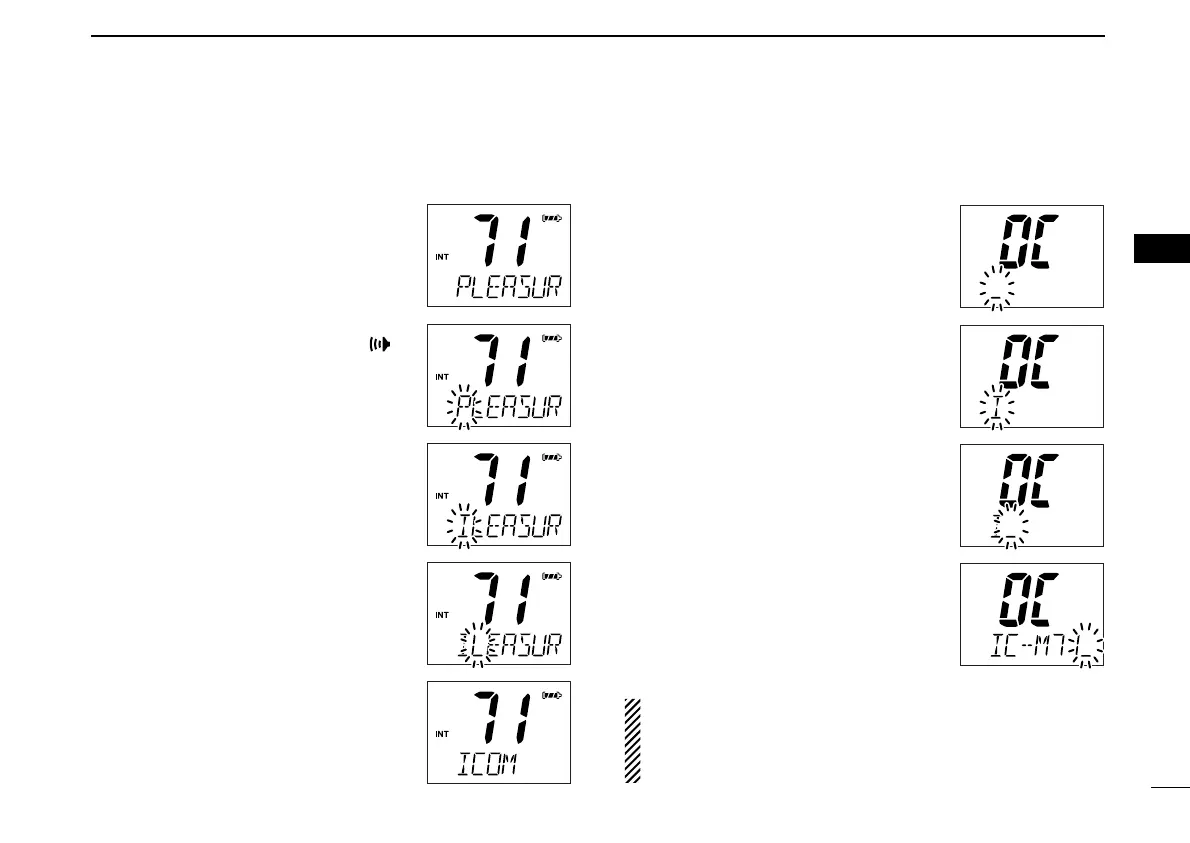
q Push [
YY
]/[
ZZ
] to select a channel to
program.
• Push and hold [CH/WX•U/I/C] for 1 sec.
to select a channel group, if necessary.
w While pushing and holding [],
push [CH/WX•U/I/C].
• The 1st character of the currently pro-
grammed name or comment blinks.
e Push [
YY
]/[
ZZ
] to select a character.
r Push [H/L•LOCK] to move to the
right; then push [
YY
]/[
ZZ
] to select a
character.
• Pushing [16•9], moves to left
t Continue until the desired characters
have been selected, then push
[CH/WX•U/I/C] to return to normal
operation.
DD
Opening comment programming
q While pushing and holding
[SCAN•DUAL], turn power ON.
• “OC” is displayed and the 1st character
of the currently programmed comment
blinks.
w Push [
YY
]/[
ZZ
] to select a character.
e Push [H/L•LOCK] to move to the
right; then push [
YY
]/[
ZZ
] to select a
character.
• Pushing [16•9], moves to left
r Continue until the desired characters
have been selected, then push
[CH/WX•U/I/C] to return to normal
operation.
The programmed opening comment is briefly displayed or
scrolled when the transceiver is powered ON.
However, the opening comment indication can be skipped
by pushing [16•9].
IC-M72_1.qxd 06.1.11 18:19 Page 13 (1,1)



 To Next Page