17
6
7
7
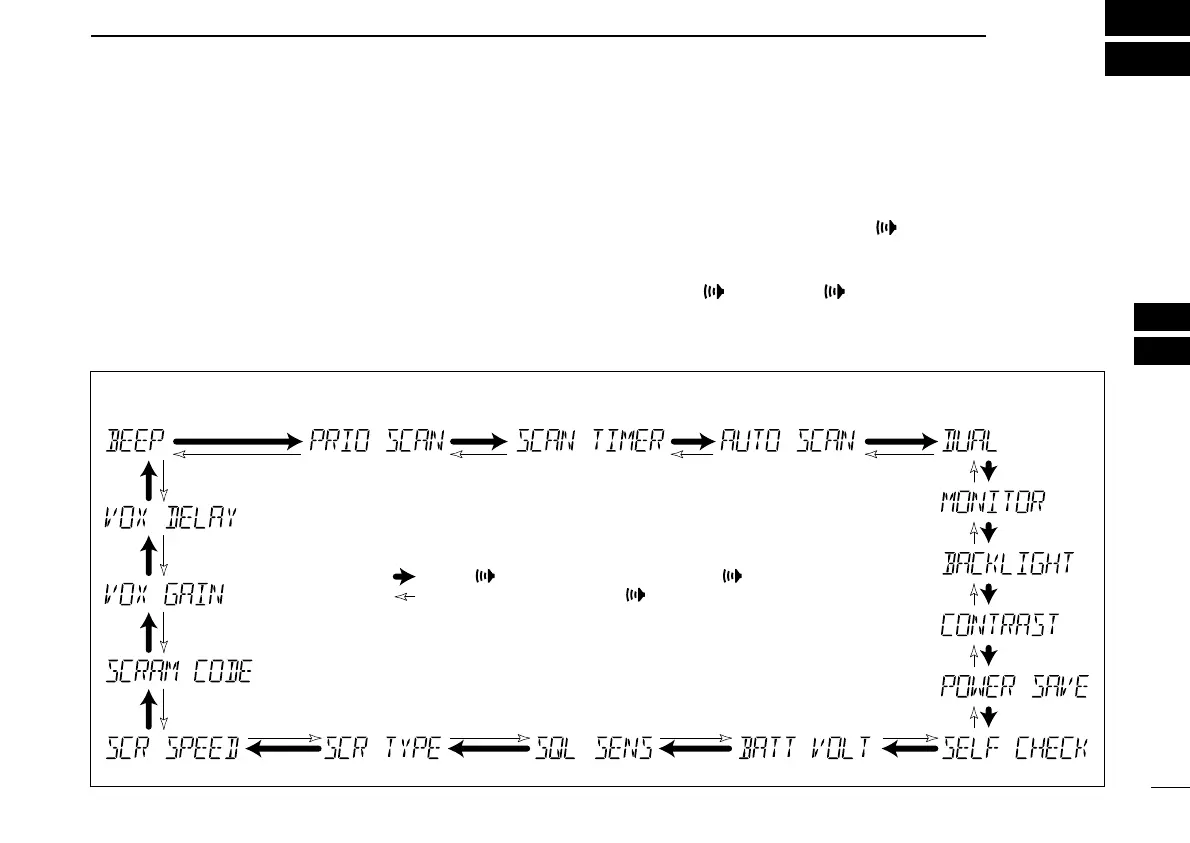
SET MODE
New2001
■ SET mode programming
SET mode is used to change the condition of 18 transceiver
functions: beep tone function, weather alert function, scan
type, scan resume timer, auto scan function, dual/tri-watch
function, monitor key action, backlighting function, LCD con-
trast selection, auto power save function, self check function,
battery voltage indication, squelch sensitivity, channel name
scroll type, scroll speed, scrambler code, VOX gain and VOX
delay.
D SET mode operation
q Turn power OFF.
w While pushing and holding [], turn power ON to enter
the SET mode.
• “BEEP” (Beep tone function setting) appears.
e Push [], or push []] and [
YY
]/[
ZZ
] to select the de-
sired item.
r Push [
YY
]/[
ZZ
] to select the desired condition of the item.
t To exit the SET mode, push [16•9].
D SET MODE ITEMS
Beep tone* Scan type
‡
Scan resume timer
‡
Auto scan start function
‡
Dual/Tri-watch
‡
Monitor key
action
Display
backlight
LCD
contrast
VOX delay
VOX gain
Voice scrambler
code
†
Scroll speed
Power save
function
Self-check functionBattery voltage indicationSquelch sensitivity
Channel name scroll type
: Push [ ], or while pushing and holding [ ], push [Y]
: While pushing and holding [ ], push [Z]
*Starting item
†
Availability may differ according to versions.
‡
Not available with Dutch versions.
IC-M72_1.qxd 06.1.11 18:19 Page 17 (1,1)



 To Next Page