18
6
MEMORY/CALL PROGRAMMING
■ General
The transceiver has 124 memory channels (100 regular, 10
pairs of scan edge channels for mixed bands and 1 call chan-
nel for each band—VHF, UHF, 50 MHz and 1200 MHz). Note
that memory channels are not grouped according to band. In
other words, a given memory channel can be programmed
with either a VHF frequency, a UHF frequency, a 50 MHz fre-
quency or a 1200 MHz frequency. This is not the case with
call channels. Call channels are band specific.
The following can be programmed into memory/call channels:
• Operating frequency
• Duplex direction with an offset frequency (p. 16)
• Subaudible tone encoder or tone squelch on/off with a tone
(CTCSS) frequency (pgs. 16, 25)
• Mode—AM, FM, etc. (p. 14)
• Skip information* (p. 23)
*Except for scan edge memory channels and call channels.
☞ NOTE:
➥ Memory channels can be assigned names (of up to 6
characters).
➥ When memory names are assigned, each push of [MR]
toggles between frequency and name indication.
■ Programming a memory
channel
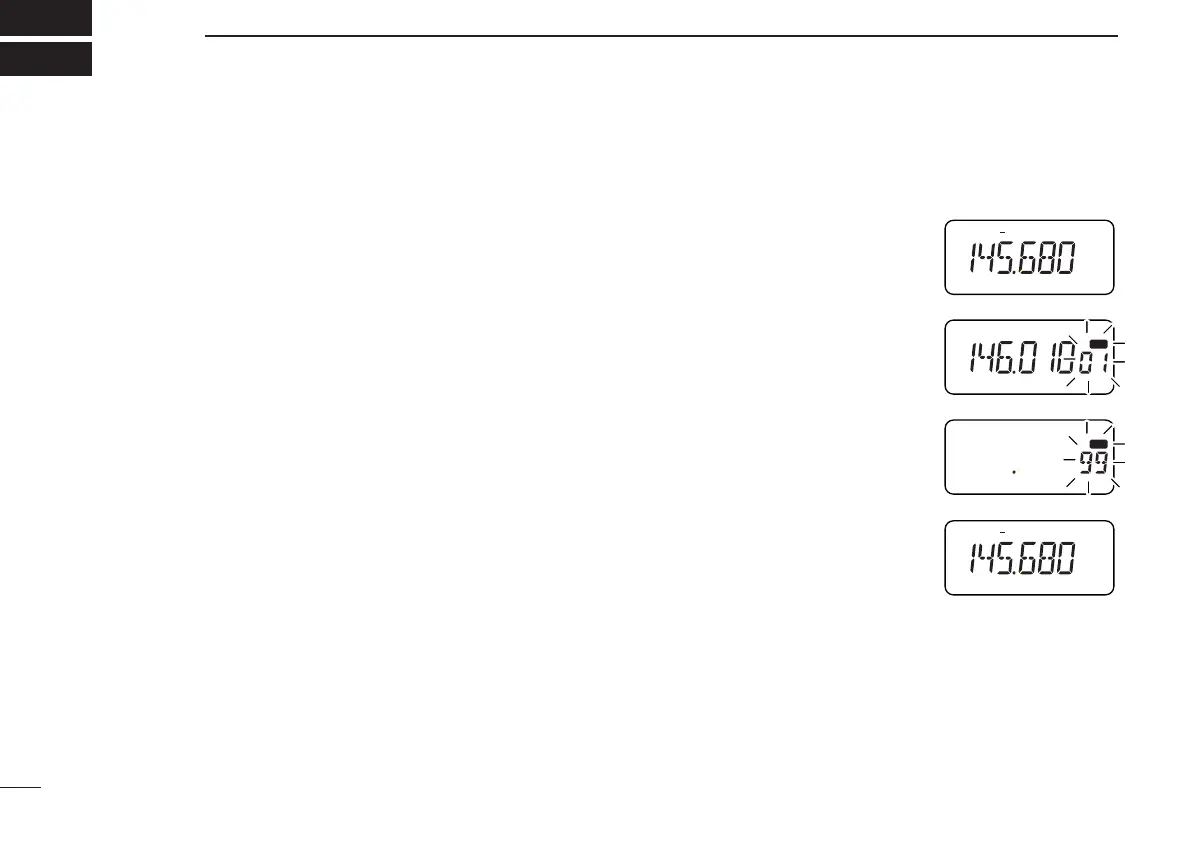
➀ Push [VFO] to select VFO mode.
➁ Set the desired frequency:
➥ Set other data, such as repeater
information, if required.
➂ Push [(MR)MW] for 1 sec.
•“X” and the previously selected
memory channel flash.
➃ Push [MULTI(↔)] (or rotate [DIAL])
to select the desired memory chan-
nel.
• Call channels and scan edge
channels, as well as regular chan-
nels, can be programmed in this
way.
• Only the decimal point appears
for memories not yet pro-
grammed.
• If you want to confirm the VFO frequency, push [MR] mo-
mentarily—the VFO frequency briefly appears.
➄ Push [(MR)MW] for 1 sec. to program.
•“
X” and the memory channel number stop flashing.
• VFO mode is selected.
IC-T81A/E Manual-(1) 01.12.5 6:55 PM Page 18 (1,1)



 To Next Page