24
8
SCAN FUNCTIONS
■ Skip channel setting
Memory channels can be set to be skipped during memory
scan. This is useful to speedup the memory scan interval.
➀ Push [MR] to select memory mode.
➁ Push [(MR)MW] for 1 sec. to enter memory write mode.
➂ Rotate [DIAL] (or push [MULTI(↔)]) to select a memory
channel.
➃ Push [MULTI(↕)] twice times to select “SKIP.”
➄ Push [MULTI(↔)] (or rotate [DIAL])
to toggle the skip setting for the se-
lected channel ON/OFF.
•“SKIP” appears when the channel is
set as a skip channel.
➅ Push [VFO] to program the setting
and exit memory write mode.
☞ NOTE: Scan edge channels, 0A to 9B, cannot be set to
show “SKIP” settings, however, they will be skipped dur-
ing scan.
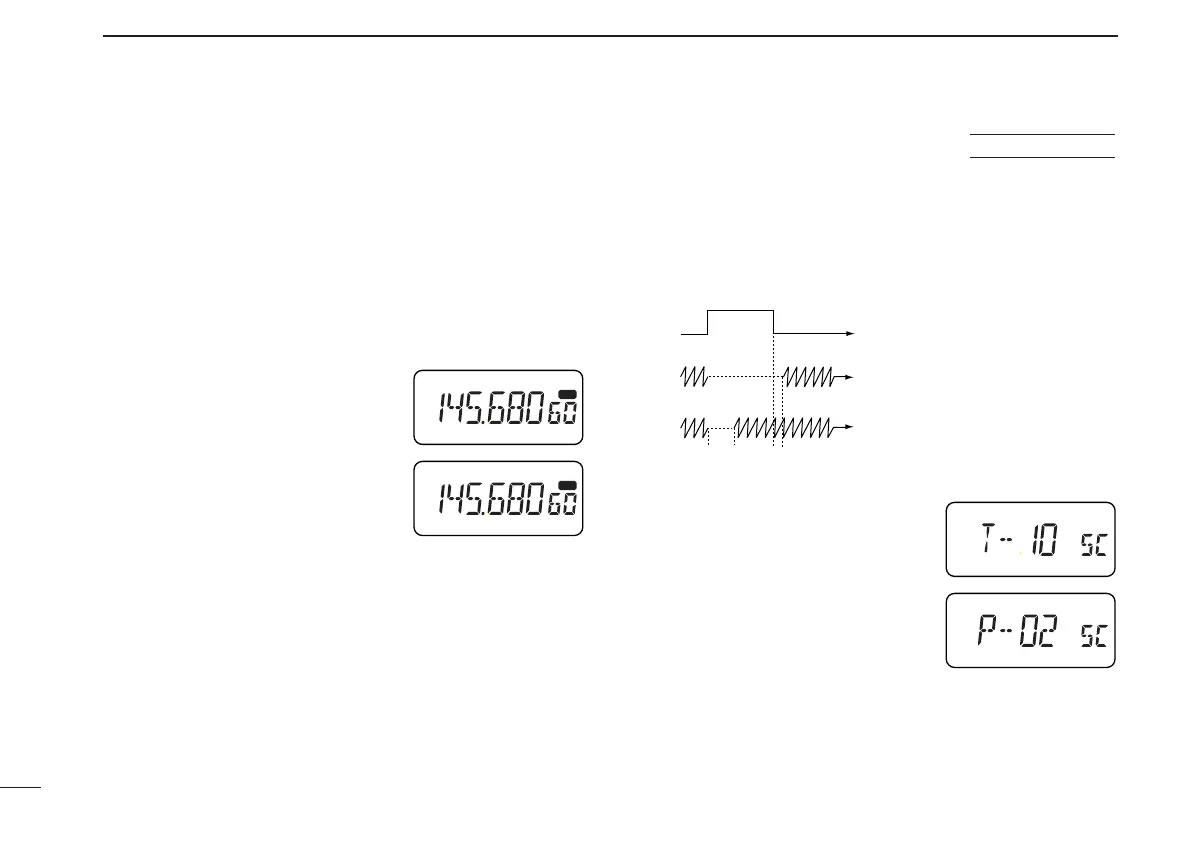
■ Scan resume
condition
The resume condition can be selected as a pause or timer
scan. This setting is common for all scans.
USING
SET MODE
Pause
scan
Receiving
a signal
Timer
scan
10 sec. 2 sec.
When receiving a signal, pause
scan pauses until the signal dis-
appears; timer scan pauses for
10 sec.
➀ Push [MULTI] for 1 sec. to enter set
mode.
➁ Push [MULTI(↕)] one or more times
until “SC” appears.
➂ Push [MULTI(↔)] (or rotate [DIAL])
to select the desired scan resume
condition.
•“T-10”: scan pauses for 10 sec. on a
received signal.
•“P-02”: scan pauses on a received signal until it disappears.
➃ Push [VFO] to exit set mode.
IC-T81A/E Manual-(1) 01.12.5 6:56 PM Page 24 (1,1)



 To Next Page