19
6
MEMORY/CALL PROGRAMMING
■ Memory editing
Memory (call) channel contents can be moved to VFO or to
another memory.
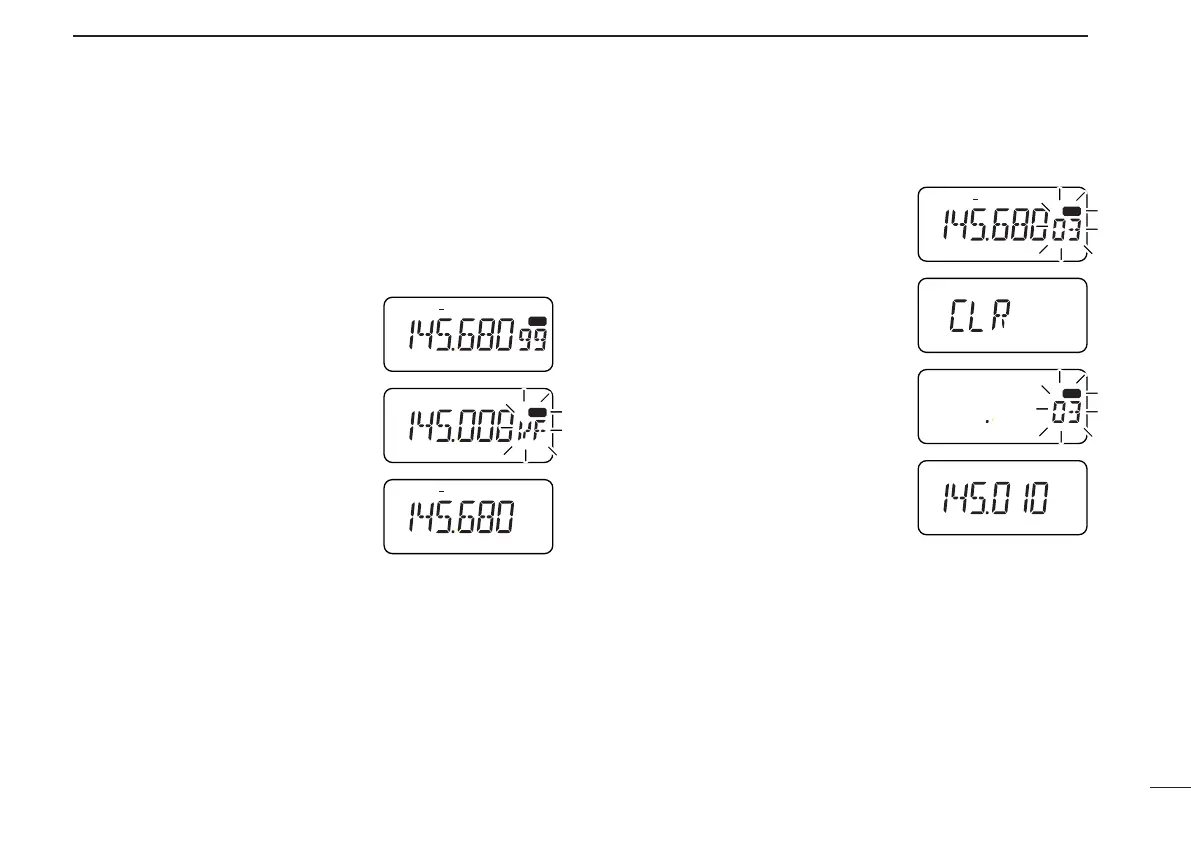
D Transferring a memory (call) channel’s
contents
➀ Select the memory (call) channel to
be transferred:
➥ Push [MR] ([CALL)]) to select
memory (call) mode.
➥ Push [MULTI(↔)] to select the
memory (call) channel.
➁ Push [(MR)MW] for 1 sec.
•“VF” appears and flashes with “X”
and the previously selected VFO fre-
quency appears..
To transfer the contents to VFO:
➂ Push [(MR)MW] for 1 sec.
• The contents are transferred and VFO mode is selected.
To transfer the contents to another memory (call) channel:
➂ Push [MULTI(↔)] (or rotate [DIAL]) to select the memory
(call) channel to be transferred to.
➃ Push [(MR)MW] for 1 sec.
• The contents are transferred and memory (call) mode is selected.
D Clearing a memory
Memories can be cleared from VFO or memory mode.
➀ Push [(MR)MW] for 1 sec. to enter
memory menu mode.
•“X” and a memory channel number
flash.
➁ Push [MULTI(↔)] (or rotate [DIAL])
to select the memory channel to be
cleared.
➂ Push [MULTI(↕)] to display “CLR.”
• Scan edge channels 0A/0B and call
channels cannot be cleared.
➃ Push [(MR)MW] for 1 sec. to clear
the previously selected memory
channel.
•“X” and a memory channel number
flash and the previously stored infor-
mation is erased.
➄ Push [VFO] to select VFO mode.
☞ NOTE: Be careful—the contents of cleared memories can-
not
be recalled.
IC-T81A/E Manual-(1) 01.12.5 6:55 PM Page 19 (1,1)



 To Next Page