ID TECH VP6800 User Manual
Page | 17
7.2. VP6800 Mounting Guidelines and Installation
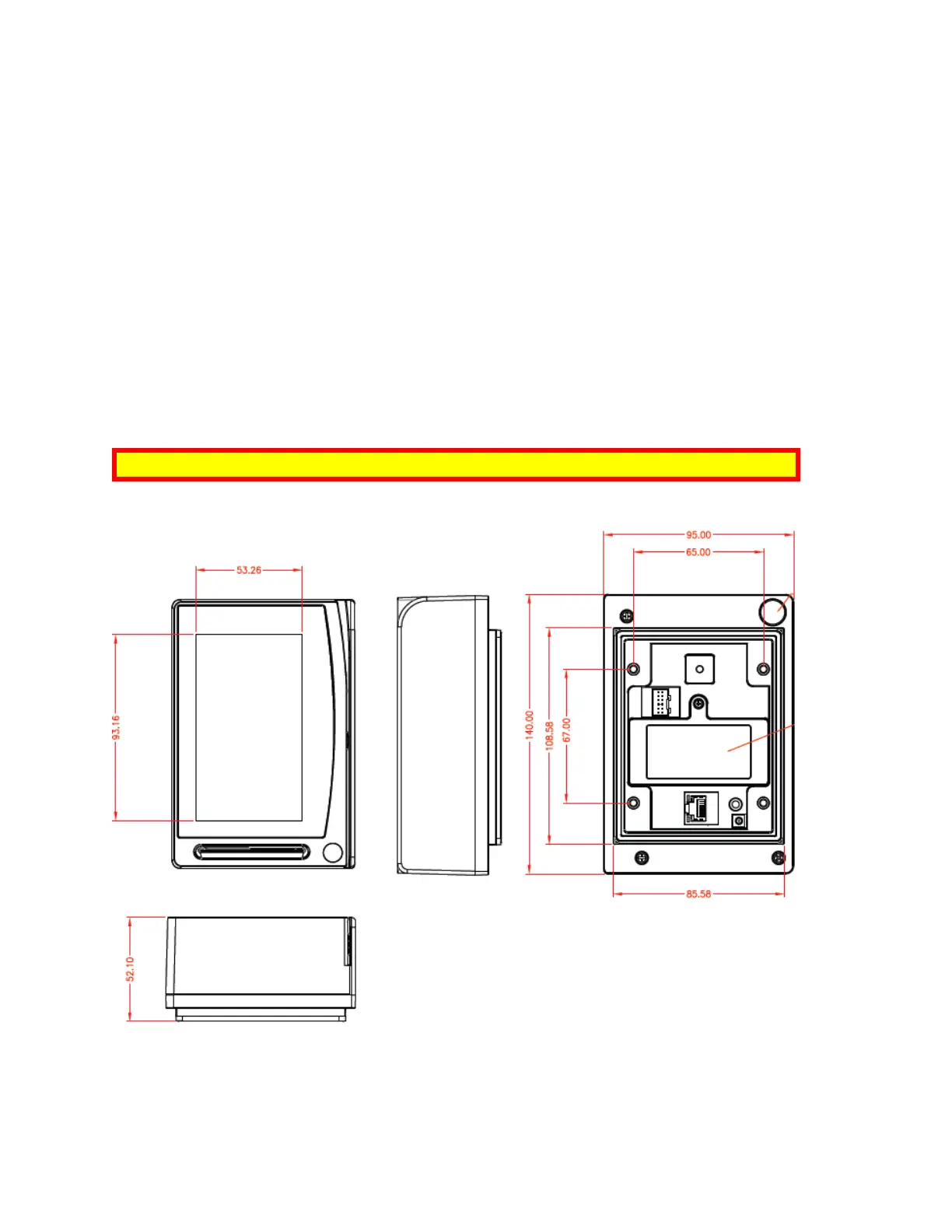
Mount the unit according to the drawings shown, with #8-32 studs spaced 65mm apart horizontally
and 67mm vertically. Use a torque wrench to tighten the screws to 8kgf.
For safety reasons, make sure to mount the VP6800 at a height no greater than two meters from the
floor.
Warning: The antenna’s RF field is sensitive to the proximity of metal. There are three options for
mounting the VP6800 on a metal surface:
• Mount with the RF emitting surface of the antenna at least 1cm in front of any metal.
• Mount with the RF emitting surface of the antenna at least 1cm behind any metal. This will
reduce the effective range of the antenna and is not recommended.
• Mount flush with the metal, but allow a minimum of 1cm distance from the metal
Above all else, do not mount the VP6800 in a location where it is surrounded by metal.



 To Next Page