35
Booting errors
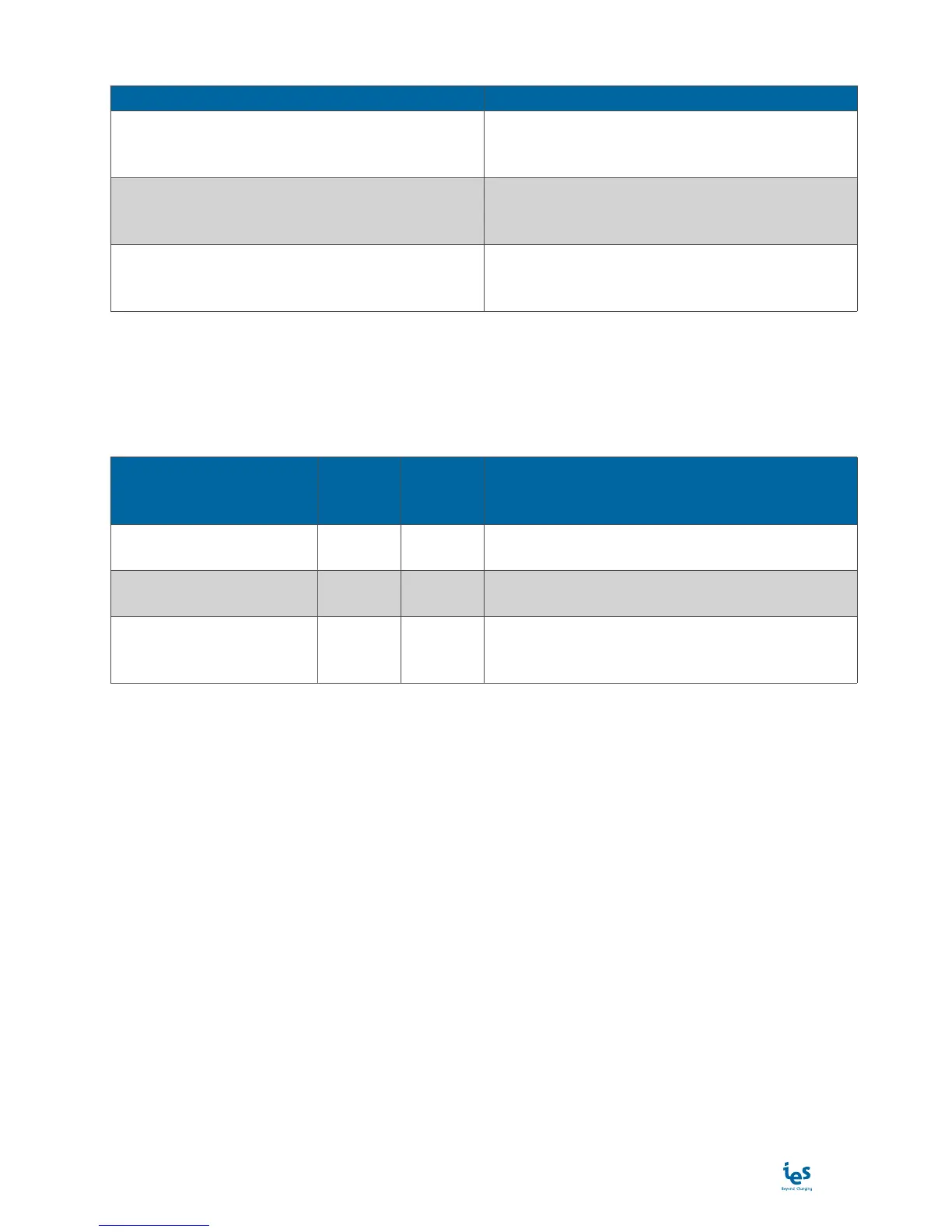
Message Description
Error connecting server.
Message displayed during the startup of the
charging station if the backend server reject the
connection.
Error connecting to rfid reader.
Message displayed during the startup of the
charging station if the RFID does not work. Please
see the maintenance manual.
Error connecting to comm control unit.
Message displayed during the startup of the
charging station if the CCU does not work. Please
see the maintenance manual.
Power limitation
If necessary, you can limit the power delivered by the charging station on the backend server.
For the charging station, use the OCPP frame “Change Configuration” to adjust the following configuration
parameters:
Configuration parameters
details
Expected
value
type
Default
value
Description
PowerLimit Watts 24000 Maximum power to be delivered by the charger. Al-
low to limit the output power below 24kW.
VoltageSupplyLimit Volt 230 The nominal value of the single-phase voltage pro-
vided in the country. Usually 230V in Europe.
CurrentInputLimit Amp 40 The maximum current allowed by the power supply
installation (value of the circuit-breaker installed
outside the charger).
Refer to your backend server instructions to know how to change these configuration parameters.


 To Next Page