45
ifm Operating Instructions IO-Link Master with Profinet interface StandardLine 8 Ports IP 65 / IP 67 (AL1102) 2017-05-31
Configuration
>
8.4.2 Add the device to the Profinet network
22406
The configuration of the Profinet parameters is done via the Profinet projection software.
The Profinet parameters define which data is transmitted between AL1102 and the higher-level
Profinet controller.
Requirements:
> Profinet has read and write permission on the AL1102 (→ Configure communication profile (→ p. 34))
> The GSD file of the AL1102 is installed (→ Install GSD file (→ p. 44))
1 Create/open project
► Create new Profinet project.
OR
Open an existing Profinet project.
► Configure Profinet connection.
2 Add the AL1102 to project
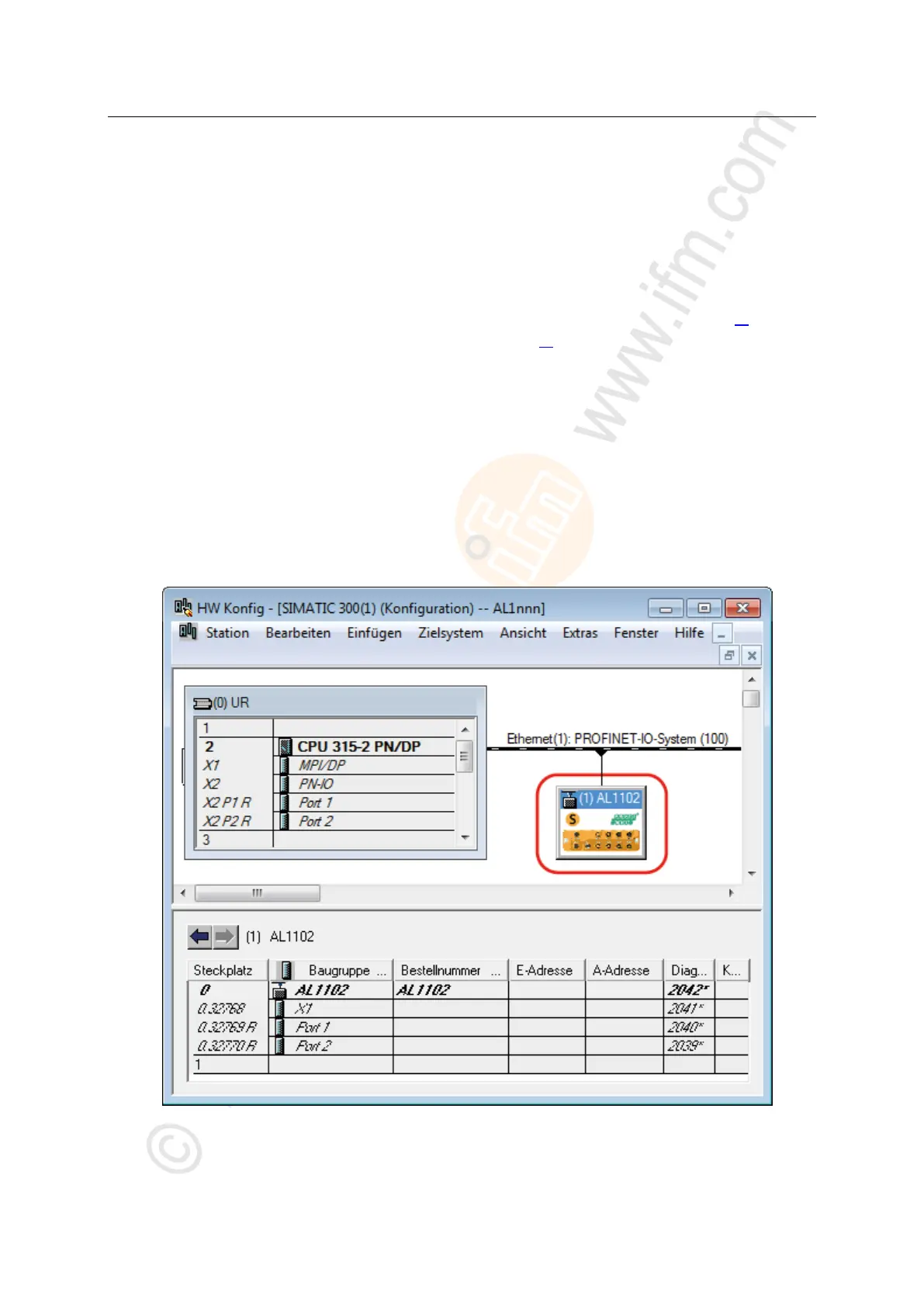
► Open STEP-7 application "HW Config".
> Program window shows the hardware structure of the project.
► Open hardware catalogue.
► Move the [AL1102] node via drag&drop from the hardware catalogue to the Profinet connection.
> STEP 7 shows the device as Profinet bus participant.


 To Next Page