■■
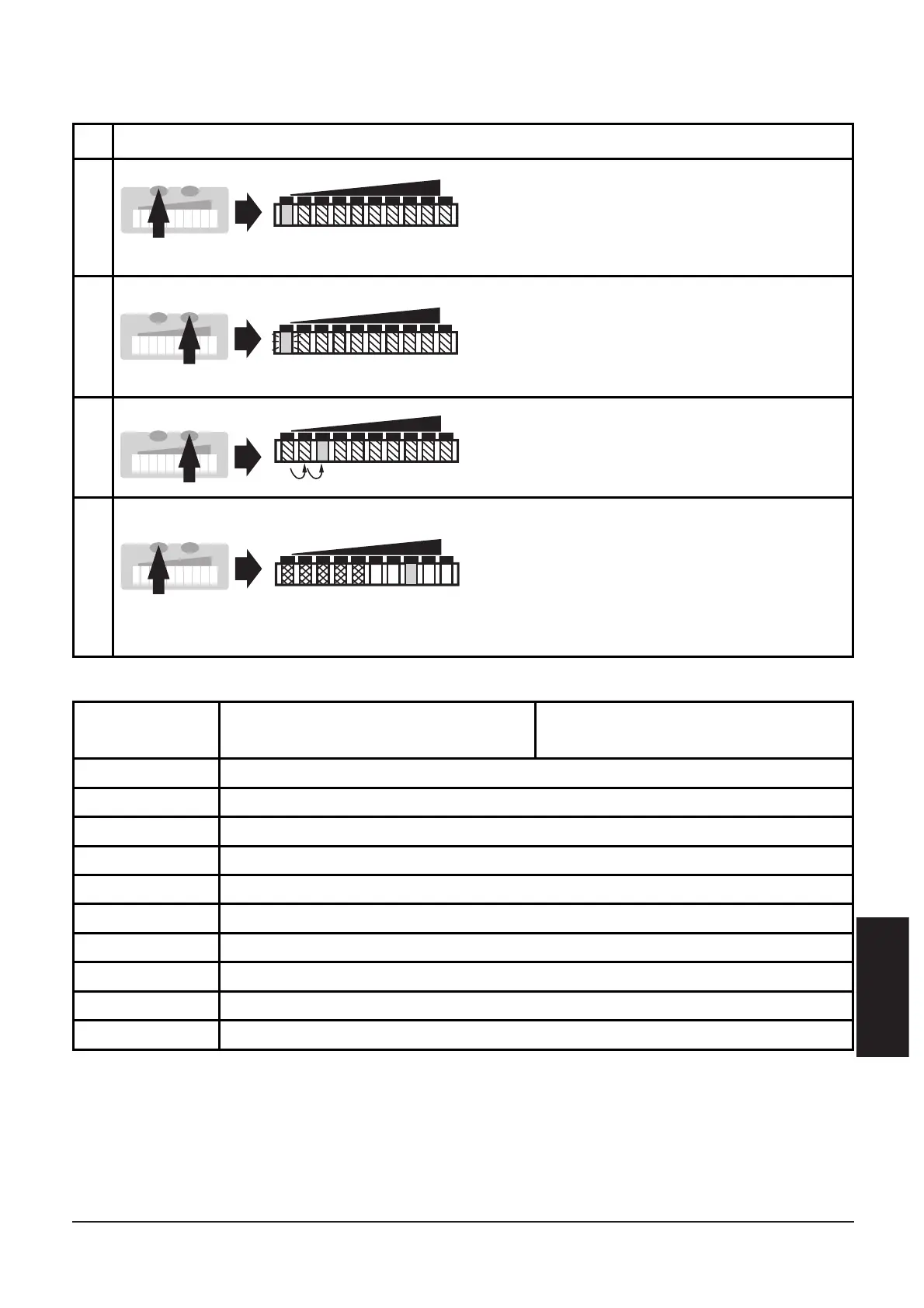
Setting the output function for S2
Following functions can be set:
35
ENGLISH
1
2
Press the Mode/Enter button
twice. The current setting is indi-
cated (green LED).
Press the Learn/Set button for 5 s
(until LED flashes).
3
Press the Learn/Set button
several times until the requested
LED lights.
4
Press the Mode/Enter button
briefly (acknowledgement).
The indication goes off briefly.
The unit stores the new setting
and passes into the run mode
temperature.
5 s
Ensure you are in run mode temperature.
Logic
function
0
1
2
3
4
5
6
7
8
9
For use as N.O. function S2 is
switched when
For use as N.C. function S2 is
not switched when
temperature ≥ SP
Temp
flow ≥ SP
Flow
and temperature ≥ SP
Temp
flow ≥ SP
Flow
and temperature < SP
Temp
flow < SP
Flow
and temperature ≥ SP
Temp
flow < SP
Flow
and temperature < SP
Temp
flow ≥ SP
Flow
or temperature ≥ SP
Temp
flow ≥ SP
Flow
or temperature < SP
Temp
flow < SP
Flow
or temperature ≥ SP
Temp
flow < SP
Flow
or temperature < SP
Temp
temperature < SP
Temp












 To Next Page