20
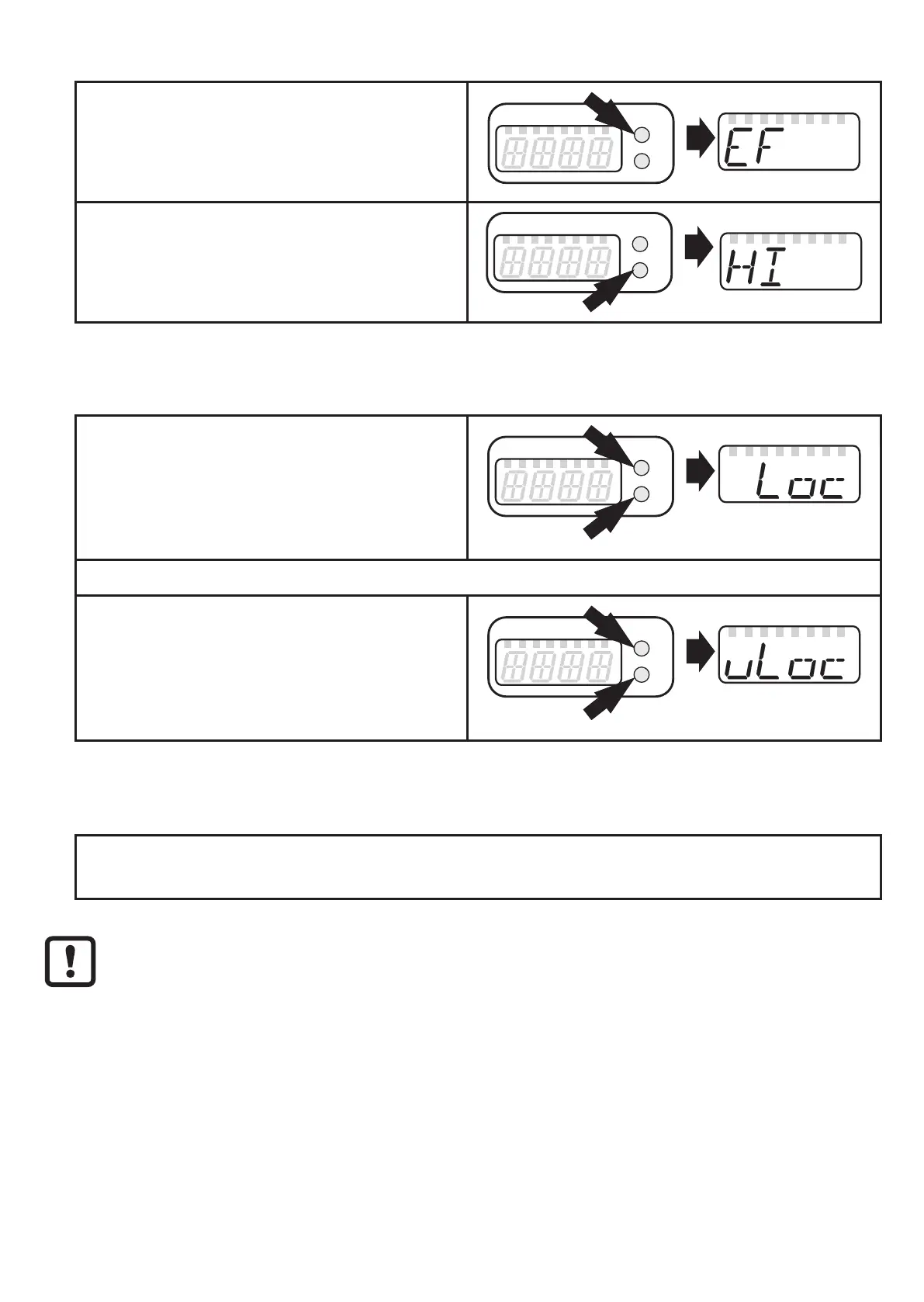
• Change from menu level 1 to menu level 2:
► Press [Mode/Enter] until [EF] is
displayed�
► Press [Set] briefly�
> The first parameter of the sub-menu
is displayed (here: [HI])�
• Locking / unlocking
The unit can be locked electronically to prevent unintentional wrong settings�
► Make sure that the unit is in the
normal operating mode�
► Press [Mode/Enter] + [Set] for 10 s�
> [Loc] is displayed�
During operation: [Loc] is briefly displayed if you try to change parameter values�
► Press [Mode/Enter] + [Set] for 10 s�
> [uLoc] is displayed�
When delivered: unlocked�
• Time out:
If during parameter setting no pushbutton is pressed for 15 s, the unit exits the param-
eter setting mode� The parameter value is not changed�
For medium temperatures over 50 °C some parts of the housing can heat
up to over 65 °C�
In this case do not press the pushbuttons manually; instead use an object (e�g�
ballpoint pen)�







 To Next Page