13
Commissioning
Check whether the voltage given on the type plate cor-
responds to the available mains voltage�
The socket used must be earthed
(fitted with earth contact)�
If these conditions have been met, the machine is ready
for operation when the mains plug is plugged in�
If these conditions are not met, safe operation is not guar-
anteed and the machine could be damaged�
Observe the ambient conditions (temperature, humidity,
etc�) listed under “Technical Data”�
The battery in the Wireless Controller (WiCo) must be
charged at the station before the first use of the device�
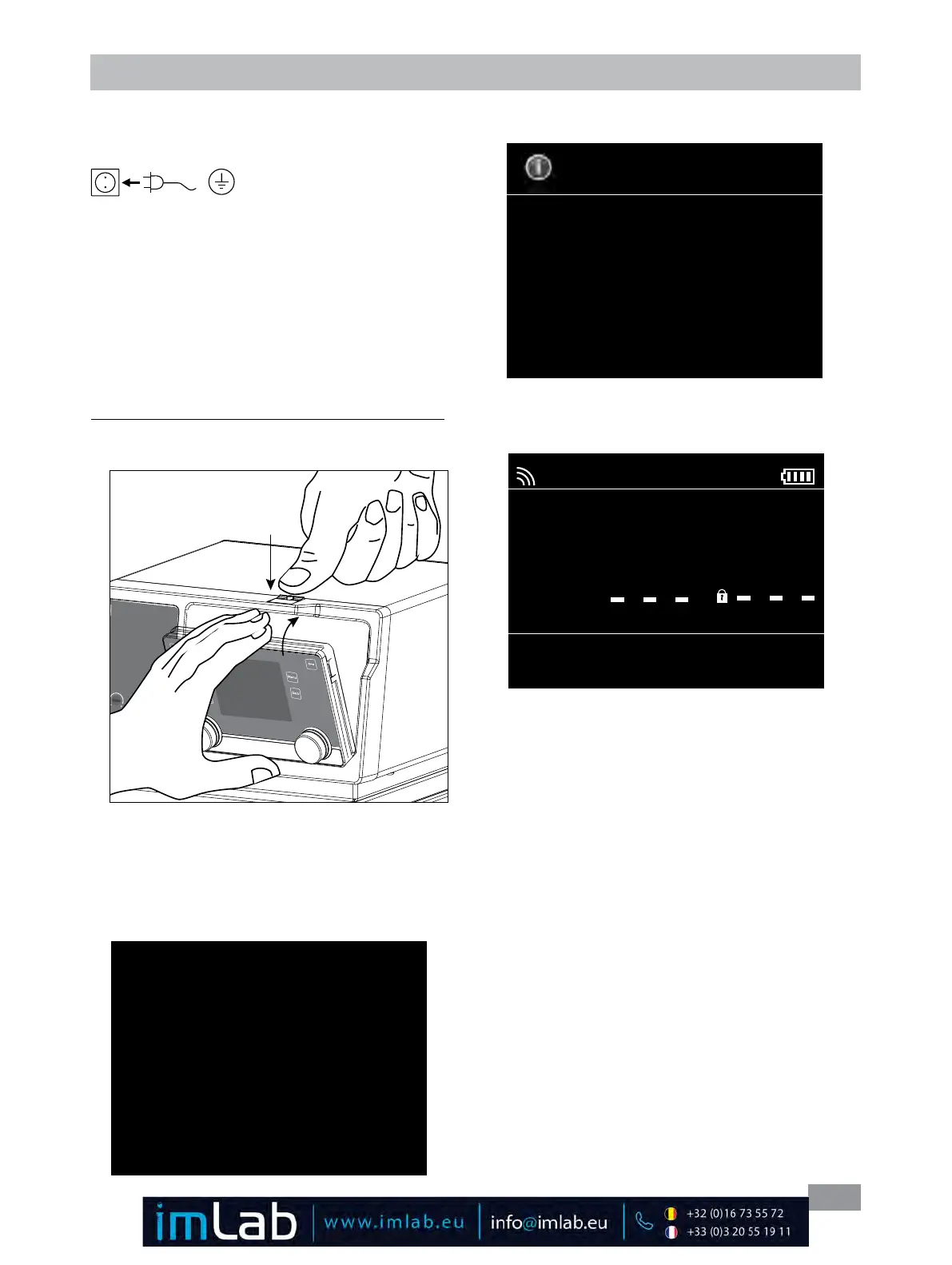
Mounting the Wireless Controller to the station:
Put the WiCo into the holder at the station while pressing
the release button�
After several seconds, screen display the information of WiCo�
IKA
®
Circulator
IC/HBC Control
Version 1.3.000
Then the working screen in standby status appears and
the device is ready for operation�
Information
Internal Max: 95 °C
Internal Min: 5 °C
External Max: 95 °C
External Min: 5 °C
Fluid H
2
O (Water)
A
0.00
int °C
ext °C
int 0.00 1000
set °C Pump rpm
Safe Temp °C
Change the temperature setting with left knob (K)�
Change the pump speed setting with the right knob (J)�
In standby status, press the left knob (K)� The device starts
heating function and the pump begins to run�
In work status, press the right knob (J) to stop operation
of the pump� The heating function and the pump stops�
Note: In standby status, press the right knob (J) to start
the pump function, the heating function will not be acti-
vated�
In working status, press the left knob (K) to stop the heat-
ing function, the pump keep running�
When the WiCo is switched on without being connected
to the station, the green LED bar (D) and the green Blue-
tooth
®
LED (F) on circulator lights up�
The controls of the WiCo allow locked by pressing the key
button (O), so no accidental changes during operation are
possible (key symbol appears in the display) �
By pressing the key button (O) again, the controls are re-
leased (key symbol disappears from the display)�
Fig. 18
Fig. 19
Fig. 20
If the WiCo should be permanently attached to the station,
we strictly recommend to fasten the unlocking button with
the integrated screw (turn counter clock wise)�
After switch on the mains switch (2) at the rear side of
the station, the screen of the WiCo displays the device
designation and the software version after a beep�
Fig. 17








 To Next Page