15
Working with Wireless Controller (WiCo)
•
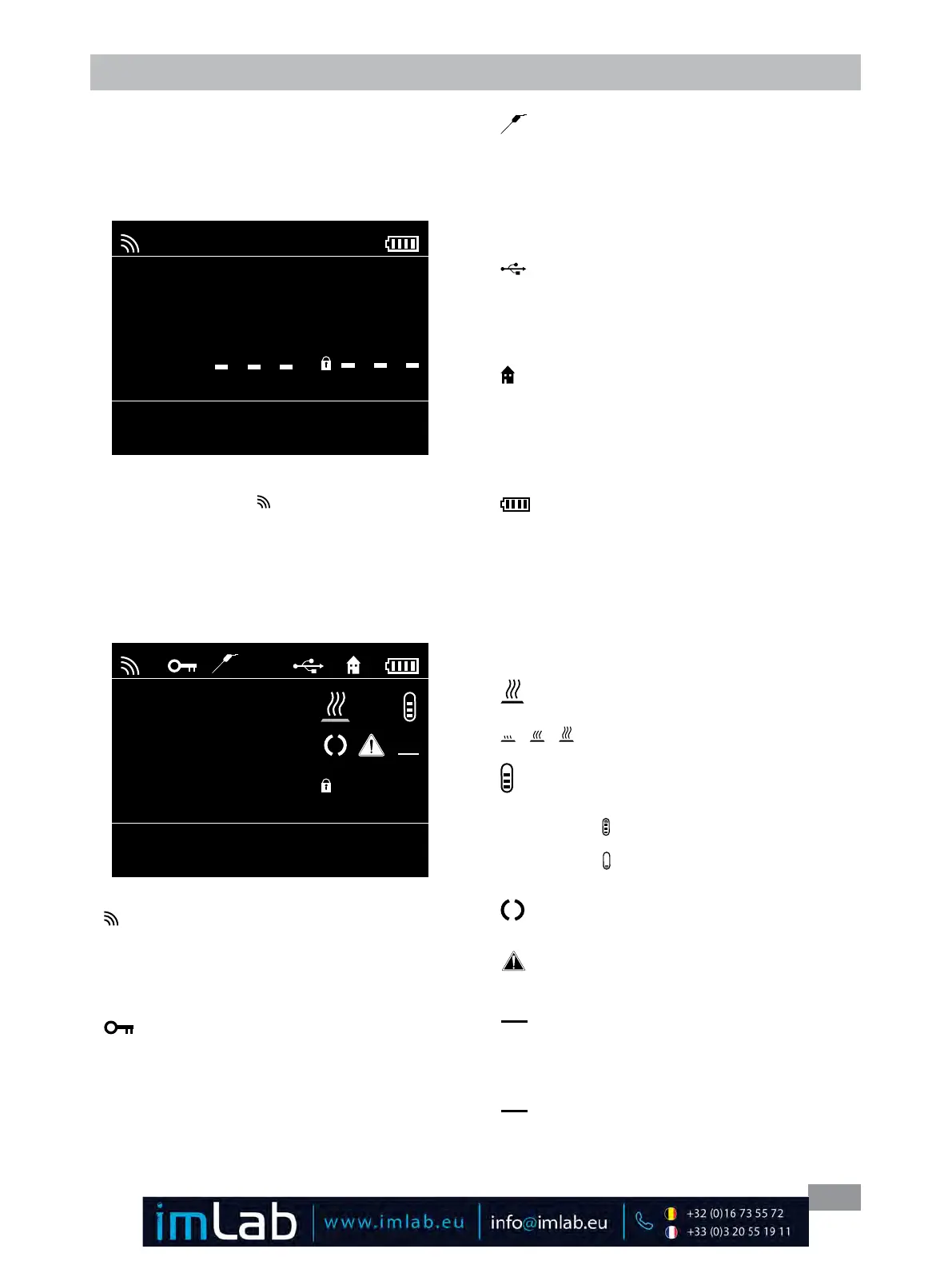
Working screen at the time of delivery:
The start and information screen (see section "Commis-
sioning") appears for a few seconds after the WiCo is
switched on� After this, the following working screen ap-
pears automatically in the display�
A
0.00
int °C
ext °C
int 0.00 1000
set °C Pump rpm
Safe Temp °C
• Explanation of symbols on the working screen:
The symbols displayed change depending on the status
and settings of the WiCo and the station� The screen
below shows the most significant symbols on the work-
ing screen�
A
200.00
int °C
ext °C
int
250.00
1000
set °C Pump rpm
Safe Temp °C
PC
200.00
260
Bluetooth
®
:
This symbol means the station and the WiCo are com-
municating via Bluetooth
®
�
The symbol no longer appears if no Bluetooth
®
commu-
nication is being performed�
Key:
This symbol means that the function of the keys and the
rotary knobs for controlling the WiCo are disabled�
The symbol no longer appears if the functions are en-
abled once again by pressing the key button a second
time�
Temperature Sensor:
This symbol appears when the external temperature
sensor is connected�
A Operating Mode:
This symbol indicates the operating mode currently se-
lected (A, B, C)�
USB:
This symbol means the WiCo is communicating or the
battery is charged via a USB cable� The symbol no longer
appears if no USB cable is being used for communicat-
ing with the station�
Home:
This symbol means that the WiCo is connected to the
station and is communicating with the station via the
contacts�
The symbol no longer appears if the WiCo is removed
from the station�
Battery pack:
This symbol indicates the charging status of the RB 1
battery pack within the WiCo�
The charging symbol appears if the WiCo
- Is connected to a PC via a USB cable
- Is connected to a Circulation station via a USB cable
- Is connected to the power supply unit OS 1.0 via a
USB cable
- Is connected to the station via the charger contacts�
Heating
This symbol indicates that the heating function is active�
indicate active heating process�
Fluid level
This symbol indicates fluid level�
The red symbol means the fluid is above the maximum
fluid level� Excess fluid should be drained out�
The red symbol means the fluid is below the minimum
fluid level� Please add fluid�
Pump:
This symbol indicates that the pump is activated�
Warning:
This symbol indicates that warning is active�
PC
PC Control:
This symbol means that either the station or the WiCo
is connected to a computer and is being controlled from
the computer�
PR
Program Control:
This symbol indicates that the WiCo is controlled by a
program (see "PROGRAMS")�
Note: The wireless symbol appears only when the station
is switched on�
Fig. 22
Fig. 23








 To Next Page