58
iii
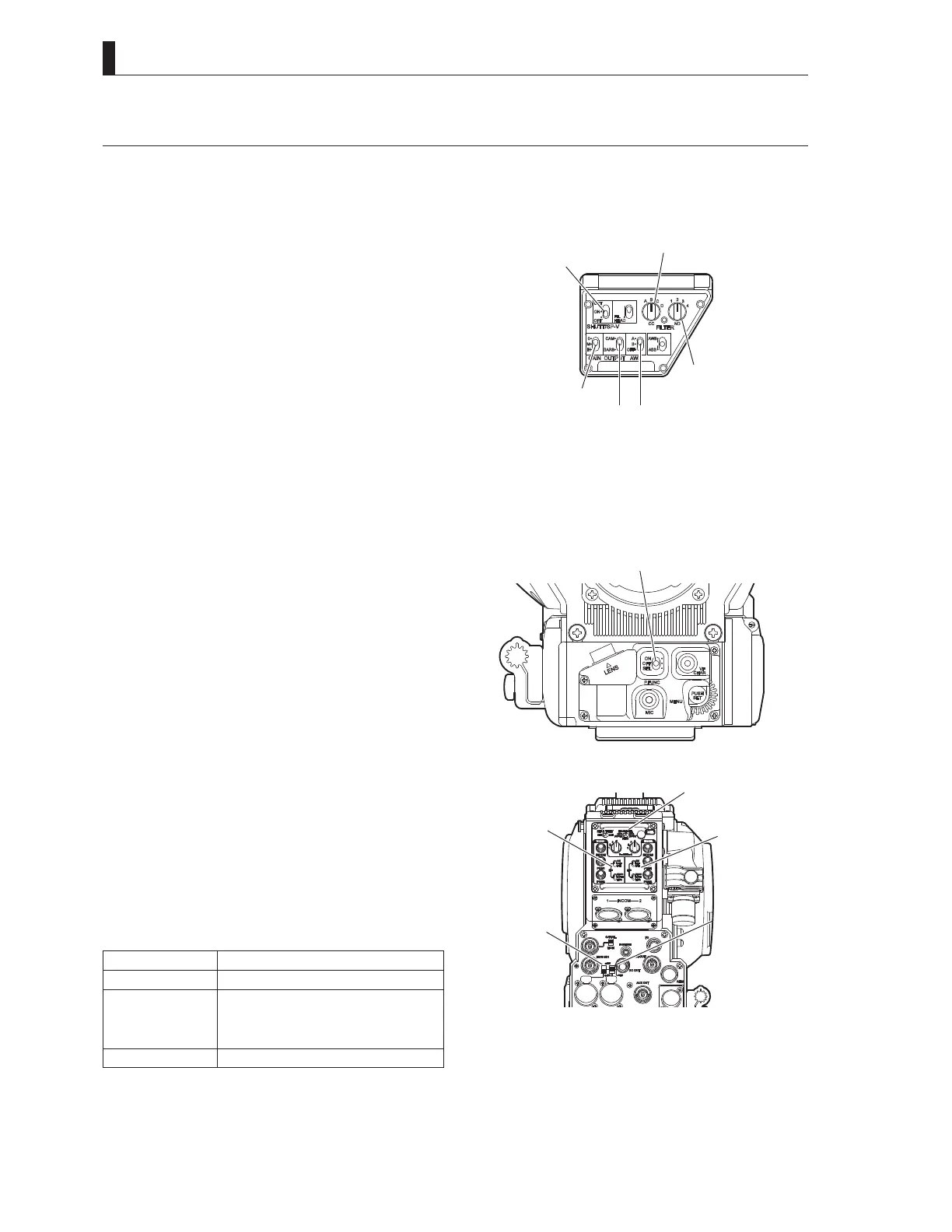
4.2 Switch Position Check
:KHQWKHFDPHUDLVXVHGIRUWKH¿UVWWLPHVHWWKHVZLWFKHVRQWKHFDPHUDWRWKHSRVLWLRQVLQGLFDWHGLQWKH¿JXUHEHORZDQGHQVXUH
WKDWWKHFDPHUDZRUNVSURSHUO\$IWHUHQVXULQJWKDWLWZRUNVSURSHUO\VHWWKHVZLWFKHVDFFRUGLQJWRWKHHQYLURQPHQWLQZKLFKWKH
camera is used and shooting conditions.
IN S CT
WB S CT
CC FI T CC
N FIT
OUTPUT S CT
SHUTT SUP-
■
Camera Right
*$,16(/(&7VZLWFK
$:%6(/(&7VZLWFK $
&&),/7(5VZLWFK(&&$.
1'),/7(5VZLWFK
2873876(/(&7VZLWFK&$0
6+8776839VZLWFK 2))
Note:
When the camera is connected to the BS, the switches on the
camera are disabled except the CC FILTER switch (ECC) and
ND FILTER switch. When the camera has the operational
priority for the CC FILTER (ECC) and ND FILTER switches,
WKH),/7(5ORFDOLQGLFDWRUOLJKWV3UHVVLQJWKH),/7(5+($'
switch will switch the operational priority between the camera
and the BS.
PFUNC
■
Camera Front
3)81&VZLWFK2))
Note:
When the camera is connected to the BS, you cannot use the
P.F U NC swit c h .
S CT
INT COM-
MIC
NT COM-1
IC
IC-1 POW
MIC- POW
■
Camera Rear
,17(5&20)5217956(/(&7VZLWFK 2))
,17(5&200,&VZLWFK 21
,17(5&200,&VZLWFK 21
- MIC-1 POWER switch, MIC-2 POWER switch
Depending on the type of microphone to use, the power supply
settings differ.
Switch Position Description
AB+12V Supplies +12V AB power to the microphone.
OFF Supplies no power to the microphone.
Applicable for a dynamic microphone or
a microphone with built-in power supply
which requires no power supply.
+48V Supplies +48V Phantom power
Reference:
For details on the microphone, refer to the instructions accompanying the microphone to be used.



 To Next Page