SWIFT K11-EN, Rev.A 54
6.5 Calibration
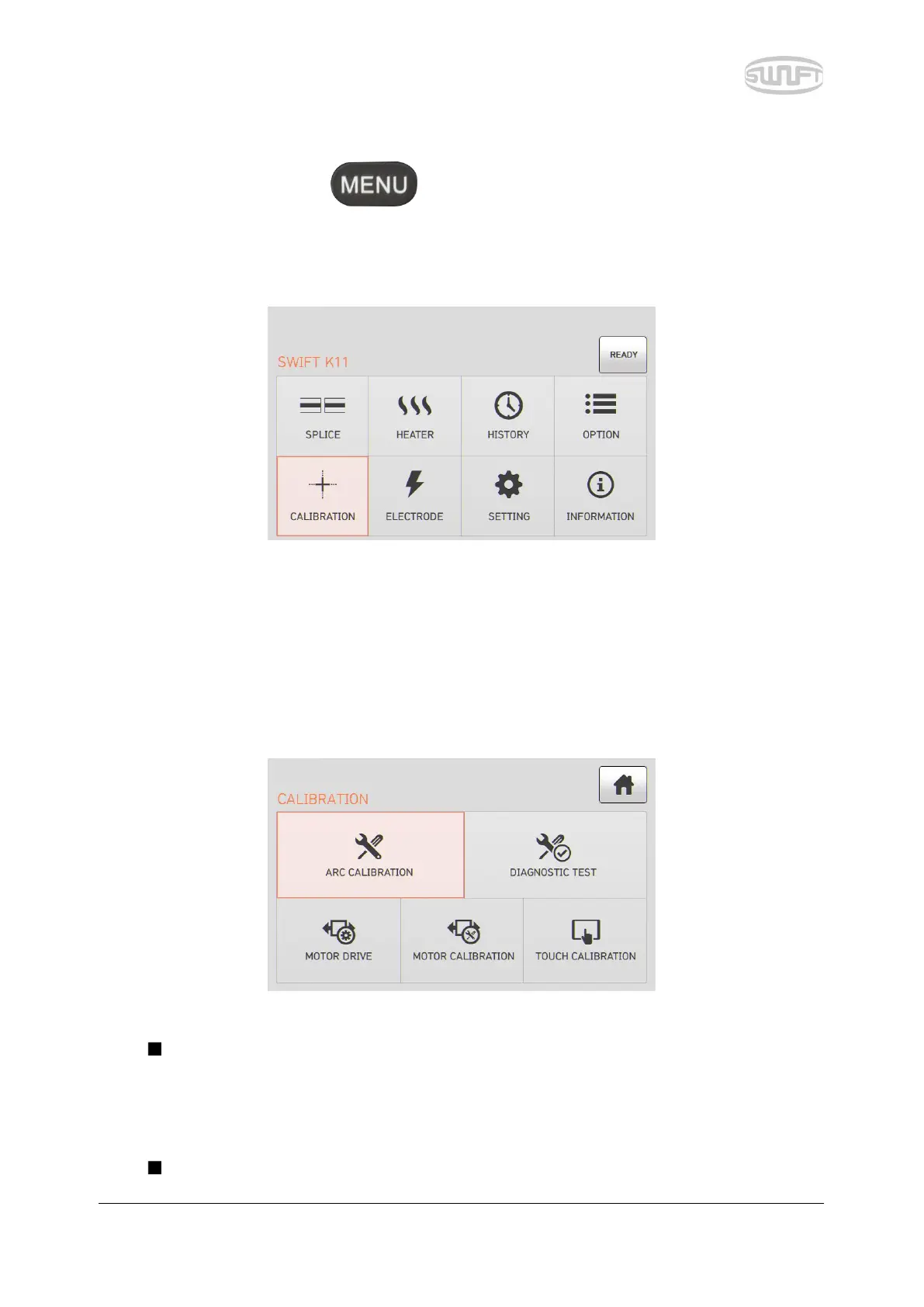
To import splice mode, press and then select “Calibration” menu by touching it. It
displays a screen to select calibration menu as follows. The calibration menu is equipped with
various functions such as discharge amount calibration, motor operation test, etc.
6.5.1 Discharge amount calibration
Swift K11 continuously checks change in temperature and air pressure through each sensor. Based
on such data, discharge amount is automatically calibrated. Change in discharge amount due to
electrode abrasion or optical fiber’s splice, however, is not automatically calibrated. The central
axis of discharge can also be moved leftwards or rightwards with numerous discharge. In this case,
discharge amount calibration is required.
When executing discharge amount calibration, discharge voltage is automatically
changed into a proper value. As this value is calculated by a certain computing program,
a user cannot arbitrarily change it.
Upon discharge amount calibration, SM optical fiber should be used.


 To Next Page