TRADUCTION OF THE ORIGINAL INSTRUCTIONS FOR USE
BS 400/60 AFI-Eing ED.2011 rev.00 26/60
* The automatic cycle starts by pushing again the button I (20/RI0055). The electronic driver makes a self-
checking, and in case the aforementioned operations have not been properly carried out the cycle does not begin
and an error message appears on the display. The reason of the problem has to be removed to start the automatic
cycle.
DURING THE AUTOMATIC CUTTING CYCLE THE PRESENCE OF THE USER IS NOT REQUIRED AND CAN
BE LIMITED TO OVERSEEING THE WHOLE PROCESS.
Note: after finishing the cutting cycle the saw stops, waiting for the piece counter to be set to zero again or
for a new cycle to start, without leaving the automatic modality. On the display the message EP appears.
* When a bar ends, the saw stops waiting for a new one to be loaded, and it goes back to the semiautomatic
mode.
After removing what is left of the bar, place a new one on the feeder, just a few millimeters beyond the cutting line.
Set up the saw for the automatic cycle again by means of the buttons TEST+F3 - (4) + (25) – and, without resetting
the piece counter, start the cycle again by pushing the button I (20/RI0055) twice.
* During the automatic cycle - F3 flashing - the buttons 22,23,24 (coolant), 11,13 (blade speed), 10 (information on
the cycle) are active and can be used. Moreover, by pushing F1, F2 and F3, the feeder strokes, number of cuts to
make and piece counter can respectively be shown on the display.
CICLO AUTOMATICO
15.11 - PROTECTION AGAINST OVERLOADS
The motor is protected against excessive heating thanks to bimetallic thermo-protectors (placed directly in the coil)
which interrupt the drivers circuit. If this happens, the corresponding error message appears on the display.
The normal working can be restored – after the temperature has dropped below the required level - only by starting
again the cycle.
In the meantime look for and eliminate the origins of the excessive heating, such as, for example, high cutting
speed, no oil in the gearbox, short circuits, blade stuck into the material, and so on.
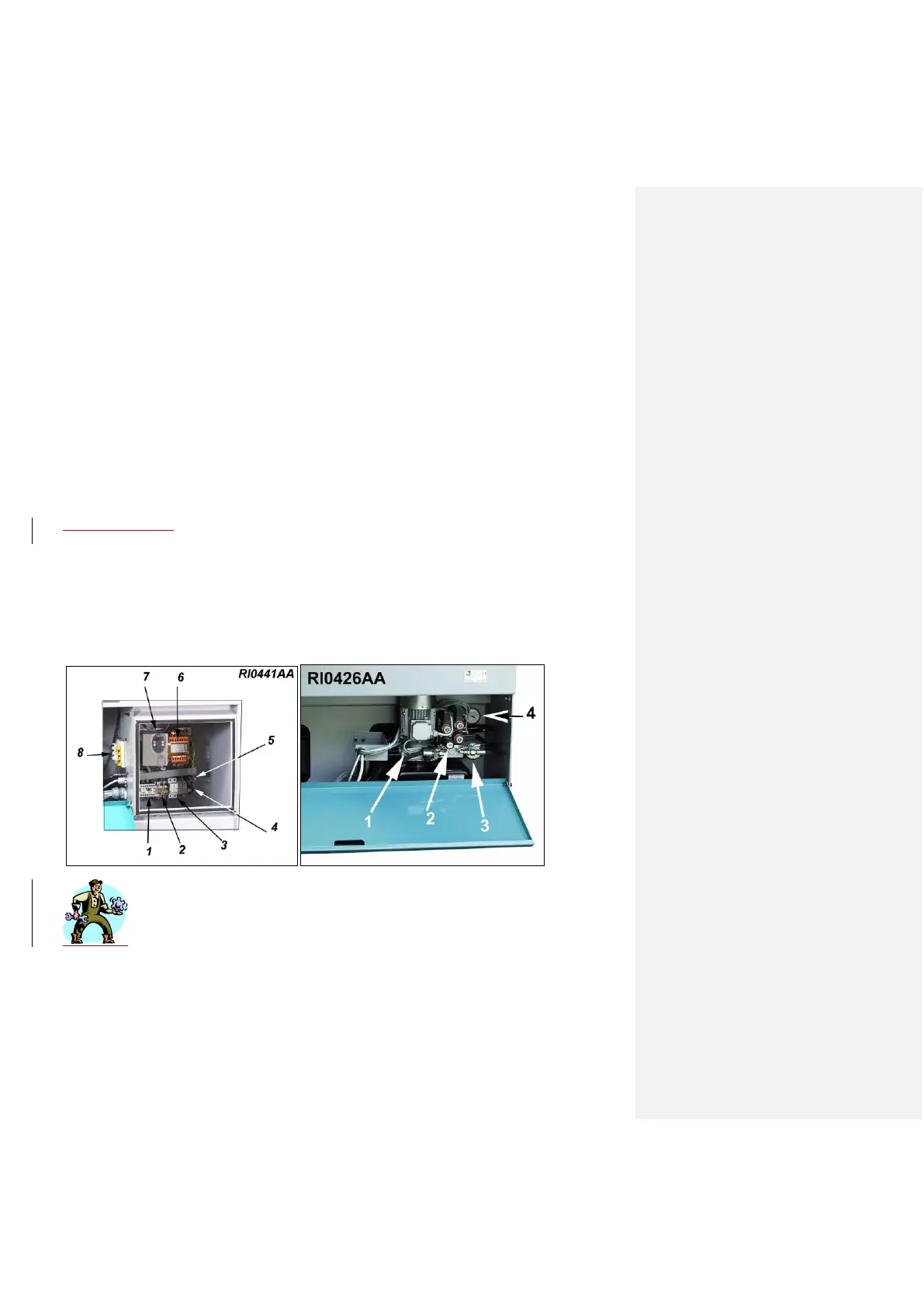
If such a problem happens often, look at what kind of error message appears on the Inverter display – 7/RI0441 –
and communicate it to the Technical Service.
- 16 - ADJUSTMENTS
BLADE - Carbide metal pad adjustment according to blade thickness - drawing RI0181
This adjustment must be done when you have a blade with thickness other than 1,1 mm or in case the hard metal
pads are worn out. The easiest test is the following: put a blade in the guides and move it back and forth to evaluate
the mechanical play. Depending on the result, proceed as follows: loosen slightly one screw – 1/RI0181 – to make
more room for the blade (or tighten it to get the pads closer).
put the blade inside a guide and, while pressing manually the two parts one against each other, tighten strongly the
two aforementioned screws.
Check that the mechanical play is not excessive (Max. 0.02 or 0.03 mm) and make sure that both screws –
2/RI0181 - are properly tightened.



 To Next Page