15
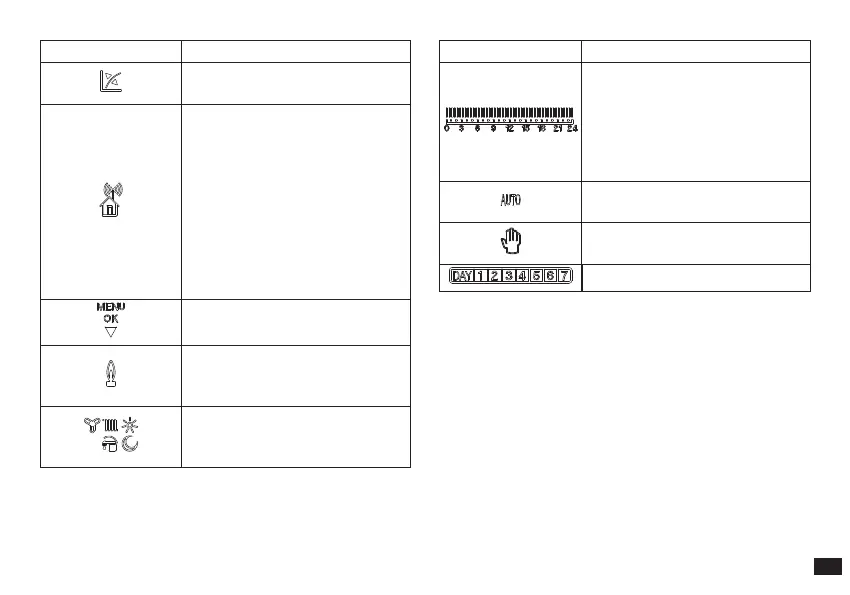
Symbol Description
functioning with external
temperature probe active
Indicates the association between
the Base and CAR
V2
:
FLASHING: association in
progress.
FIXED: association completed
successfully.
If the signal is lost, the symbol
ashes simultaneously with the
fault signal (e.g. CAR
V2
out of
operating range of the base).
description of functioning of the
button (6 Fig. 2-2) - Menu or Ok
ame presence symbol (only
appears with the connection to
some boiler models)
symbols that identify the
functioning mode in the hourly
programming
Symbol Description
time bar that identies the
functioning period at “comfort”
and “economy” temperature
on the basis of the type of
programming (cooling, central
heating, DHW)
functioning with automatic
program.
functioning with manual
program
display of days of the week
N.B.: Some icons can assume dierent meanings according
to the context, see the successive paragraphs to identify the
functions activated by the presence of several icons at the
same time.
3.1 Back-lighting.
By pressing any button the display lightens for a set time.
N.B.: CAR
V2
, standard model equipped with boiler does not
have backlighting function.



 To Next Page