29
10. DIAGNOSTICS AND ERRORS
10.1 Diagnostics.
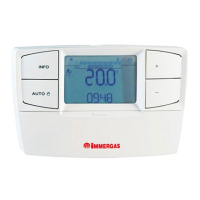
e CAR
V2
continually controls the functioning status of the
boiler and signals any anomalies, stating the corresponding
error code on the display.
e error codes have meaning depending on the boiler to
which the CAR
V2
is connected. erefore, refer to the boiler
instruction book for a complete list of error codes and their
relative meaning.
In the case of a fault that cannot be reset, contact a qualied
technician (e.g. the Immergas After-Sales Technical
Assistance Service).
“ERR>XX” appears on the display in the event of an error,
where XX stands for the number that identies the error
code as well as the ashing code.
As well as the error codes referring to the functioning state
of the boiler, the CAR
V2
also checks its own functioning
state, indicating any malfunctions.
Code Description
ERR>CM
Communication error between the Base and
the boiler
ERR>TP
Error in reading the room temperature or
value measured o scale (below 0°C or over
50°C)
10.2 Reset errors.
In the event of resettable boiler bock, the ashing
icon appears on the display. In this case, by acting on the
relevant button and holding it down for 5 seconds, it is
possible to send a release signal to the boiler that allows
to reset correct boiler functioning within a few seconds.
If normal functioning conditions are set, it goes back to
functioning as previously set.
It is possible to operate up to a maximum of 5 consecutive
reset attempts, aer which an hour must pass before another
5 attempts are available.
10.3 Reset CAR
V2
remote control.
Acting on the hole for general rest (ref. 4 Fig. 2-2) the CAR
V2
hardware can be reset without losing the congurations
set by the user, such as the time, date and scheduled times.
If the CAR
V2
original factory set conditions are to be restored,
act as follows.
Press and release the button in the “reset” hole (ref. 4 Fig.
2-2) holding the button down (ref. 2 Fig. 2-2).
At this point, CAR
V2
will be restored with all factory settings,
keeping the current time and day but losing the association
with the Base, which must be restored (par. 12.6).



 To Next Page