23
7. COOLING MODE FUNCTIONS
With the CAR
V2
in cooling mode ( ), the of DHW heating
and room cooling functions are enabled.
Important: this function can only be used with boilers that
an be coupled with a chiller.
Two main functioning modes can be selected: automatic or
manual. Plus a forced automatic timed program.
- Manual ( ): the room temperature is kept constant
at the value set by the user every time, according to
requirements.
- Automatic ( ): the room temperature is regulated on
two levels (comfort and economy) during the day via a
program set by the user.
- Forced automatic ( ashing): the room temperature
is modified momentarily with respect to automatic
functioning until the successive passage between comfort
and energy mode of the automatic program set.
7.1 Manual functioning.
By pressing the button, pass alternately from
automatic to manual functioning.
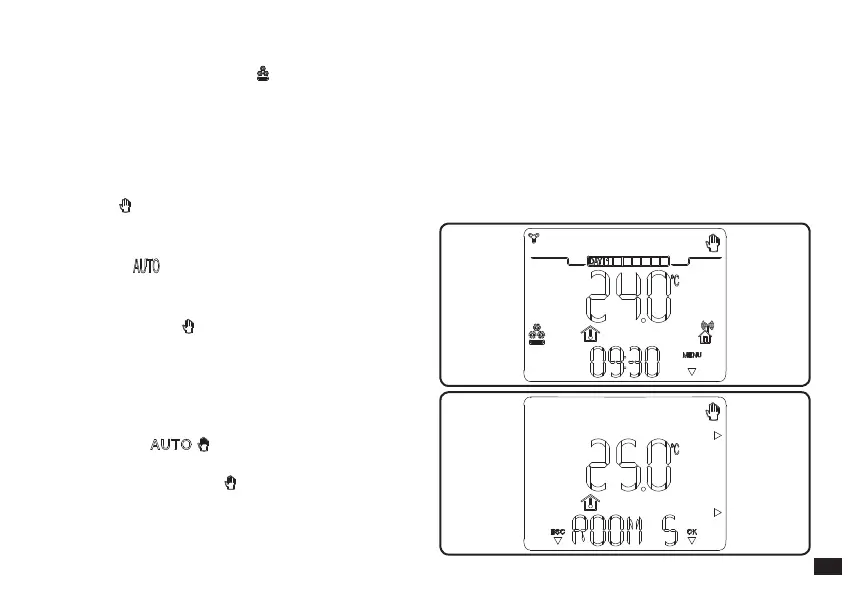
Once manual mode is set, the icon lights up on the display
(Fig. 7-1).
Fig. 7-2
Fig. 7-1
Set the desired room temperature by simply pressing the
+ / - buttons and the room temperature setting will appear
on the display (Fig. 7-2). Just wait a few seconds to conrm
the new value.
In manual mode any room temperature from +15°C to
+40°C can be selected, which will be kept constant until
new adjustments are made or a dierent mode is selected.



 To Next Page