28
INSTALLERUSERMAINTENANCE TECHNICIAN
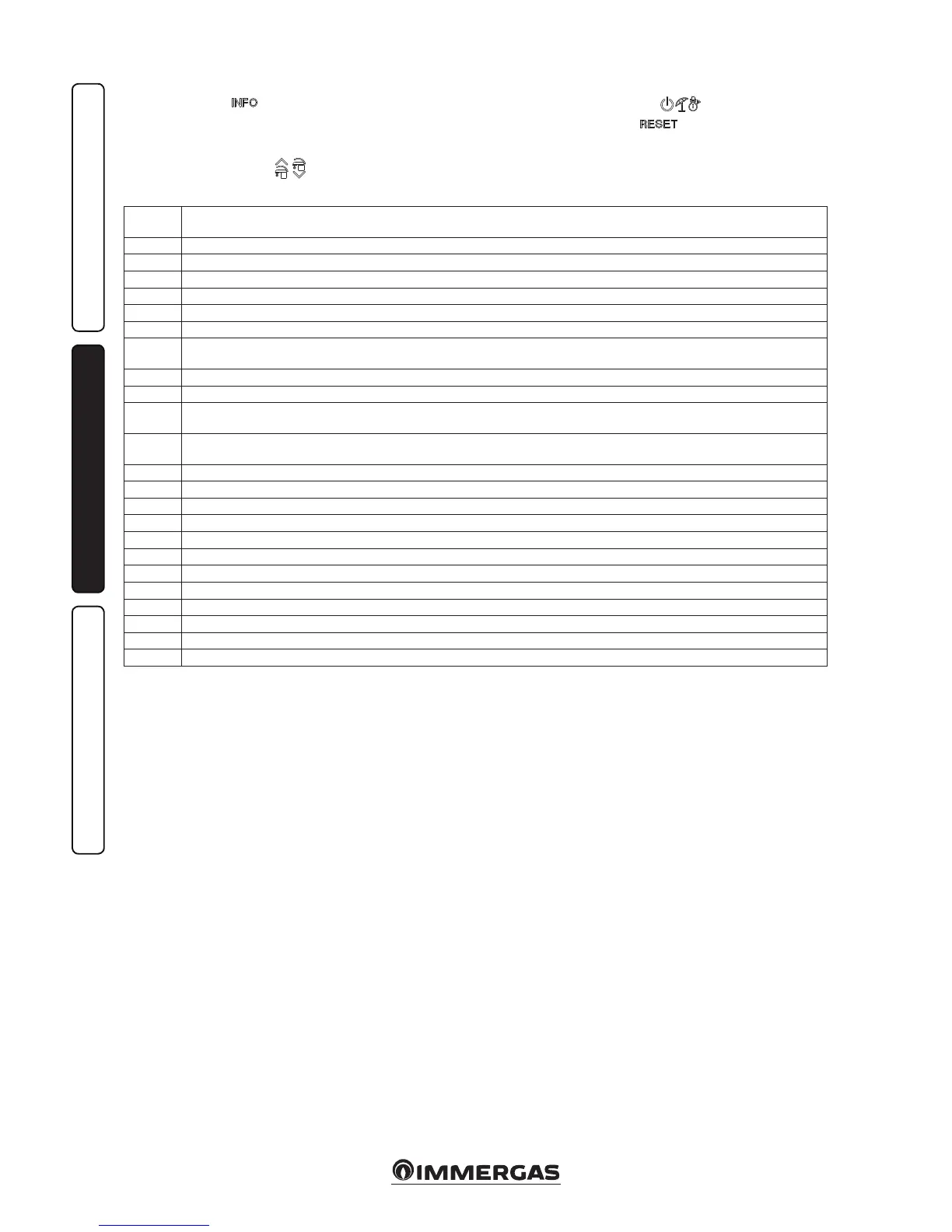
2.6 INFORMATION MENU.
By pressing the button “
“, the “Information
menu” is activated for at least 1 second, display-
ing some boiler operating parameters.
To scroll through the various parameters, press
the buttons “DHW regulation” “
“.
Wit h t h e m en u a ct i v e on t he in di -
cator (19) the parameter via the letter “d”
plus the number of the parameter that is
being displayed will a lternately show.
To view the parameter value, select it by pressing
the button
.
Press “ ” or wait 15 minutes to go back to
the previous screen or exit the menu.
2.7 BOILER SHUTDOWN
Switch the boiler o by putting it in “o” mode,
disconnect the onmipolar switch outside of the
boiler and close the gas cock upstream from the
appliance. Never leave the boiler switched on if
le unused for prolonged periods.
2.8 RESTORE CENTRAL HEATING
SYSTEM PRESSURE
Periodically check the system water pressure.
e boiler pressure gauge should read a value of
between 1 and 1.2 bar.
If pressure falls below 1 bar (with the circuit cold),
restore normal pressure via the cock located at the
bottom of the boiler (Part. 1 Fig. 6).
N.B.: close the valve aer the operation.
If pressure values reach around 3 bar the safety
valve may be activated.
In this case, remove water from a radiator air
vent valve until a pressure of 1 bar is achieved,
or ask for assistance from professionally qualied
personnel.
In the event of frequent pressure drops, contact
qualified staff for assistance to eliminate the
possible system leakage.
2.9 DRAINING THE SYSTEM.
To drain the boiler, use the special draining
valve (Fig. 6).
Before draining, ensure that the lling cock is
closed.
2.10 ANTIFREEZE PROTECTION.
e “Victrix Tera Plus” series boiler features
an antifreeze function that lights the burner
automatically when the temperature falls below
4°C (standard protection down to min. temper-
ature of -5°C). All information relative to the
anti-freeze protection is stated in Par. 1.3. In
order to guarantee the integrity of the appliance
and the domestic hot water heating system in
zones where the temperature falls below zero,
we recommend the central heating system is
protected using anti-freeze liquid and installation
of the Immergas Anti-freeze Kit in the boiler. In
the case of prolonged inactivity (second case),
we also recommend that:
- the electric power supply is disconnected;
- the heating circuit and boiler domestic water
circuit must be drained. In systems that are
drained frequently, lling must be carried out
with suitably treated water to eliminate hard-
ness that can cause lime-scale.
2.11 CASE CLEANING.
Use damp cloths and neutral detergent to clean
the boiler casing. Never use abrasive or powder
detergents.
2.12 DECOMMISSIONING.
In the event of permanent shutdown of the boiler,
contact professional sta for the procedures and
ensure that the electrical, water and gas supply
lines are shut o and disconnected.
Id
Parameter
Description
d 0.0 Not used
d 0.1 Displays the ame signal (uA)
d 0.2 Displays the primary exchanger output instant heating ow temperature
d 0.3 Not used
d 0.4 Displays the values set for central heating set
d 0.5 Displays the values set for DHW set
d 0.6
Displays the external environment temperature (if optional external probe present)
If the temperature is below zero, the value is displayed ashing.
d 0.7 Displays the storage tank unit temperature
d 0.8 Displays the system return water temperature
d 0.9
Displays the list of the last eight anomalies.
(to scroll the list press the “central heating temperature regulation” buttons (6 and 7))
d 1.0
Anomaly list reset. Once “d 1.0” is displayed, press the Reset button for at least 3 seconds; deletion is conrmed via the “88” symbols
ashing for two seconds
d 1.1 Not used
d 1.2 Displays the pump operating speed
d 1.3 Not used
d 1.4 Displays the pump ow rate (lh/100)
d 1.5 Displays the fan operating speed (rpm/100)
d 1.6 Displays the temperature read on the ue probe
d 1.7 Displays the calculated ow temperature
d 1.8 At the end of the screed heater function, displays for how many hours the ow temperature remained at “Top set”
d 1.9 Toggles between the safety soware version and the functional soware version
d 2.0 Displays the ow temperature of zone two (optional)
d 2.1 Displays the ow temperature of zone three (optional)
d 2.2 Not used







 To Next Page