Operation 3-1
3
3. Operation
3-1 Inspection and Preparation
Before Operation
Check the following before starting operation.
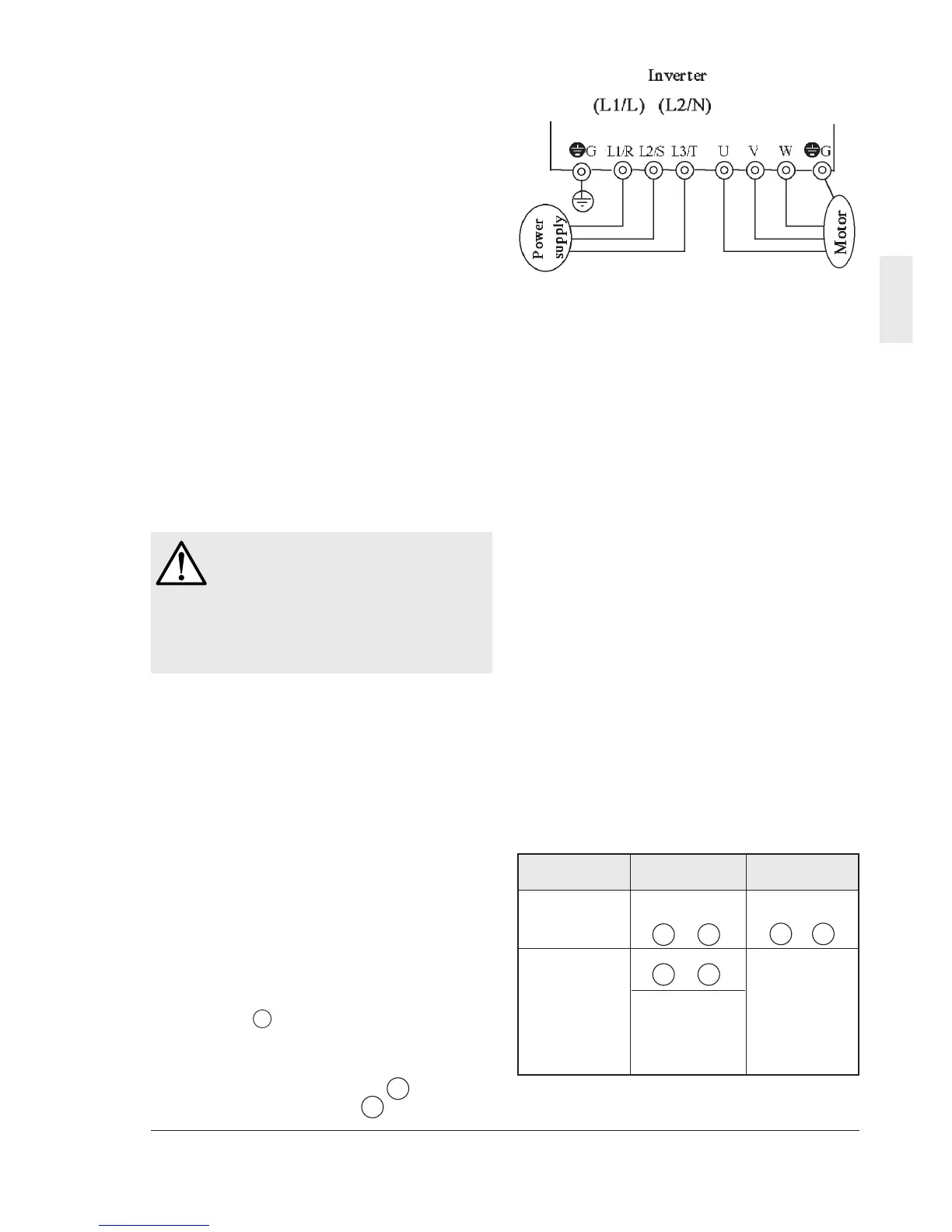
(1) Check if connection is correct.
Especially check if the power cables are
connected to inverter output terminals U, V
and W and that the grounding cable is
grounded without fail.
(2) Check for short circuits between terminals
and exposed live parts and ground faults.
(3) Check for loose terminals, connectors and
screws.
(4) Check if the motor is separated from
mechanical equipment.
(5) Turn the switches off so that the inverter
does not start or operate erroneously at
power-on.
(6) After the power is turned on, check the
following.
a. Check if the keypad panel shows an alarm.
b. Check if the fan built in the inverter rotates.
(1.5 kW or above)
3-2 Operation Method
There are various operation methods. Refer to
chapter 4 "Keypad Panel" and chapter 5
"Selecting Functions" to select the method most
suitable for the purpose and operation
specification. Table 3-2-1 shows general
operation methods.
3-3 Test Operation
After checking for errors in section 3-1, perform
a test operation.
In the factory shipment state, the inverter is in
the keypad panel operation mode.
(1) Turn the power on and check that the LED
blinks while indicating the 0.00 Hz
frequency.
(2) Using the key, set the frequency to a low
frequency such as 5 Hz.
(3) To turn forward: F02 = 2
To reverse: F02 = 3
After setting the above, press the key to start
operation. To stop, press the key.
Fig. 3-1-1 Inverter connection diagram
Table 3-2-1 General operation methods
WARNING
• Be sure to install the terminal cover
before turning the power on.
• Do not remove the cover during power
application.
• Do not operate switches with wet hands.
Otherwise electric shock could occur.
(4) Check the following points.
a. Check if the direction of rotation is correct.
b. Check for smooth rotation without motor
humming or excessive vibration.
c. Check for smooth acceleration and
deceleration.
(5) Referring to function code P04 Motor 1
(auto tuning), tune the motor constant.
When no abnormality is found, raise the
operation frequency to check.
After checking for correct operation during the
above test operation, start normal operation.
Caution 1: If any abnormality is found to the
inverter or motor, immediately stop operation
and determine the cause referring to chapter 7
Troubleshooting.
Caution 2: If voltage is applied to the L1/R, L2/S
and L3/T or L1/L and L2/N main circuit power
supply terminals even after the inverter stops,
the inverter output terminals U, V and W are live
and you will receive electric shock when
touching the terminals. As well, the smoothing
capacitor is not discharged immediately after
the power is turned off and it takes time for the
capacitor to be discharged.
To touch the electric circuit after turning the
power off, check that the charge lamp is unlit
and check for safe voltage using a multimeter.
Operation Frequency Operation
method setting command
Operation Keypad keypad panel
using keypad panel keys keys
panel
,,
Contact input
,
(switch),
Operation Potentiometer terminals FWD-
using external or analog voltage P24, terminals
signal terminal current or REV-P24
multistep speed
operation
V
RUN STOP
V
V
V
V
RUN
STOP



 To Next Page