41
The clock numbers are tied
directly to their associated
I/O channel and cannot be
re-configured! For example,
Clock 3A will ALWAYS be
on channel 15. The only
change that can be made to
the first IOS parameter
for the high-speed I/O
is if you want to use it
for a general purpose or
dedicated function, or line
types 0 and 9 through 25!
speed differential I/O. Figure 9.6 illustrates the IOS variable settings for the
high speed differential I/O.
Configuring the High-Speed I/O to a Non-Clock
Function
Configuring the high-speed I/O to clock functions will be covered in depth in
the following subsections on configuring encoder and ratio functions.
Here we will briefly discuss using the high-speed I/O as a general
purpose or dedicated I/O function.
Care must be taken when configuring the high-speed I/O to a
general purpose or dedicated function as the output current sink is
150mA for the entire I/O group 10.
The IOS variable will be configured for the high-speed I/O in the
same fashion as it is set for the isolated I/O.
For detailed usage example see Section 12, Sample Applications:
Registration.
Connecting and Configuring an Encoder
The high-speed differential I/O module may be used for closed loop
motion control by receiving quadrature input from a differential or single ended
encoder.
High-Speed I/O channels 13 and 14 are configured by default for this function, so
you would want your expansion module inserted into expansion slot #2.
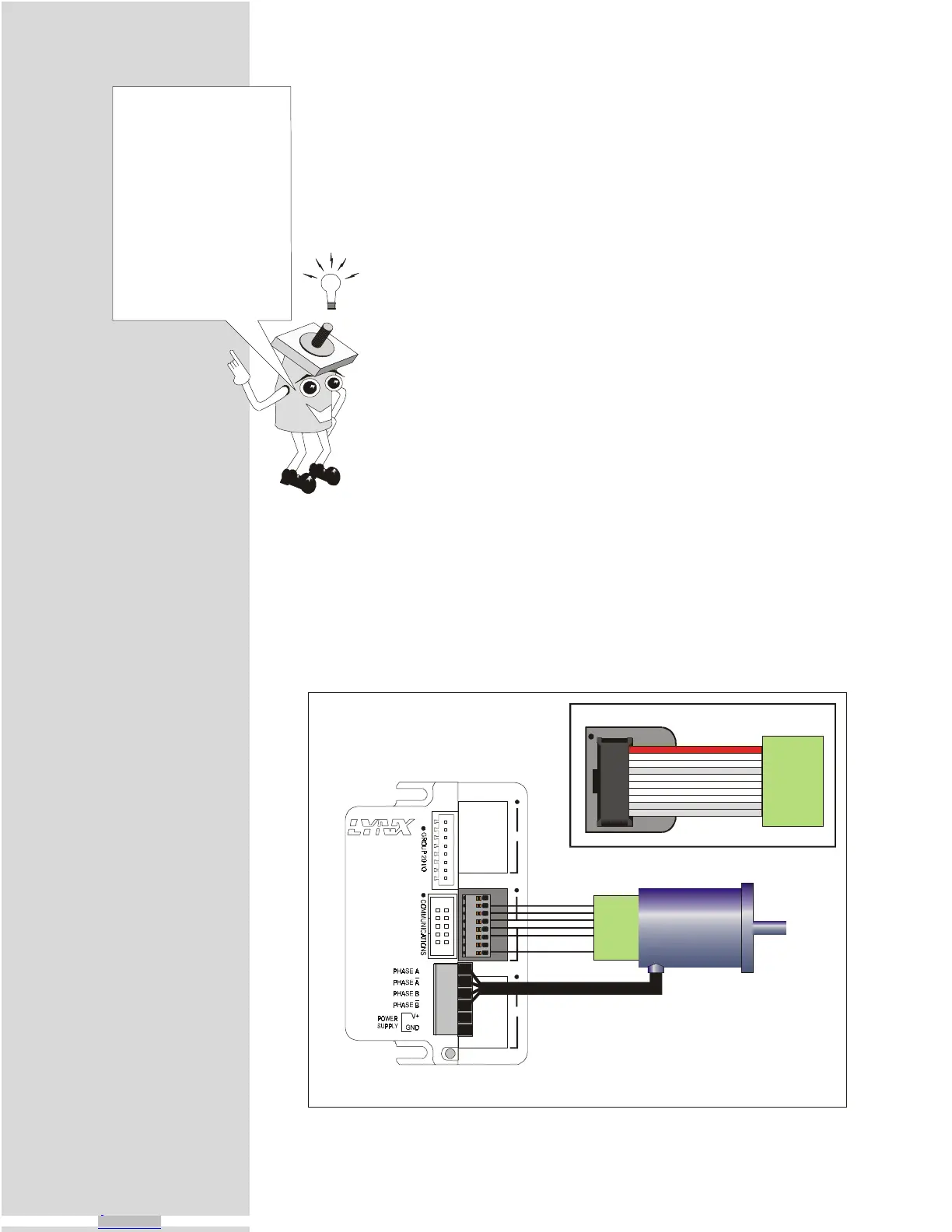
Connect your encoder as shown in the following figure and table.
MICRO
TM
MicroLYNX
123
GND
+5VDC
Channel B-
Channel A+
Channel B+
Channel A-
Differential
Encoder
Steppin
Motor
Connection Showin
8 Position
Phoenix Terminal
Connection Showin
10 Pin Header
GNDGND
+5VDC+5VDC
Channel B-14-
Channel A+13+
Channel B+14+
Channel A-13 -
Figure 9.7: Differential Encoder Connection
Downloaded from Arrow.com.Downloaded from Arrow.com.Downloaded from Arrow.com.Downloaded from Arrow.com.Downloaded from Arrow.com.Downloaded from Arrow.com.Downloaded from Arrow.com.Downloaded from Arrow.com.Downloaded from Arrow.com.Downloaded from Arrow.com.Downloaded from Arrow.com.Downloaded from Arrow.com.Downloaded from Arrow.com.Downloaded from Arrow.com.Downloaded from Arrow.com.Downloaded from Arrow.com.Downloaded from Arrow.com.Downloaded from Arrow.com.Downloaded from Arrow.com.Downloaded from Arrow.com.Downloaded from Arrow.com.Downloaded from Arrow.com.Downloaded from Arrow.com.Downloaded from Arrow.com.Downloaded from Arrow.com.Downloaded from Arrow.com.Downloaded from Arrow.com.Downloaded from Arrow.com.Downloaded from Arrow.com.Downloaded from Arrow.com.Downloaded from Arrow.com.Downloaded from Arrow.com.Downloaded from Arrow.com.Downloaded from Arrow.com.Downloaded from Arrow.com.Downloaded from Arrow.com.Downloaded from Arrow.com.Downloaded from Arrow.com.Downloaded from Arrow.com.Downloaded from Arrow.com.Downloaded from Arrow.com.Downloaded from Arrow.com.Downloaded from Arrow.com.



 To Next Page