INFOSEC UPS SYSTEM – 15, Rue du Moulin – 44880 Sautron – France – www.infosec-ups.com
Hot Line Tel : +33 (0)2 40 76 15 82 – fax : +33(0)2 40 94 29 51 – hotline@infosec.fr – 02 19 AA 59 203 07
UPS stay in Bypass mode and No AC input is indicated.
Step 2: Switch OFF the external power switch to disconnect the AC power to the UPS. Wait until the LCD
is OFF.
Step 3: Switch OFF the battery breaker if the UPS will disconnect from the AC power for a long time.
6-4-2. Turn Off Operation in Line Mode
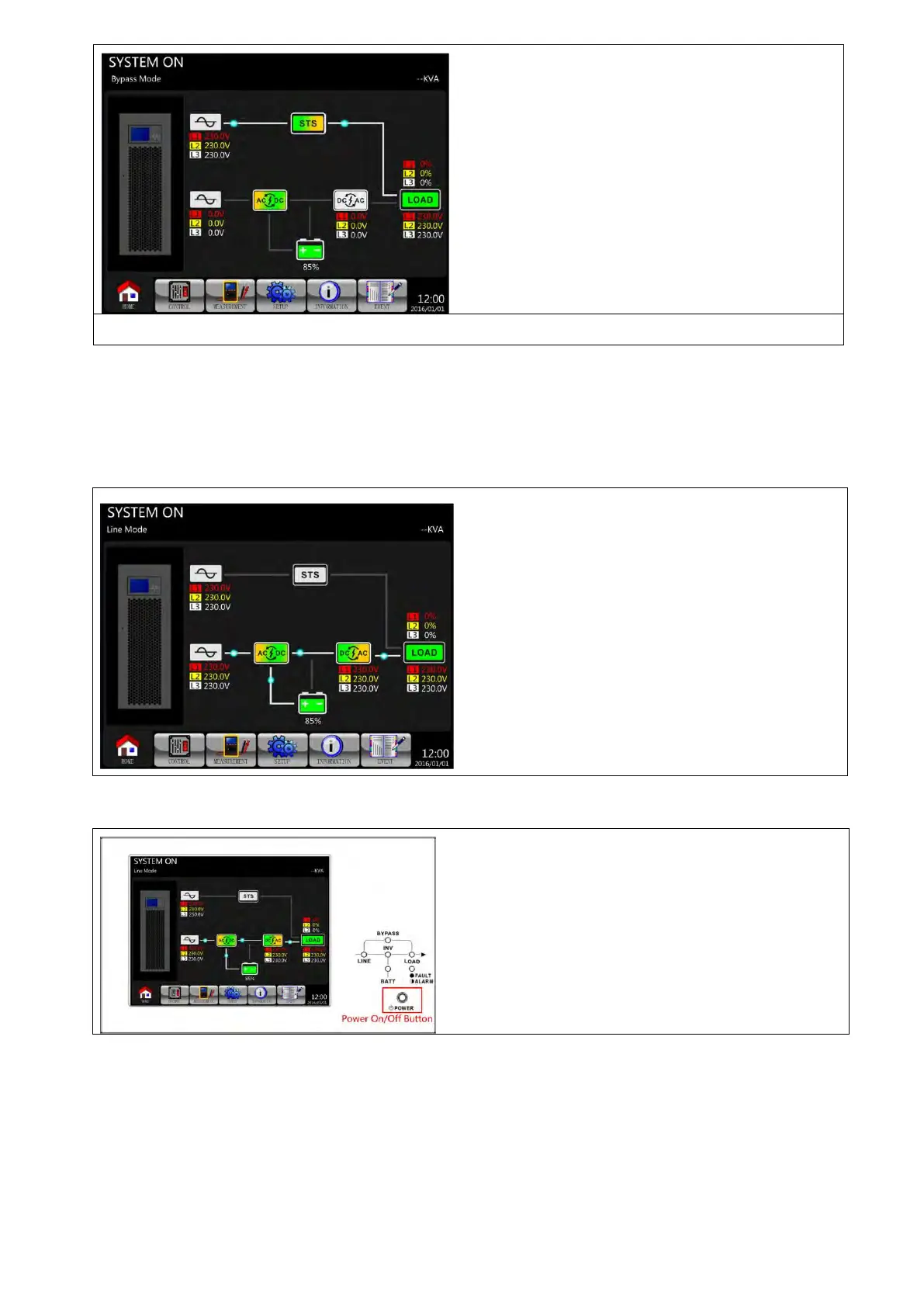
The LCD diagrams are shown below when the UPS operates in the Line Mode.
Step 1: Press “POWER” button for 2 seconds to turn off the UPS. Or use the Menu-Control-System Turn
Off to turn off the UPS.
After turning off, the UPS will tranfer to Standby Mode or Bypass Mode, depending on the “Bypass Mode”
Setting.
6-4-3. Turn Off Operation in Battery Mode
The LCD diagram is shown below when the UPS operates in the Battery Mode.

 To Next Page
 Loading...







