INFOSEC UPS SYSTEM – 15, Rue du Moulin – 44880 Sautron – France – www.infosec-ups.com
Hot Line Tel : +33 (0)2 40 76 15 82 – fax : +33(0)2 40 94 29 51 – hotline@infosec.fr – 02 19 AA 59 203 07
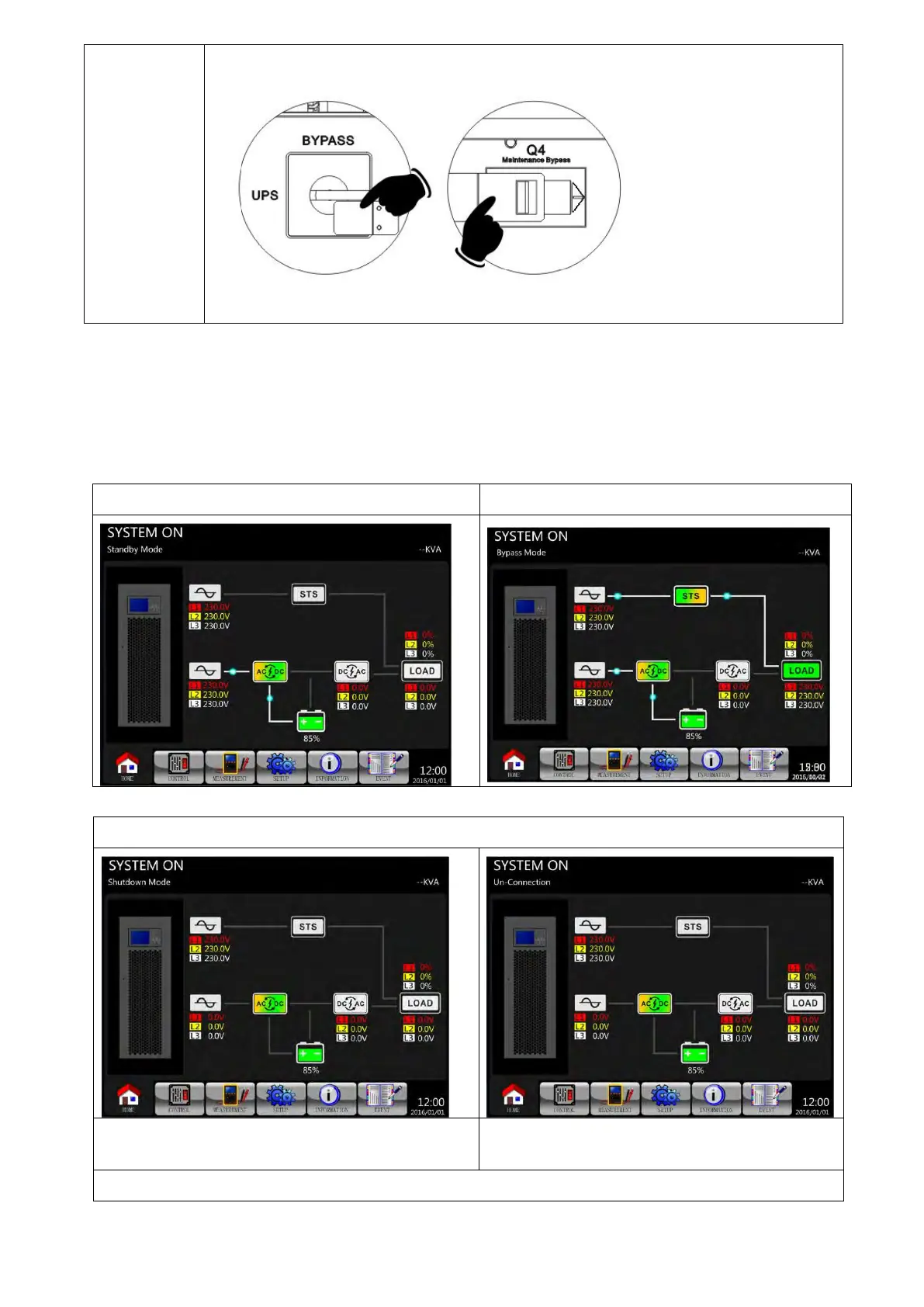
Lock back the mechanical lock plate as shown below.
100KVA/120KVA 160KVA/200KVA
6-4. Turn off Operation
6-4-1. Turn Off Operation in Bypass Mode/ Standby Mode
When the UPS is neither turned on or off, the UPS operates in the Standby Mode or Bypass Mode,
depending on the “Bypass Mode” Setting.
The LCD diagrams are shown below.
Bypass Mode Setting is Disabled
Bypass Mode Setting is Enabled
Step 1: Switch OFF the Q1 Breaker. The LCD diagrams are shown below.
Bypass Mode Setting is Disabled
UPS enters Shutdown Mode.
It is normal the Un-Connection is shown when
power stages have shut off their control power.
Bypass Mode Setting is Enabled

 To Next Page
 Loading...







