EasyManua.ls Logo

Innovative Technology NV9 USB - Page 32

Innovative Technology NV9 USB
43 pages
Print Icon
To Next Page IconTo Next Page
To Previous Page IconTo Previous Page
Loading...
NV9 USB Manual Set Section 2 8
Copyright © Innovative Technology Ltd 2012 GA00550-2
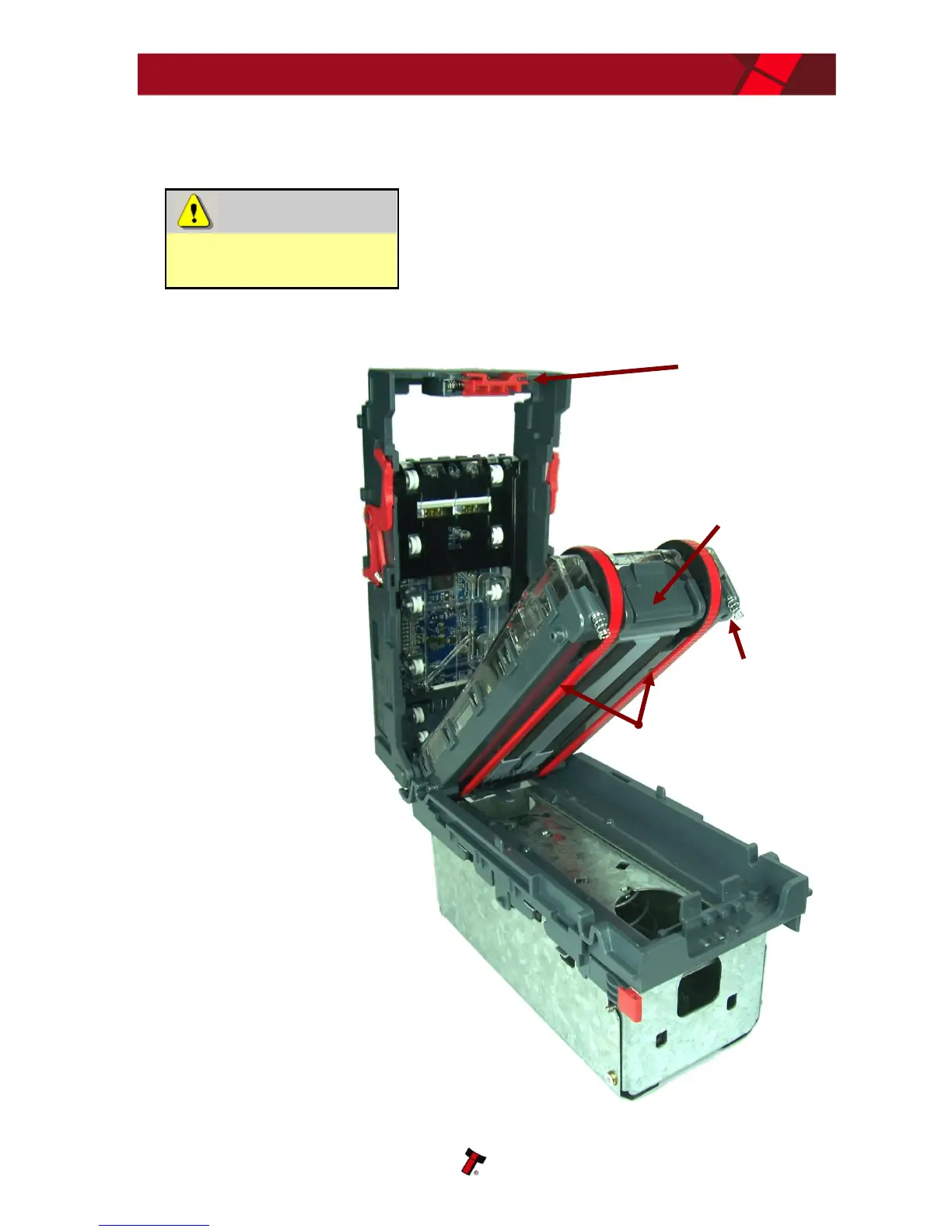
If the belts are worn or damaged, they should be replaced (ITL part number
FD00106). This is a simple procedure, and is carried out as follows:
WARNING!
Do not try to disassemble
Do not attempt to disassemble the validator
head trying to do this could result in the
validator needing reinitialisation, cause personal
injury or could damage the unit beyond repair.
Open the top of
the unit using the
Release catch
Release the
lozenge by gently
pressing the
Lozenge release
catch
Remove and place
the lozenge on a
clean dry surface
Press in the large
wheels to release
the belt tension
and then remove
the belts, sliding
them off the
smallest wheels
first
Replace the belts
by fitting them
over the lozenge,
largest wheels first
Reassemble and
close the unit
Lozenge
release
catch
Drive belts
Release catch
Lozenge

Related product manuals