11
User Manual
USING YOUR INSTANT POT PRO PLUS
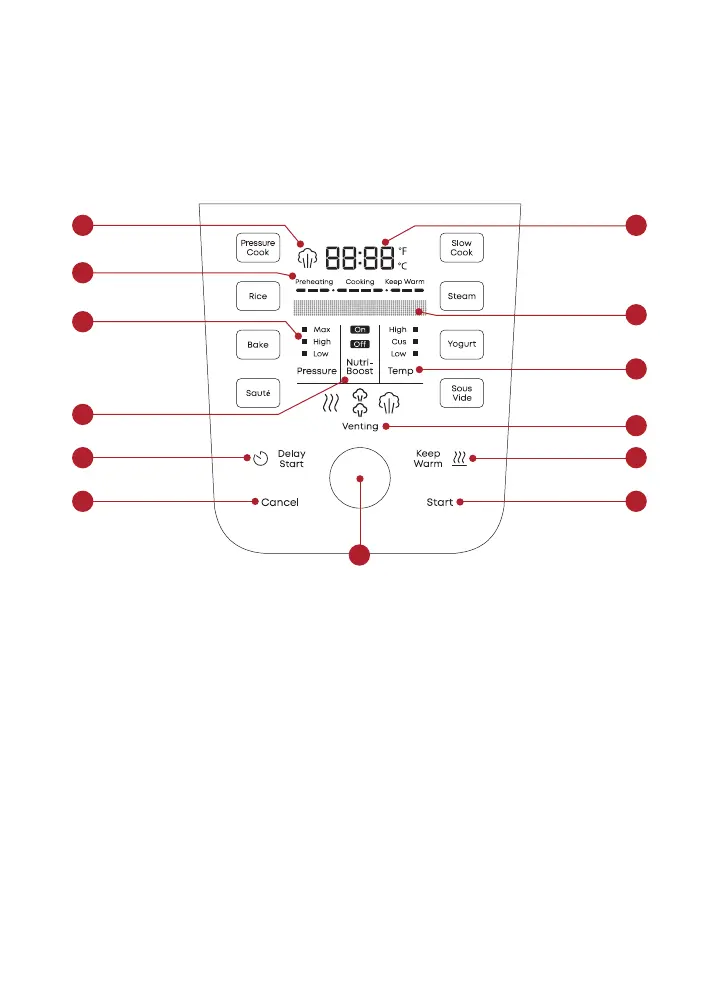
Control panel
We’ve designed the control panel to be simple to use and easy to read.
1. Pressure Indicator
When lit, indicates pressure
in the multicooker
2. Time Display
Counts down for cooking
Counts up for Keep Warm
Shows custom temperature settings
Choose Fahrenheit or Celsius
3. Progress Bar
Shows cooking progress at-a-glance
4. Message Bar
Shows status and Smart Program
instructions
5. Pressure
Choose High, Low or Max
6. NutriBoost
Choose On or Off
7. Temperature
Choose High, Low or Custom
8. Venting Options
Natural release
Pulse release
Quick release
9. Delay Start
Choose On or Off
Can also be used as kitchen timer
10. Keep Warm
Choose On or Off
11. Control Dial
Adjust time, temperature,
pressure settings
12. Start
13. Cancel
2
4
7
10
11
12
8
1
9
13
5
6
3













 To Next Page