114
Zone 2 and Zone 3
In addition to your main listening room, you can also enjoy playback in two other rooms, or as we call them, Zone 2
and Zone 3. And, you can select a different source for each room.
Zone 2 speakers must be connected to an amp in Zone 2.
Connecting Your Zone 2 Speakers
You can enjoy 2-channel stereo playback in Zone 2 and
a different source to those selected for your main room
and Zone 3.
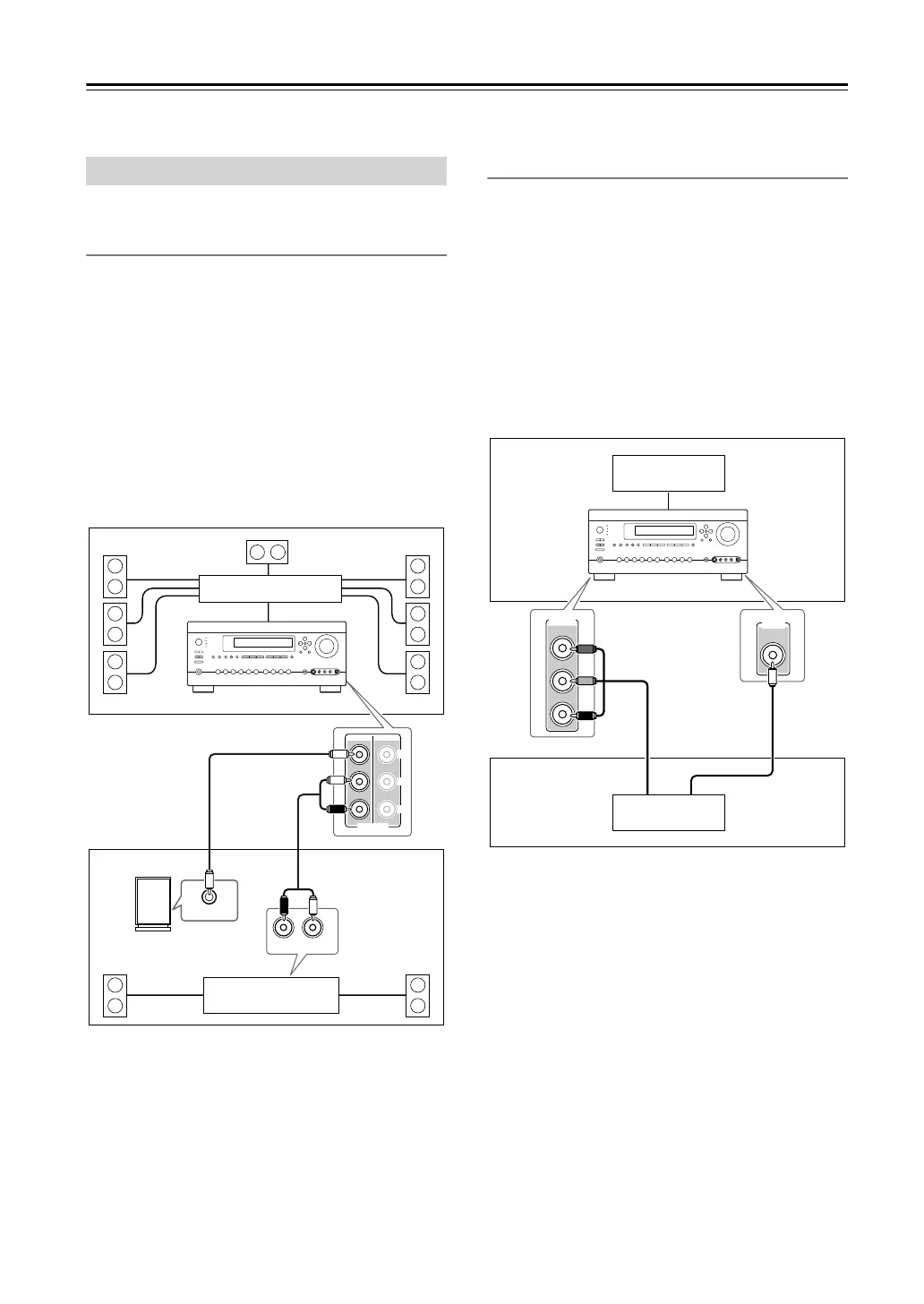
Hookup
• Use an RCA audio cable to connect the AV control-
ler’s ZONE 2 PRE OUT L/R jacks to an analog audio
input on your Zone 2 amp.
• Use an RCA audio cable to connect the AV control-
ler’s ZONE 2 PRE OUT SW jack to the line input on
a powered subwoofer in Zone 2.
• Connect your Zone 2 speakers to the speaker termi-
nals on your Zone 2 amp.
Note:
•With the default settings, the Zone 2 volume must be
set on the Zone 2 amp. If your Zone 2 amp has no vol-
ume control, set the Zone 2 Out setting to Variable so
that you can set the Zone 2 volume on the AV control-
ler (see page 116).
Zone 2 Video Outputs
The AV controller features a composite video output and
component video output for connection to a TV in
Zone 2, so you can enjoy both audio and video in that
zone.
Hookup
• Use a composite video cable to connect the AV con-
troller’s ZONE 2 OUT V jack to a composite video
input on your Zone 2 TV.
• Alternatively, use a component video cable to connect
the AV controller’s COMPONENT VIDEO MONI-
TOR OUT 2/ZONE 2 OUT jacks to a component
video input on your Zone 2 TV.
• If you use the COMPONENT VIDEO MONITOR
OUT 2/ZONE 2 OUT, you must set the Monitor Out2
setting to Zone 2 (see page 47).
Notes:
• The ZONE 2 OUT V jack outputs video from compo-
nents connected to composite video inputs and
S-Video inputs.
• The COMPONENT VIDEO MONITOR
OUT 2/ZONE 2 OUT outputs video from components
connected to component video inputs.
Connecting Zone 2
R
L
IN
LINE INPUT
ZONE 2 ZONE 3
PRE OUT
L
R
SW
Main room
Zone 2
Multichannel power amp
Receiver/
integrated amp
AV controller
Powered
subwoofer
ZONE 2
OUT
MONITOR OUT 2
/ZONE 2 OUT
Main room
TV
Zone 2
AV controller
TV
DTC-9.8En.book Page 114 Friday, February 15, 2008 1:23 PM


 To Next Page