En-7
'
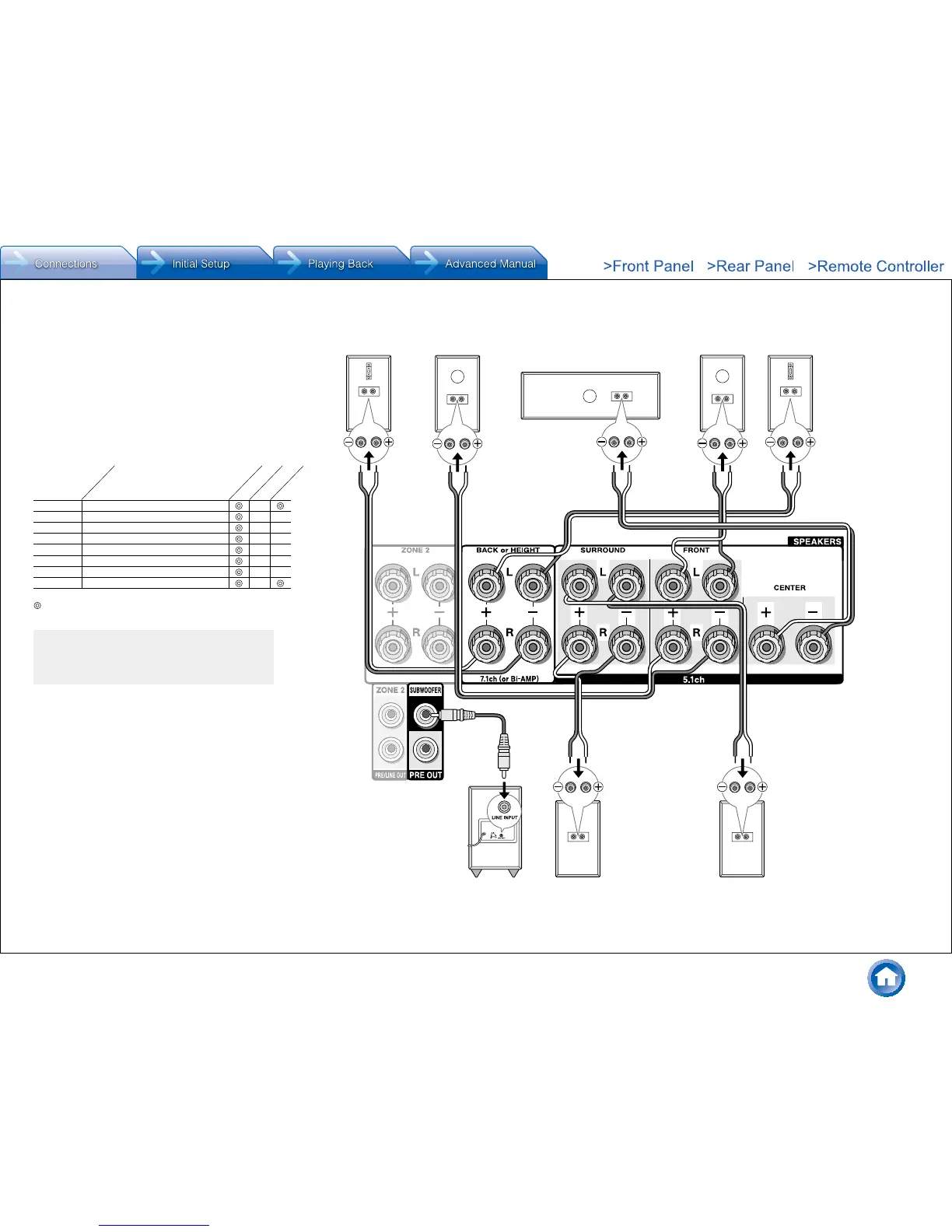
Subwoofer with built-in
power amplifier
&
Surround R
8FH
Right back
Or right height
79G
Left back
Or left height
%
Surround L
$
Center
#
Front R
"
Front L
A speaker configuration
where only one back
speaker is connected is
not supported�
and the other type is designed to be integrated with normal
speakers� Dolby Enabled Speakers placed with their
diaphragms facing toward the ceiling create higher effect
in the Dolby Atmos and Dolby Surround listening modes
by providing sounds echoing off the ceiling� You can select
(g)(h) or (i)(j) on the unit� For connection with the unit,
use the SPEAKERS BACK or HEIGHT terminals�
When playing Dolby Atmos, the speakers required depend
on how you have setup your back speakers or height
speakers� The following shows combinations of speakers
for reproducing Dolby Atmos�
1 Back
2 Front High
3 Rear High
4 Top Front
5 Top Middle
6 Top Rear
7 Dolby Enabled Speaker (Front)
8 Dolby Enabled Speaker (Surround)
Connection
pattern
Front
Center
Surround
Back or Height
: Required, : Optional
Connection of a subwoofer is optional�
Important:
Connect speakers with 6 Ω to 16 Ω impedance. Using a
speaker with less impedance than the supported value
may result in failure�



 To Next Page