46
Listening to the Radio
—Continued
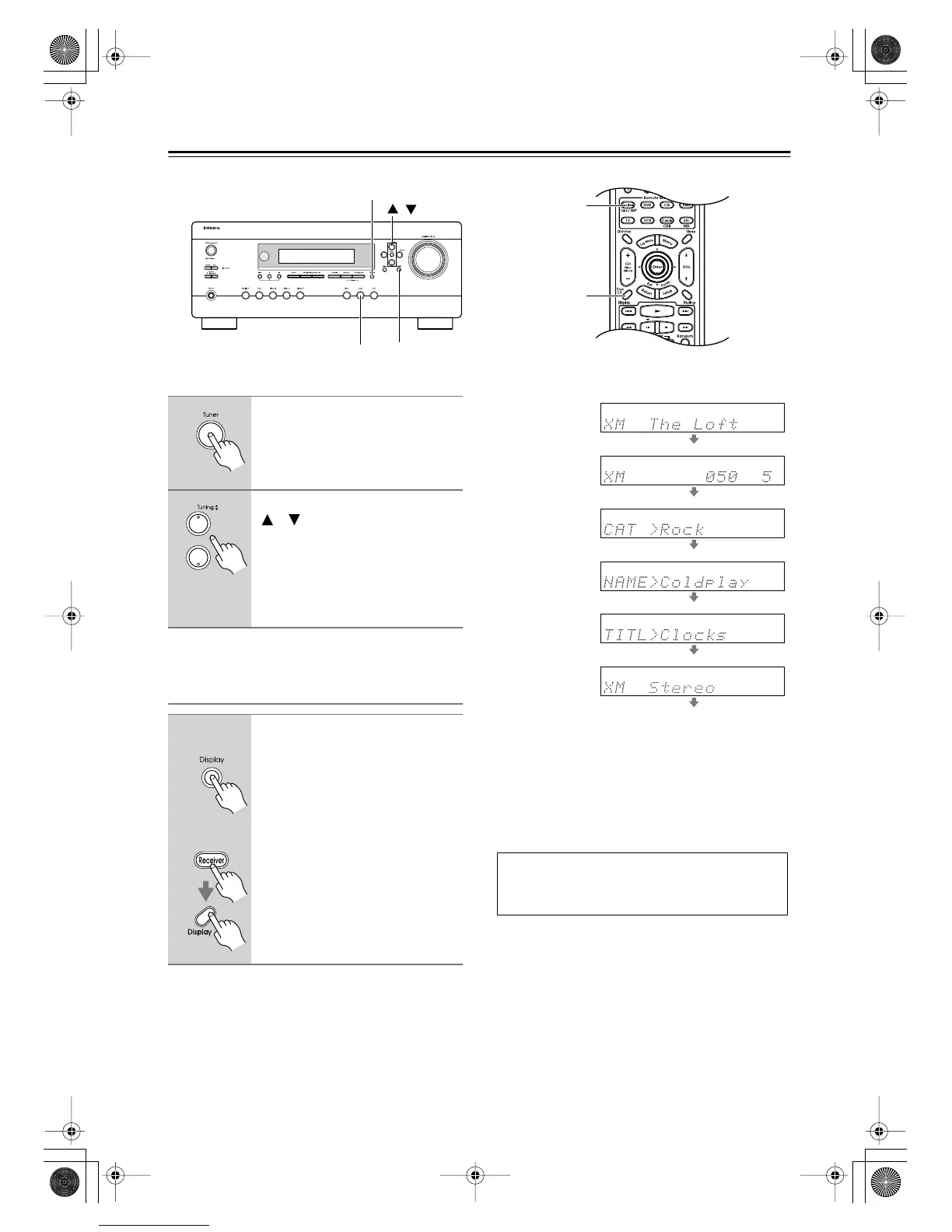
Selecting XM Channels from the Front Panel:
Displaying XM Radio Information
The following information can be displayed:
Note:
If the category, artist, or song title is not available, “- - -”
will be displayed instead.
■
Displaying XM Information on Your TV
When you select a different XM channel, or the artist or
song title changes, the following information is dis-
played on your TV for 5 seconds.
Tip:
You can display this information at anytime by pressing
the [Display] button.
Display
Receiver
ReturnTuner
Display
/
1
Press the [Tuner] input selector
button repeatedly to select XM.
If “CHECK ANTENNA” appears on
the display, make sure the XM antenna
is connected properly.
2
Use the Tuning Up and Down
[ ]/[ ] buttons to select a chan-
nel.
In Channel Search mode, you can
select any channel.
In Category Search mode, you can only
select channels from the currently
selected category.
1
On the AV receiver, press the
[Display] button repeatedly to
cycle through the available infor-
mation.
On the remote controller, press
the [Receiver] Remote Mode but-
ton, and then press the [Display]
button repeatedly.
Remote
controller
AV receiver
Channel name
Channel number
& preset number
Category
Artist
Song title
Listening mode
XM [Category name]
[Channel name]
[Artist name / Song Title]
[Ch. No]
DTR-4.6.book Page 46 Thursday, September 22, 2005 1:45 PM



 To Next Page