8
Front panel facilities
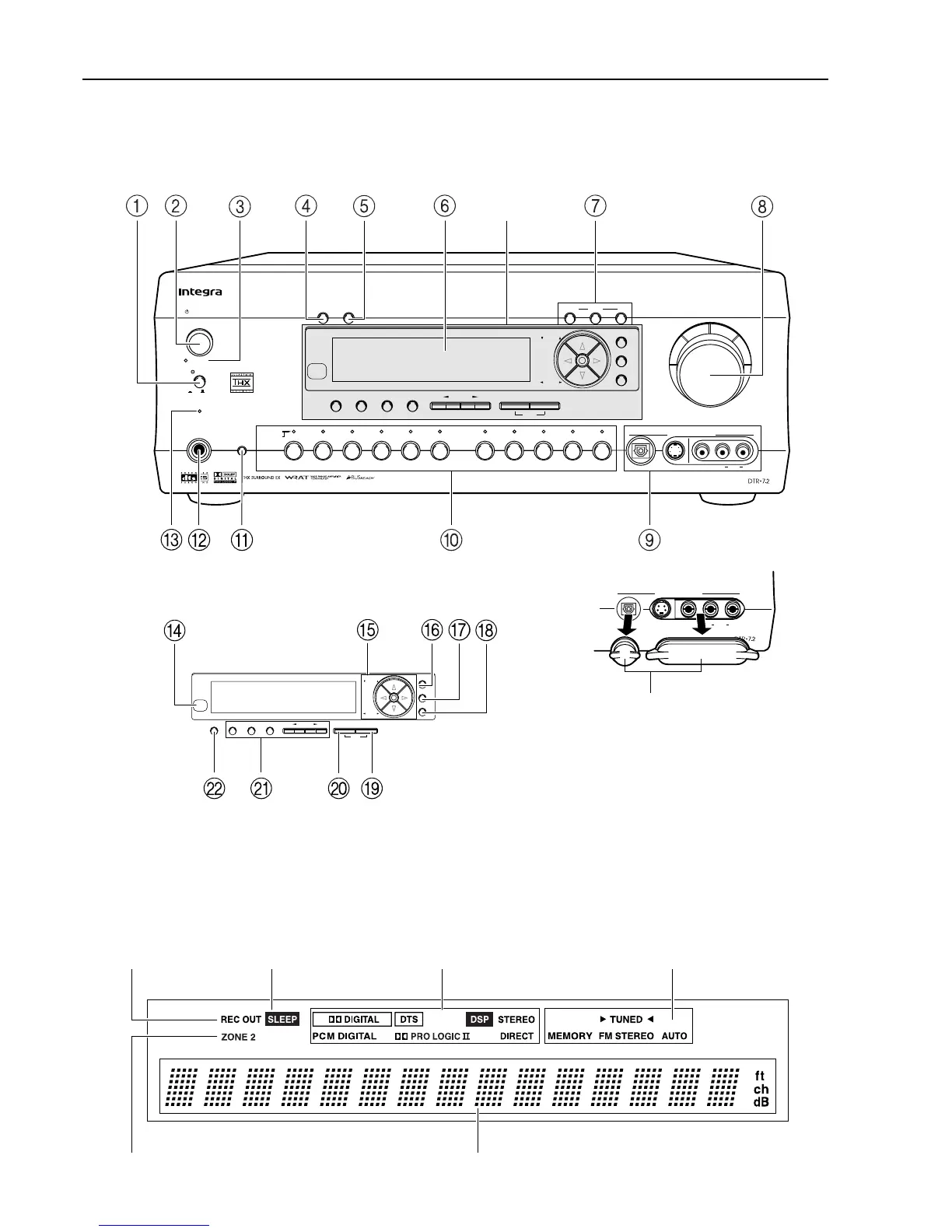
Here is an explanation of the controls and displays on the front panel of the DTR-7.2.
Front panel
Front panel display
Rec out indicator Sleep indicator Tuning indicators
Multi function displayZone 2 indicator
Master Volume
Standby/On
Power
On
O
f
f
psamplingU
Audio
Selector
Tape
FM AM Phono CD
Digital
Video 1
VCR 1
Video 3
Video 2
VCR 2
Video 4 Video 5
DVD
Zone
2
()
GRN
Rec
()
RED
A
-
FO
RM Listening Mode Memory
Video 5
/
Video Cam Input
StereoDirect
DSP
Surround THX
Clear
FM Mode Memory
Rec Out
Zone 2 Of
f
DimmerDisplay
S Video
Audio
Video L R
Phones
Standby
Enter
Return
Se
tup
Preset
Tun
ing
A
-
FO
RM Listening Mode Memory
StereoDirect
DSP
Surround THX
Clear
FM Mode Memory
Enter
Return
Se
tup
Preset
Tun
ing
See illustration
below
Digital
Video 5
/
Video Cam Input
S Video
Audio
Video L R
The Video 5 input jacks are
equipped with protective caps.
When using these jacks, remove
the protective caps and keep them
safely. When not using these
jacks, replace the protective caps.
Protective caps
Listening mode or
digital input format
indicators



 To Next Page