41
Connecting the AV Receiver—Continued
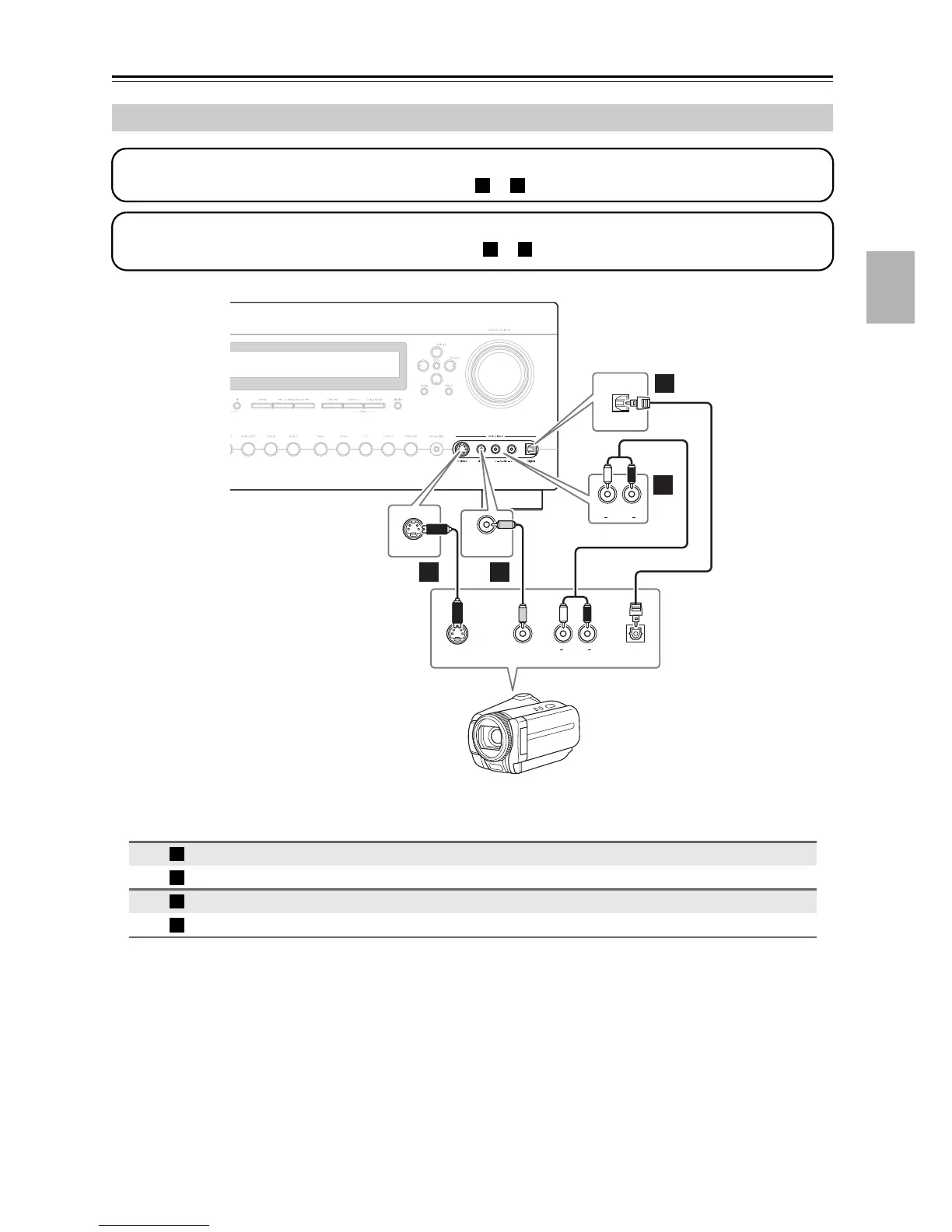
Connecting a Camcorder or Other Device
Connection AV receiver Signal flow Camcorder
AUX 2 Input S Video
⇐
S-Video output
AUX 2 Input Video
⇐
Composite video output
AUX 2 Input L-Audio-R
⇐
Analog audio L/R output
AUX 2 Input Digital
⇐
Digital optical output
Step 1: Video Connection
Choose a video connection that matches your camcorder ( or ), and then make the connection.
A B
Step 2: Audio Connection
Choose an audio connection that matches your camcorder ( or ), and then make the connection.
a b
Digital
AUX 2 Input
S Video
AUX 2 Input
OPTICAL
OUT
AUX 2 Input
Audio
AUX 2 Input
Video
LR
S VIDEO
OUT
AUDIO
OUT
VIDEO
OUT
LR
B
A
a
b
Camcorder, etc.
A
B
a
b



 To Next Page