141
Using the Remote Controller
Other Settings for the Remote Controller
—Continued
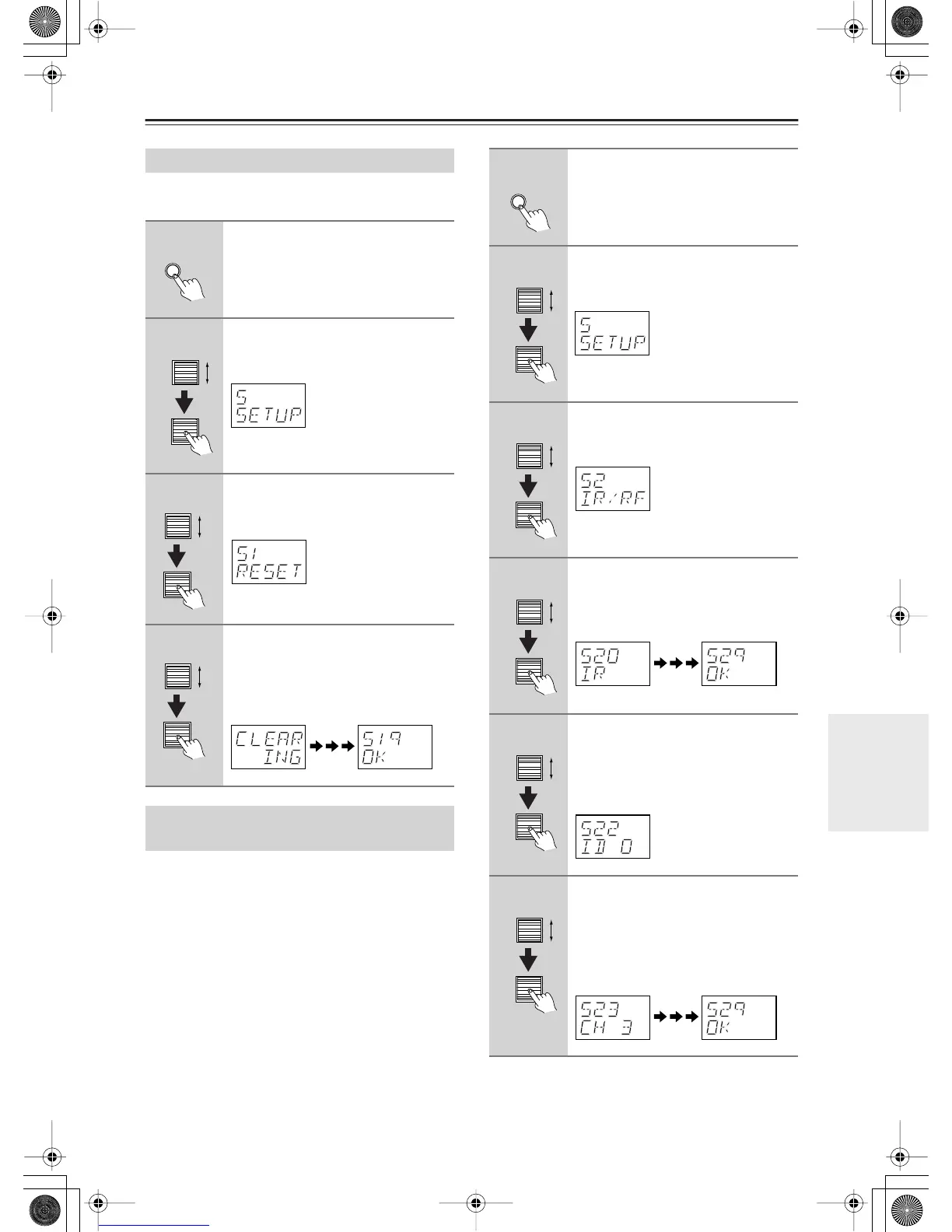
You can reset the remote controller to its default set-
tings.
You can set the remote controller’s transmission signal
format to either infrared (IR) or radio frequency (RF).
The default setting is IR.
This is useful when, for example, the RDC-7.1 is
installed in a rack or is not in line of sight of the remote
controller as it allows you to use a commercially avail-
able RF receiver to pick up commands from the remote
controller, which are then fed to the RDC-7.1 via its IR
IN socket. For this to work, you must assign the same
ID and channel to the remote controller and RF receiver.
Resetting the Remote Controller
1
Press and hold the [Custom] but-
ton for more than three seconds.
The remote controller enters Custom
mode.
2
Roll the scroll wheel to select
“SETUP,” and then press the scroll
wheel.
3
Roll the scroll wheel to select
“RESET,” and then press the scroll
wheel.
4
Roll the scroll wheel to select
“YES,” and then press the scroll
wheel.
The remote controller is reset to its
default settings.
Using the Remote Controller with
Radio Frequency (RC-555M only)
Custom
1
Press and hold the [Custom] but-
ton for more than three seconds.
The remote controller enters Custom
mode.
2
Roll the scroll wheel to select
“SETUP,” and then press the scroll
wheel.
3
Roll the scroll wheel to select “IR/
RF,” and then press the scroll
wheel.
4
Roll the scroll wheel to select “IR”
or “RF,” and then press the scroll
wheel.
When you select “IR.”
5
If you select “RF,” roll the scroll
wheel to select the same ID as the
RF receiver, and then press the
scroll wheel.
IDs 0 to 9 and A to F can be selected.
6
Roll the scroll wheel to select the
same channel as the RF receiver,
and then press the scroll wheel.
Channels 0 to 3 can be selected.
If the ID and channel have been set suc-
cessfully, “OK” appears on the display.
Custom


 To Next Page