75
Operations
Connecting Net Audio – USA, Canada, and Australian models –
—Continued
Notes:
• To use Internet radio with the RDC-7.1, your broad-
band Internet connection needs to be up and running
and able to access the Web. Please consult your ISP if
you have any problems with your Internet connec-
tion.
• The RDC-7.1 uses DHCP and AutoIP to configure its
network settings automatically. If you want to config-
ure these settings manually, see page 122.
• The RDC-7.1 does not support PPPoE settings, so if
you have a PPPoE-type Internet connection, you must
use a PPPoE-compatible router.
• Depending on your ISP, you may need to specify a
proxy server to use Internet radio. If your PC is con-
figured to use a proxy server, use the same settings
(see page 122).
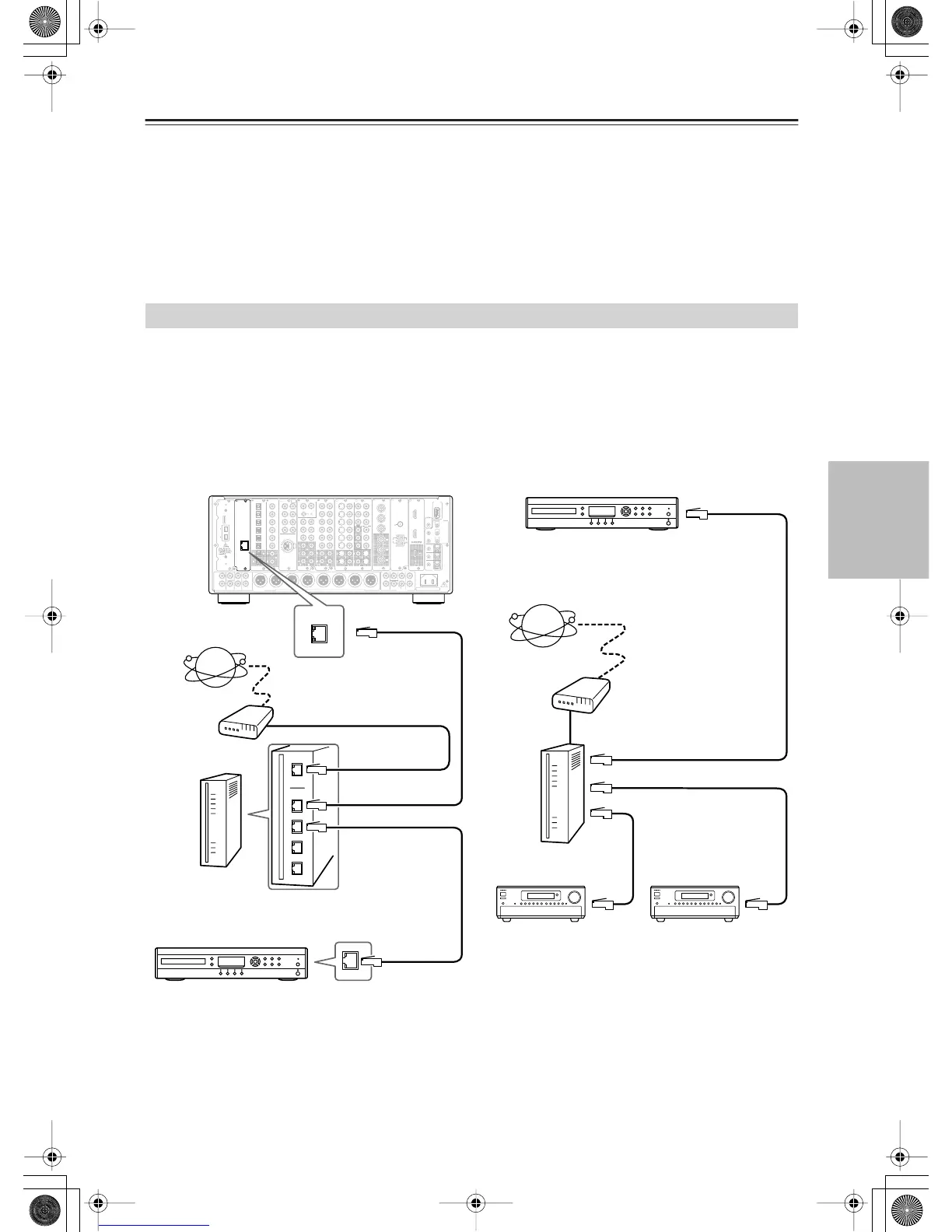
To connect the RDC-7.1 to your Ethernet network, plug one end of a CAT5 Ethernet cable into the ETHERNET (Net-
Tune) port, and plug the other end into a LAN port on your router or switch.
The following diagram shows how you can connect the RDC-7.1 to your Ethernet network. Here it’s connected to a
LAN port on the router, which has a 4-port 100Base-TX switch built-in.
You can connect any number of RDC-7.1s to the network, and the Net-Tune server can serve up to three clients
simultaneously, so you can enjoy Net-Tune in three separate rooms simultaneously. The following diagram shows a Net-
Tune network with two RDC-7.1s.
Networking Your RDC-7.1
L
R
L
R
FRONT
CENTER
SURR
SURR
BACK
SUB
WOOFER
SURR BACK R
SURR R FRONT R CENTER FRONT L
SURR BACK L
SURR L
SUBWOOFER
PRE
OUT A
(
ASSIGNABLE
)
(
SINGLE
)
(
SINGLE
)
(
ASSIGNABLE
)
(
ASSIGNABLE
)
REMOTE
CONTROL
“Net
-
Tune”
is
a
trademark
of
Onkyo
Corporation.
ETHERNET
(
Net
-
Tune
)
22
11
66
55
44
33
22
11
C D
DIGITAL IN DIGITAL IN
OPTICAL COAXIAL
OUT
SBR SBL
SR SL
SUB C
FR
FL
E
MULTI
-
CH
IN
1
DIGITAL IN
(
BALANCED
)
AES/EBU
DIGITAL IN
(
BALANCED
)
AES/EBU
AUDIO IN
1
3
2
1
PH
2
3
9
8
7
6
5
4
4
5
LRRL
GND
OUT
LR
LR
R L
F
G
L
IN
1
IN
2
HDMI, the HDMI logo
is a trademark
or registered
trademarks of HDMI
Licensing LLC.
OUT
HDMI
S
VIDEO VIDEO
IN IN
IN
1
IN
2
3
2
1
Y
P
B
P
R
COMPONENT
VIDEO
IN
3
IH
6
5
4
Y
P
B
P
R
2
1
4
3
S VIDEOS VIDEO VIDEOVIDEO
OUT OUT
OUT
1
J
OUT
(
HD/BNC
)
Y
P
B
P
R
Y
P
B
P
R
COMPONENT VIDEO
IN
(
HD/BNC
)
A
C
B
MAIN
12V
TRIGGER
OUT
IR
UJJ
D
E
200mA MAX.
100mA MAX.
100mA MAX.
100mA MAX.
100mA MAX.
ZONE
2
ZONE
3
L
R
L
R
CENTER
SURRFRONT
SURR
BACK
SUB
WOOFER
PR
E
OUT
B
AC
INLET
MODEL NO.
RDC
-
7.1
(
ASSIGNABLE
)
(
SINGLE
)
A B
RS
232
OUT
IN
K
ANTENNA
FM
75
AM
ETHERNET
(
Net
-
Tune
)
WAN port
LAN port
LAN/
Ethernet
port
Internet radio
Modem
Router
RDC-7.1
LAN/
Ethernet
port
Internet radio
Net-Tune server such as Integra
NAS-2.3 Network Audio Server
Router
LAN port
LAN port
LAN port
Modem
Room 1
Room 2
LAN port
Net-Tune server such as Integra
NAS-2.3 Network Audio Server


 To Next Page