63
Operations
Listening to Radio Broadcasts
—Continued
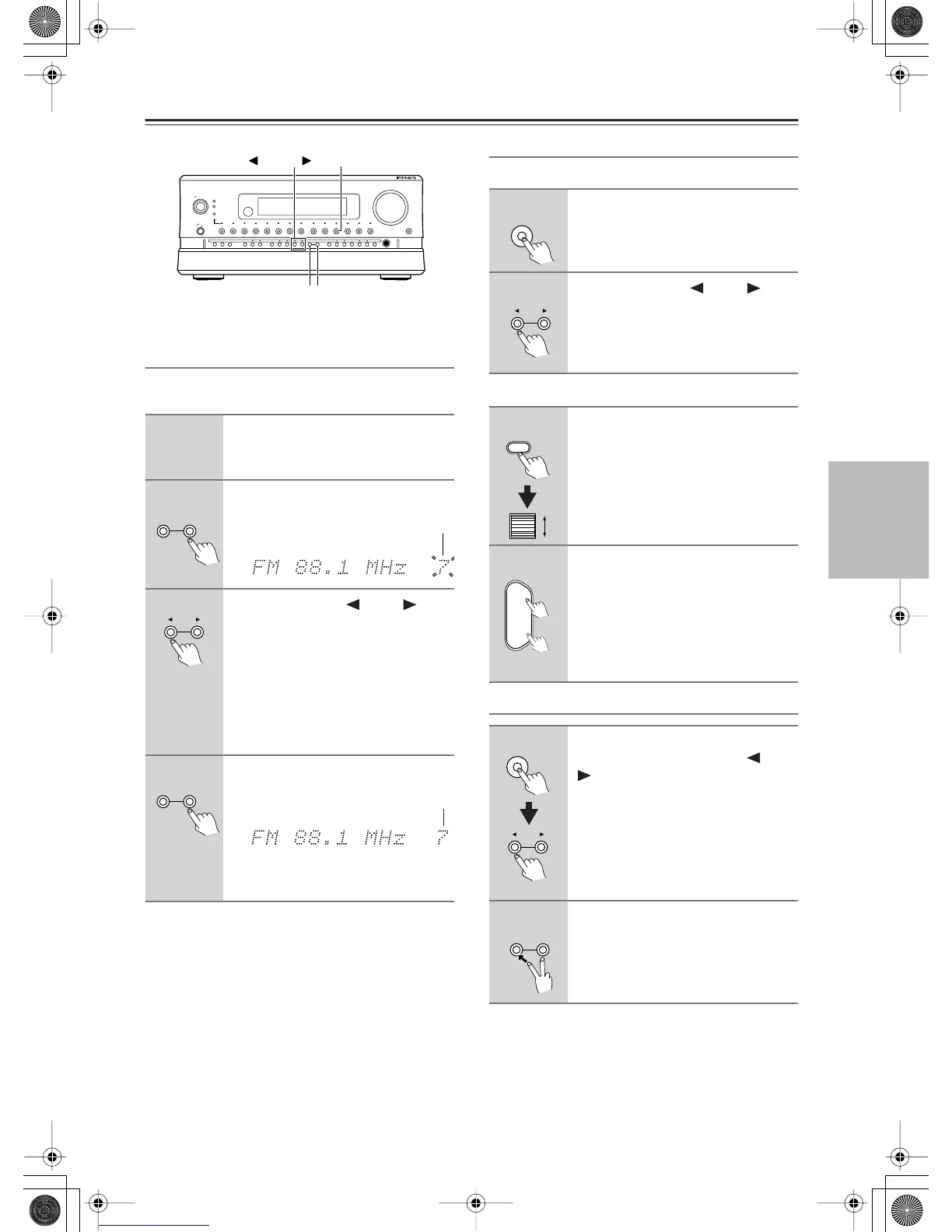
Presetting a Radio Station
Up to 40 stations can be stored in memory as preset radio
stations.
Selecting a Preset Radio Station
When using the RDC-7.1:
When using the remote controller:
Erasing a Preset Radio Station
1
Tune into the radio station you
desire (See “Tuning Into a Radio
Station”).
2
Press the [Memory] button on the
front panel.
3
Using the Preset [ ] and [ ]
buttons, select a preset number
(from 1 to 40) to assign the station.
The “MEMORY” indicator blinks for 5
seconds. Complete the procedure while
the “MEMORY” indicator blinks. If the
“MEMORY” indicator disappears before
completing the procedure, go back to step
2 and repeat the procedure again.
4
Press the [Memory] button to
finalize the procedure.
You can enter text names for any of the
preset radio stations (See page 101).
On
Standby/On
Standby
Pure Audio
On
Master Volume
Power
DVD
Video
1 Video 2
Video 3 Video 4
Video 5 Video 6 Video 7
Tape 1
Tape 2
Tuner
Phono Net Audio
C D
Open/Close
Zone 2
()
GRN
Rec
/
Zone
3
()
RED
O f f
Phones
Clear
Rec
/
Zone 3Zone 2 Off DSPDisplay Tuning Tuning ModePreset Memory Setup ExitEnter
Dimmer
AV Controller RDC
-
7.1
Memory
Tuner
Tuning Mode
Preset
Clear
Tuning Mode Memory
Flashes
Preset
Clear
Tuning Mode Memory
Lights
1
Press [Tuner] input source button
on the RDC-7.1.
2
Using the Preset [ ] and [ ]
buttons, select the number of the
desired preset station.
1
Press the [Input] button, and then
use the scroll wheel to select
TUNER.
To switch to FM or AM, press the scroll
wheel.
2
Use the [CH/Disc +/–] button to
select the presets.
Selecting Presets by Number
To select a preset by number, use the
remote controller’s number buttons. For
example, to select preset #7, press [7]. To
select preset #12, press [1] then [2].
1
Press the [Tuner] input source
button and use the Preset [ ] and
[ ] buttons to select the preset
radio station that you want to
erase (See above).
2
Press and hold the [Memory]
button and then press the [Tuning
Mode] button.
The selected preset station is erased.
Tuner
Preset
Input
CH
Disc
+
-
Tuner
Preset
Clear
Tuning Mode Memory


 To Next Page