Intel Desktop Board D865GVHZ Technical Product Specification
40
#
INTEGRATOR’S NOTE
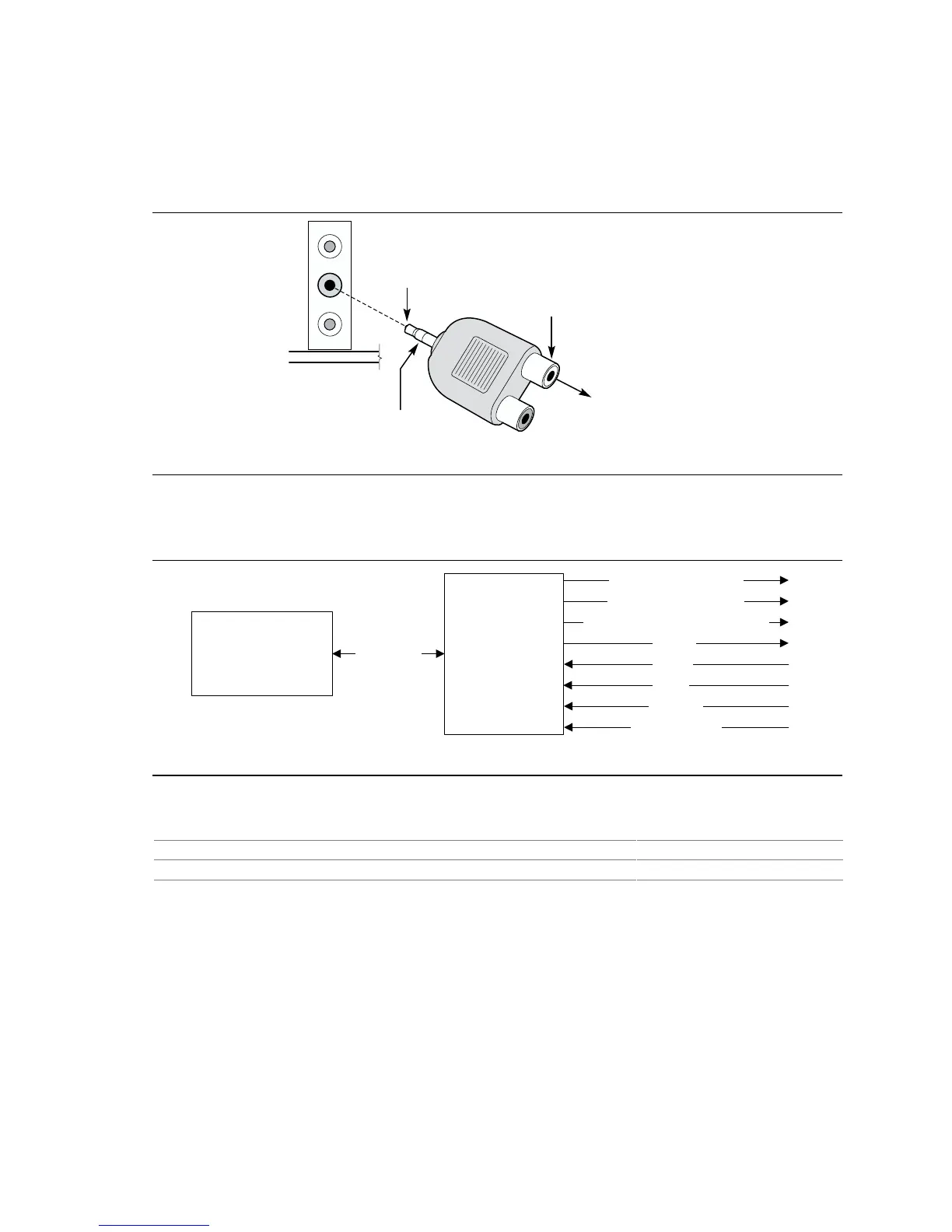
To access the S/PDIF signal with the 5.1 Digital Shared Jack option, connect an 1/8-inch stereo
phone plug to RCA jack adapter/splitter as shown in Figure 8.
OM16108
Connect to
S/PDIF output
on Back Panel
1/8-inch Stereo
Phone Plug
RCA Jack
Left Channel
(White, if colored)
Connect to 5.1
speaker system or
an S/PDIF decoder
Figure 8. Adapter for S/PDIF Back Panel Connector
Figure 9 is a block diagram of the Flex 6 audio subsystem.
82801EB
I/O Controller Hub
(ICH5)
OM16102B
AC ’97 Link
AD1985
Audio Codec
Mic In
Front Left and Right Out
CD-ROM
Line In
Center and LFE (Subwoofer) Out
Rear Left and Right Out
S/PDIF
Auxiliary Line In
Figure 9. Flex 6 Audio Subsystem Block Diagram
For information about Refer to
The front panel audio connector Section 2.9.1, page 74
The back panel audio connectors Section 2.8.1, page 61



 To Next Page