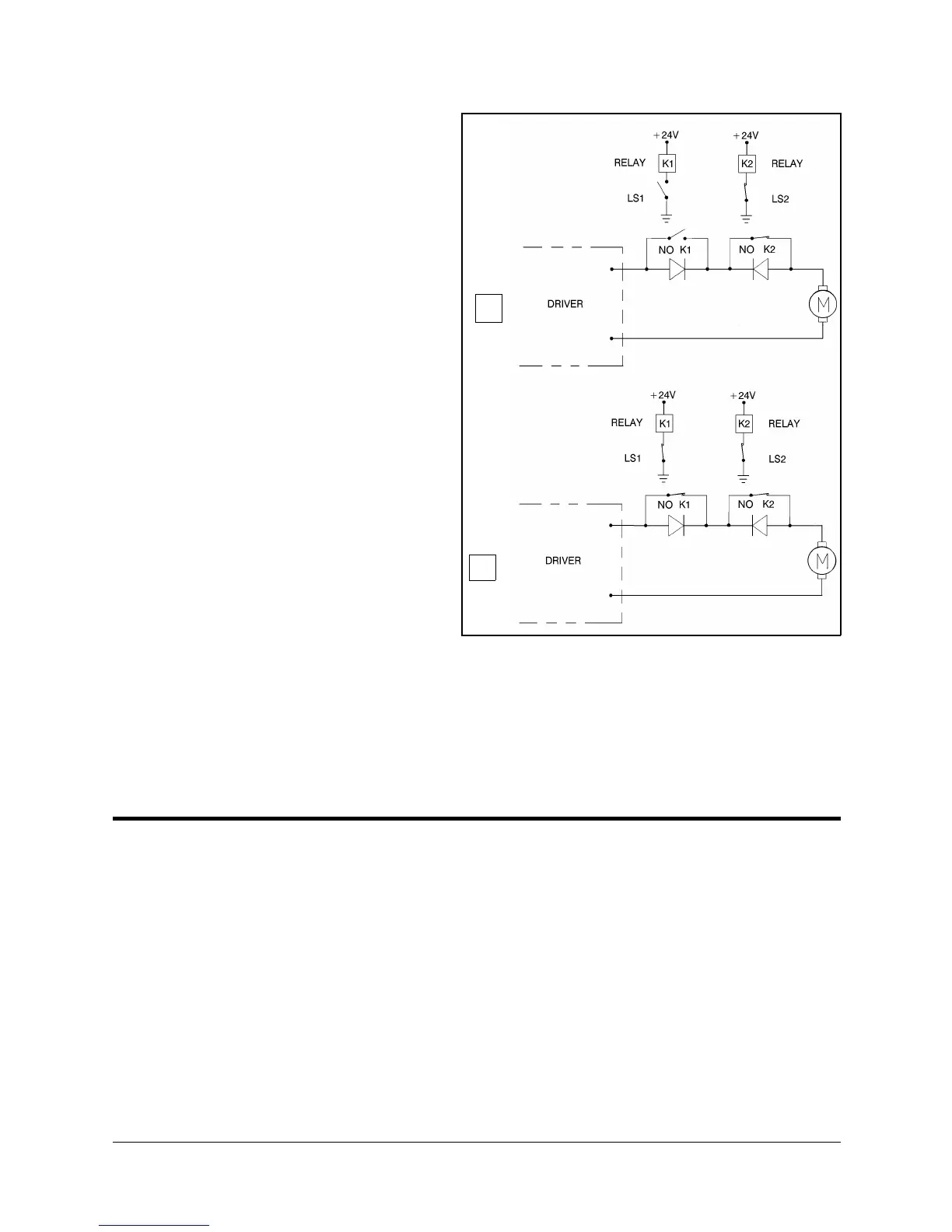
As shown in Figure 7-7A,
when limit switch 1 is
activated (that is, when the
button is depressed), the relay
contact opens and the relay is
deenergized. The motor
cannot move the joint beyond
this point. The diode allows
the motor to reverse
direction, thus permitting the
joint to move away from the
limit switch.
When the limit switch is
activated, it causes a control
error, resulting in the
activation of COFF (control
off mode), and an impact
protection message.
CON (control on mode) must
be activated and the robot
arm must be manually moved
(using keyboard or teach
pendant) away from the
impact condition.
As long as the axis has not reached one of its limits, the relay contact remains
closed, and the diode has no effect on the circuit, as shown in Figure 7-7B.
Current can flow in either direction; the motor is thus able to rotate in either
direction.
Hard Stops
When the software limits and/or the end of travel switches fail to halt the
movement of the robot arm, it is possible that the momentum of the robot arm
will drive it until it reaches its mechanical limit.
When the joint reaches this hard stop, the impact protection and thermic
protection processes detect an error, thus activating COFF.
CON must be activated and the robot arm must be manually moved away from
the impact condition.
A
B
Figure 7-7: Axis Limit Circuit
User’s Manual 7 - 5 SCORBOT-ER IX
9603


 To Next Page