SCORBOT-ER IX Installation
Controller Installation
Perform the installation procedures detailed in the following sections of
Chapter 2, “Installation,” in the Controller-B User’s Manual:
•
Computer/Terminal–Controller Installation
•
Power On
•
Controller Configuration
)
When the Peripheral Setup screen appears at the end of the controller
configuration, select Gripper Connection: None. (You will change this setting
after the gripper is installed.) Refer to the section, “Peripheral Devices and
Equipment--Robot Gripper,” in the Controller-B User’s Manual.
Robot Installation
)
Before you begin, make sure the controller POWER switch is turned off.
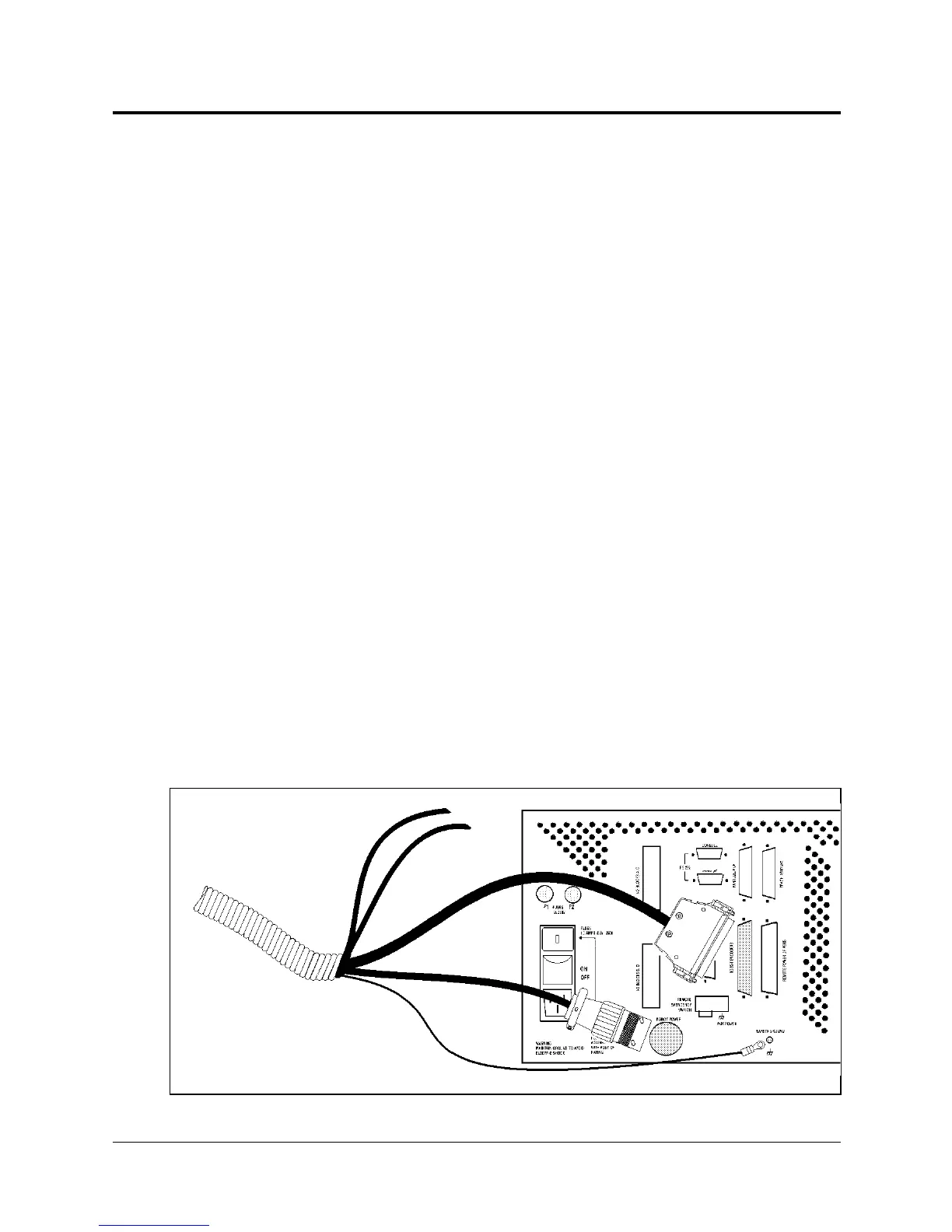
The robot cable has a number of connectors. Connect them to the controller
according to following three steps. Refer to Figure 4-4.
1. Connect the green/yellow wire to the Safety Ground:
Unscrew and remove the ground nut and washer from the Safety Ground stud.
Place the ground wire terminal onto the stud, then replace and tighten the washer
and nut.
2. Plug the the D37 connector into the Robot Encoders port.
Tighten the retaining screws on the connector.
3. Plug the 19-pin round connector into the Robot Power port.
AIR HOSES
(for pneumatic
gripper only)
3
2
1
Figure 4-4: Robot—Controller Cable Connections
User’s Manual 4 - 3 SCORBOT-ER IX
9603


 To Next Page