Main Menu
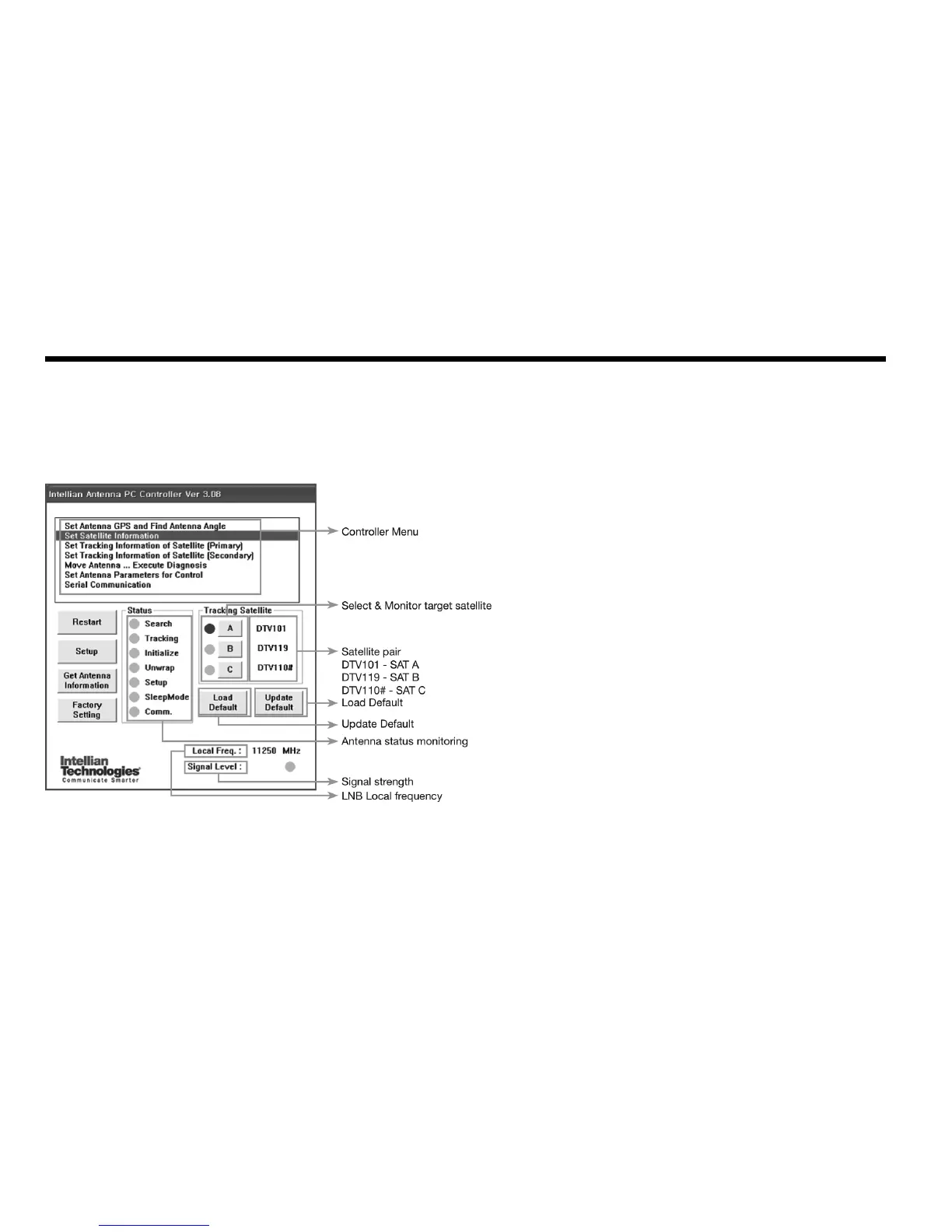
Figure 25 : Main Menu
Antenna Status Monitoring
•Search–Antennaissearchingfortheselectedsatellite.
•Tracking–Antennaistrackingtheselectedsatellite.
•Initialize–AntennaortheACUisinitializing.
•Unwrap–Antennaisunwinding/windingthecableintheantenna.
•Setup–Antennaisinsetupmode.
•Comm.–Antennaisabletobecommunicated.
Command Buttons
•Restart–Toexitsetupmodeandrestartantennaagain.
•Setup–Toenterthesetupmode.
•GetAntennaInformation–Toindicatetheinformationondisplayafterreceiving
input from he antenna.
•FactorySetting–Toinitializeallantennainformationtodefaultasitwasinthe
factory status.
•LoadDefault–ToselecttheregionallibraryonPCprogram.
•UpdateDefault–ToupdatetheantennausingtheselectedregionallibraryonPC
program.



 To Next Page
 Loading...











