39
Installing Below Deck Unit (BDU)
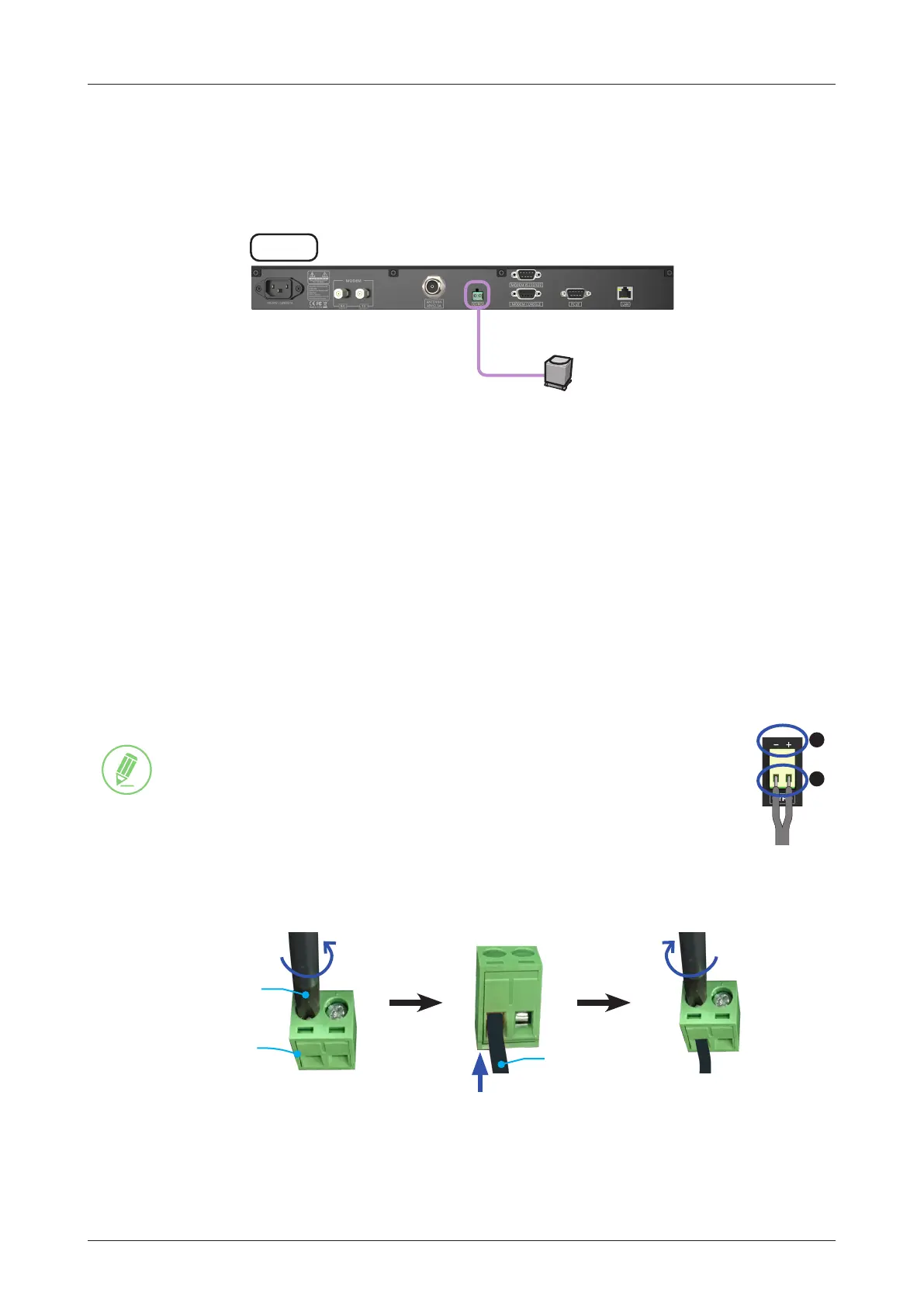
6.5.6 Connecting ACU to Ship Gyrocompass
For satellite tracking, connect a gyrocompass used on ship to the antenna system through the
gyrocompass interface of the ACU. Intellian ACU supports NMEA 0183 (GYRO) gyrocompass input.
Figure 22: ACU to Ship Gyrocompass Cable Connection
How to Connect NMEA 0183 Gyrocompass Cable
1. Using a Phillips screwdriver, loosen the two screw terminals by rotating them counterclockwise.
2. Connect two wires of NMEA 0183 gyrocompass cable to the terminals.
Figure 23: NMEA 0183 Gyrocompass Cable Connection
NOTE
When connecting the NMEA 0183 gyrocompass cable:
1. The polarity of terminal is indicated on the top with + and - marks. Connect the
cable correctly in proper polarity.
2. Strip the wires up to 5 mm (0.2"). DO NOT solder the cables.
3. Fully tighten the screws by rotating them clockwise to clamp the wires securely.
Gyro
Cable
Phillips
Screwdriver
2-position
Terminal Block
2
1
ACU
Ship's Gyro
(Customer supplied)
NMEA 0183(GYRO)
Input



 To Next Page