80
v60E - Maritime VSAT Antenna System
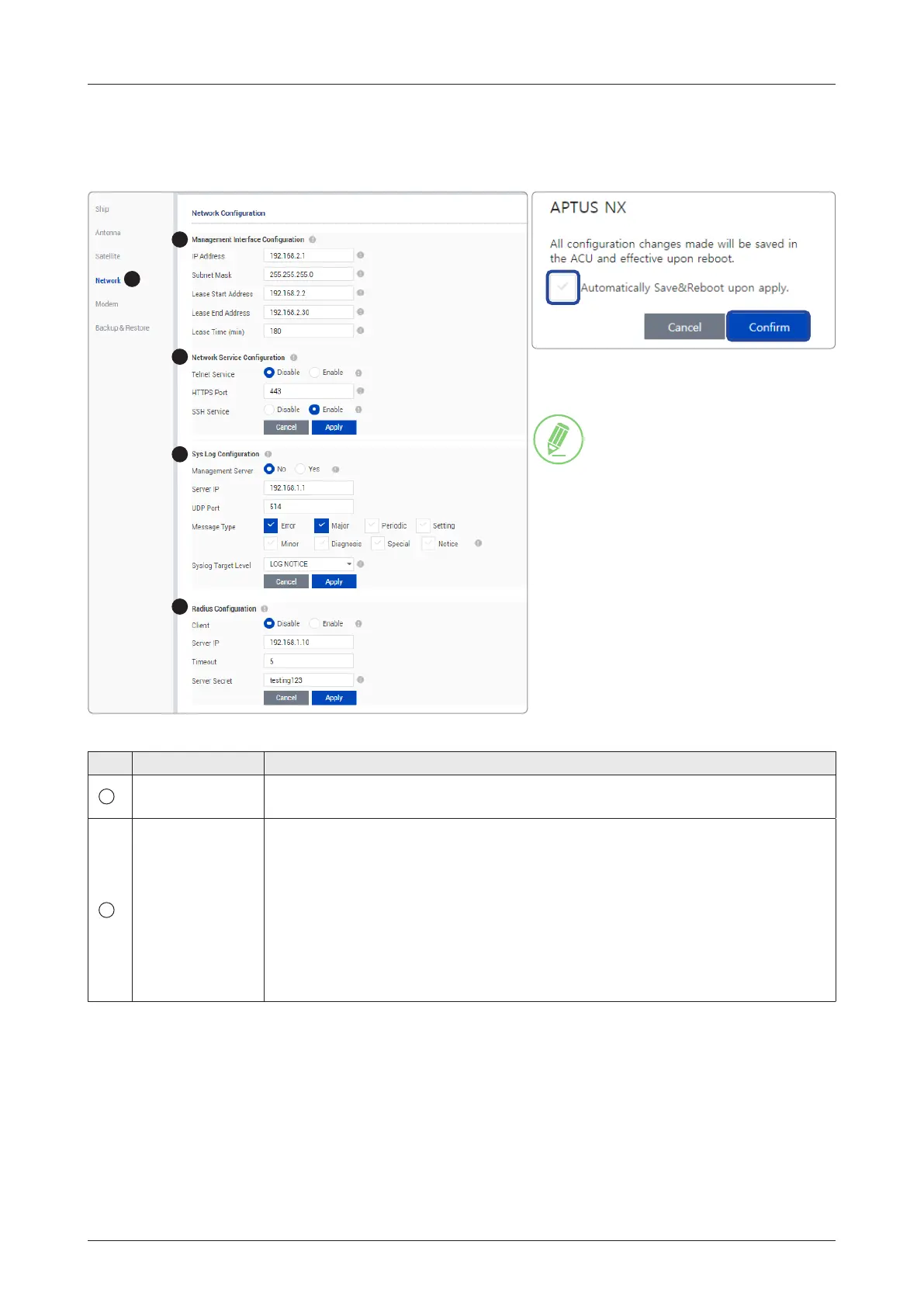
9.10.4 Network Conguration
This function is available after performing the "9.8.3 iARM Save & Reboot" on page 67.
No. Item Description
1
Network
Conguration
Sets the ACU's Internal IP address and ports.
2
Management
Interface
Conguration
Sets the Management Port's network conguration. The Management Port is
located on the ACU front panel.
• IP Address: sets the network IP address (Factory default: 192.168.2.1).
• Subnet Mask: sets the subnet mask (Factory default: 255.255.255.0).
• Lease Start Address: sets the lease IP address start range.
• Lease End Address: sets the lease IP address end range.
• Lease Time: sets the lease IP address update time.
Click the Apply button to apply the settings to the system.
1
2
3
4
5
NOTE
When clicking the Apply button
after editing the system settings,
this pop-up message will appear.
If you want to automatically save
and reboot the system, select the
checkbox and click the Conrm
button.



 To Next Page