EncoreCX
Installation & Maintenance Manual
48
REPLACING THE CCU CONTROL PCB
This PCB is NOT hot swappable. The system must be powered down to
change this board.
Electrostatic precautions must be made when replacing this board.
Connect to the ESD pillar on the CCU before removing the CCU cover.
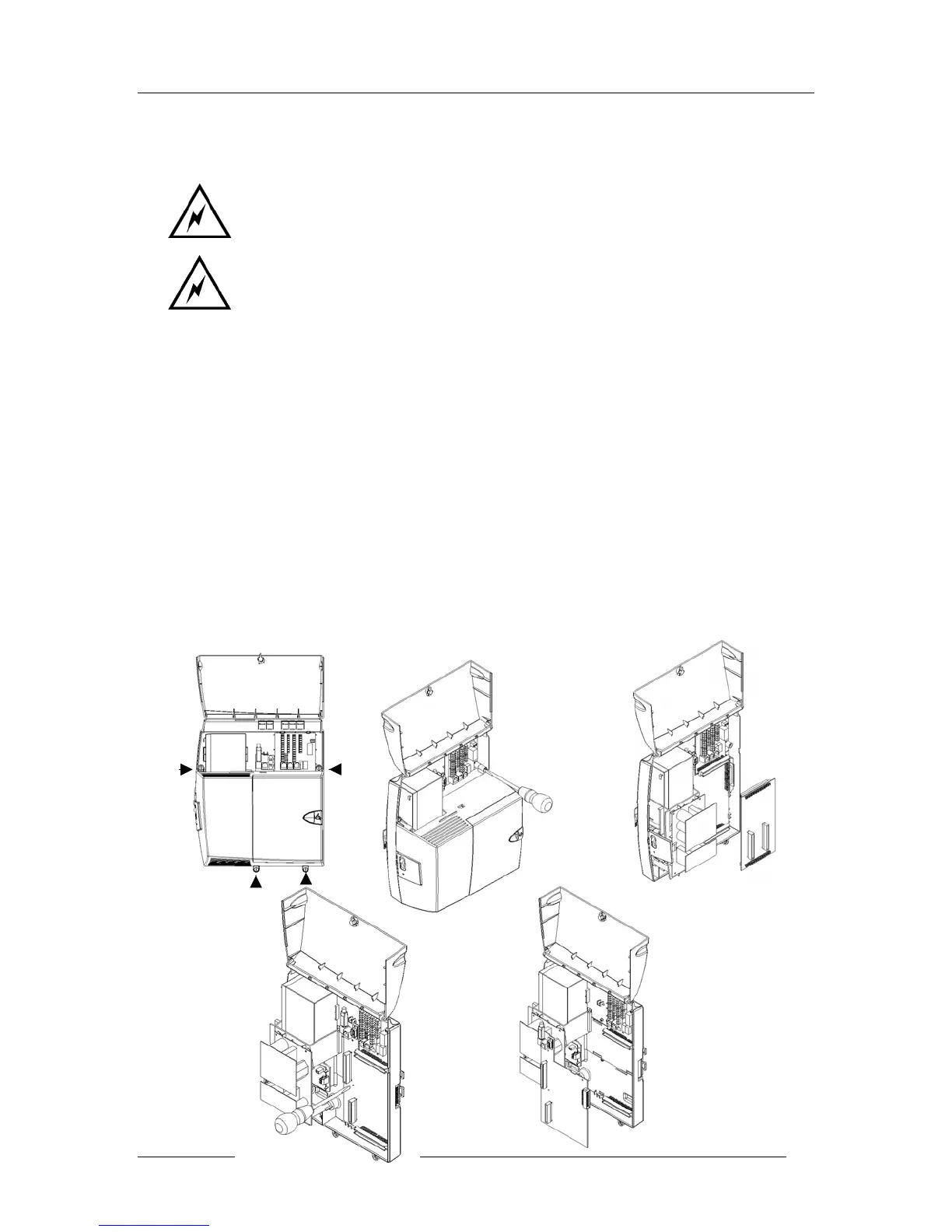
The procedure to be used when replacing the CCU control PCB is:
1. If a battery is installed, turn off the switch.
2. Power the system down by unplugging the battery at the main AC power source.
3. Remove any Voice or CO Line modules installed.
4. Open the CCU main cover by opening the four “quarter turn” screws indicated in the first
diagram below.
5. Remove the 008 card as indicated in the second diagram.
6. Remove the three fixing screws on the CCU control PCB as indicated.
7. Remove the power lead from the left-hand side of the CCU control PCB.
8. Slide the PCB to the left to remove it.
Note: Reverse the above procedure to install a new PCB.



 To Next Page